你的 Sonos,
终于从容
又聪明。
你的 Sonos,
終於從容
又聰明。
The iPhone
control layer
for Sonos
homes.
语音、文字、房间、搜索、公告和自动恢复。为每天真正听音乐的家庭设计,不是又一个设备遥控器。 語音、文字、房間、搜尋、公告和自動恢復。為每天真正聽音樂的家庭設計,不是又一個設備遙控器。 Voice, text, rooms, search, announcements and restore — designed for daily listening, not device babysitting.
公测版 · Pro 公测期间免费 公測版 · Pro 公測期間免費 Public beta · Pro is free during beta
比官方 App 多了什么比官方 App 多了什麼Beyond the Sonos app
不是另一个更好的 Sonos 客户端不是另一個更好的 Sonos 客戶端 Not another “better Sonos client”
Sonos 官方已经有 app — 我们在它之上加语音、IM 和自动化。下面 5 项,官方 App 都没做。Sonos 官方已經有 app — 我們在它之上加語音、IM 和自動化。下面 5 項,官方 App 都沒做。 Sonos already has an app. We add voice, IM and automation on top — five things its app does not do.
语音控制語音控制Voice control
自家语音识别 + 意图理解 + 语音合成。说「插播 3 条新闻」会自动暂停、播报,播完再接回原来的歌 — Siri 捷径做不到。自家語音識別 + 意圖理解 + 語音合成。說「插播 3 條新聞」會自動暫停、播報,播完再接回原來的歌 — Siri 捷徑做不到。 Our own speech recognition, intent parsing and voice synthesis. Say “read me 3 news” — it pauses, reads, then resumes the song. Siri Shortcuts can’t.
洗澡时让 Sonos 安静 30 秒,听完天气再继续。洗澡時讓 Sonos 安靜 30 秒,聽完天氣再繼續。
Pause Sonos 30 sec to hear the weather, then continue.
IM botIM botIM bots
微信 / Telegram / WhatsApp / QQ — 共用同一个后端。在地铁上发一句话,回家 Sonos 已经在播。微信 / Telegram / WhatsApp / QQ — 共用同一個後端。在地鐵上發一句話,回家 Sonos 已經在播。 WeChat, Telegram, WhatsApp and QQ share one backend. Text on the subway; the music is playing when you walk in.
「8 点放点轻爵士」— 微信发完即走。「8 點放點輕爵士」— 微信發完即走。
“Light jazz at 8” — send and forget.
场景预设場景預設Scene presets
个人:洗澡 / 睡眠 / 回家。商业:蛋糕店 / 咖啡店 / 餐厅。一键切换音乐 + 房间 + 音量。個人:洗澡 / 睡眠 / 回家。商業:蛋糕店 / 咖啡店 / 餐廳。一鍵切換音樂 + 房間 + 音量。 Personal: shower, sleep, home. Business: bakery, café, restaurant. Switch music, rooms and volume in one tap.
下班一句「回家」— 灯光、客厅音乐、加湿器同时启动。下班一句「回家」— 燈光、客廳音樂、加濕器同時啟動。
Say “I’m home” — lights, music, humidifier all on.
多平台多平台Multi-platform
iOS / macOS / 命令行 — 同一个后端,所有终端控制同一组 Sonos。Home Assistant 与 Windows 计划中。iOS / macOS / 命令行 — 同一個後端,所有終端控制同一組 Sonos。Home Assistant 與 Windows 計劃中。 iOS, macOS and a CLI today — one backend, every device drives the same Sonos. Home Assistant and Windows are planned.
用 Mac 终端管商业门店的 Sonos。用 Mac 終端管商業門店的 Sonos。
Manage retail Sonos from your Mac terminal.
自动化自動化Automation
不只是聊天回复 — 真正控制你家的音频:插播、排队、场景切换、定时任务、播完自动接回。不只是聊天回覆 — 真正控制你家的音訊:插播、排隊、場景切換、定時任務、播完自動接回。 Not a chat helper — it actually runs your audio: cut-in, queue, scene swap, scheduled jobs, resume after.
10 点自动播 5 条国际新闻,播完接着昨天的歌。10 點自動播 5 條國際新聞,播完接著昨天的歌。
5 news at 10am, then your yesterday playlist resumes.
不是另一个遥控器
不是另一個遙控器
Not another
remote
ZoneFoundry 是放在 Sonos 之上的智能控制层,把日常聆听从“找按钮”变成“说意图”。 ZoneFoundry 是放在 Sonos 之上的智能控制層,把日常聆聽從「找按鈕」變成「說意圖」。 ZoneFoundry sits on top of Sonos and turns daily listening from finding controls into saying intent.
自然说,直接做自然說,直接做Ask naturally
用语音或文字播放、暂停、搜索、广播和控制房间。用語音或文字播放、暫停、搜尋、廣播和控制房間。Use voice or text to play, pause, search, announce and control rooms.
控制每个房间控制每個房間Control every room
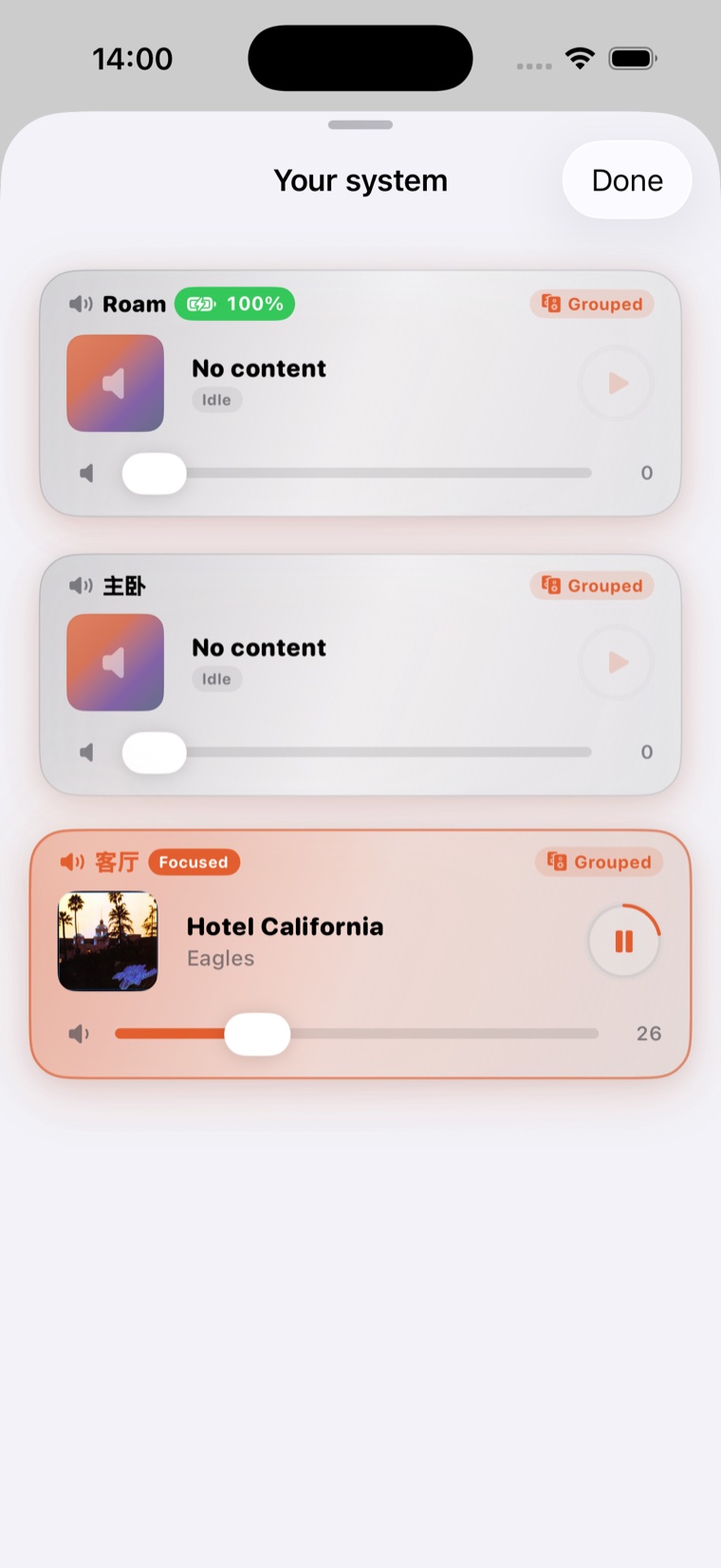
编组、音量、房间焦点和播放内容,保持清楚可靠。編組、音量、房間焦點和播放內容,保持清楚可靠。Group rooms, adjust volume and switch what is playing with clear feedback.
播报后自动恢复播報後自動恢復Announce and restore
新闻、提醒或 TTS 播报结束后,音乐会回到原来的状态。新聞、提醒或 TTS 播報結束後,音樂會回到原來的狀態。News, reminders and TTS announcements play, then music resumes.
常见搜索入口常見搜尋入口Common searches
如果你在找 Sonos 语音控制、自动化或商业音乐方案 如果你在找 Sonos 語音控制、自動化或商業音樂方案 If you are searching for Sonos voice control, automation or business audio
这些是 ZoneFoundry 重点解决的问题:不用在官方 App 里找按钮,也不用为新闻、广播、场景和多房间控制重新写一堆捷径。 這些是 ZoneFoundry 重點解決的問題:不用在官方 App 裡找按鈕,也不用為新聞、廣播、場景和多房間控制重新寫一堆捷徑。 These are the problems ZoneFoundry focuses on: fewer taps in the official app, no pile of shortcuts, and clearer control for rooms, announcements and scenes.
01
Sonos 语音控制Sonos 語音控制Sonos voice control
用自然语言播放、暂停、换房间、调音量,不需要记一堆固定命令。用自然語言播放、暫停、換房間、調音量,不需要記一堆固定命令。Play, pause, switch rooms and adjust volume with natural language instead of memorizing commands.
02新闻 / 广播后自动恢复新聞 / 廣播後自動恢復Announcements with restore
插播天气、新闻或提醒,播完自动回到原来的音乐和队列。插播天氣、新聞或提醒,播完自動回到原來的音樂和隊列。Announce weather, news or reminders, then return to the original music and queue.
03多房间 Sonos 控制多房間 Sonos 控制Multi-room Sonos control
面向家庭和小店:分组、逐房音量、场景、定时任务,保持可靠可解释。面向家庭和小店:分組、逐房音量、場景、定時任務,保持可靠可解釋。For homes and small venues: grouping, per-room volume, scenes and schedules with clear feedback.
04本地 Bridge / Docker 部署本地 Bridge / Docker 部署Local Bridge / Docker
把高级控制放回本地网络,适合 NAS、Unraid、群晖和长期稳定运行。把高級控制放回本地網絡,適合 NAS、Unraid、群暉和長期穩定運行。Keep advanced control on your local network, suited for NAS, Unraid, Synology and always-on setups.
插播重要的事,音乐继续。 插播重要的事,音樂繼續。 Announce what matters. Keep the music going.
核心体验很简单:先记住正在播放什么,播报你关心的内容,然后恢复音乐。 核心體驗很簡單:先記住正在播放什麼,播報你關心的內容,然後恢復音樂。 The core flow is simple: remember what is playing, announce what matters, then restore the music.
1
正在播放音乐正在播放音樂Playing music
客厅客廳in Living Room
客厅客廳Living Room
Midnight CityM83Hurry Up, We're Dreaming
1:353:59
2
3 条香港新闻3 條香港新聞3 Hong Kong
自动播报自動播報news stories announce
RTHK
RTHK香港最新头条香港最新頭條Latest headlines from Hong Kong
now
Now News3 分钟晨间简报3 分鐘晨間簡報3-minute morning update
TVB News今日重点新闻今日重點新聞Top stories for today
播报中...播報中...Announcing...
3
音乐恢复音樂恢復Music resumes
自动继续自動繼續automatically
客厅客廳Living Room
Midnight CityM83Hurry Up, We're Dreaming
2:483:59
应用一览應用一覽Inside the app
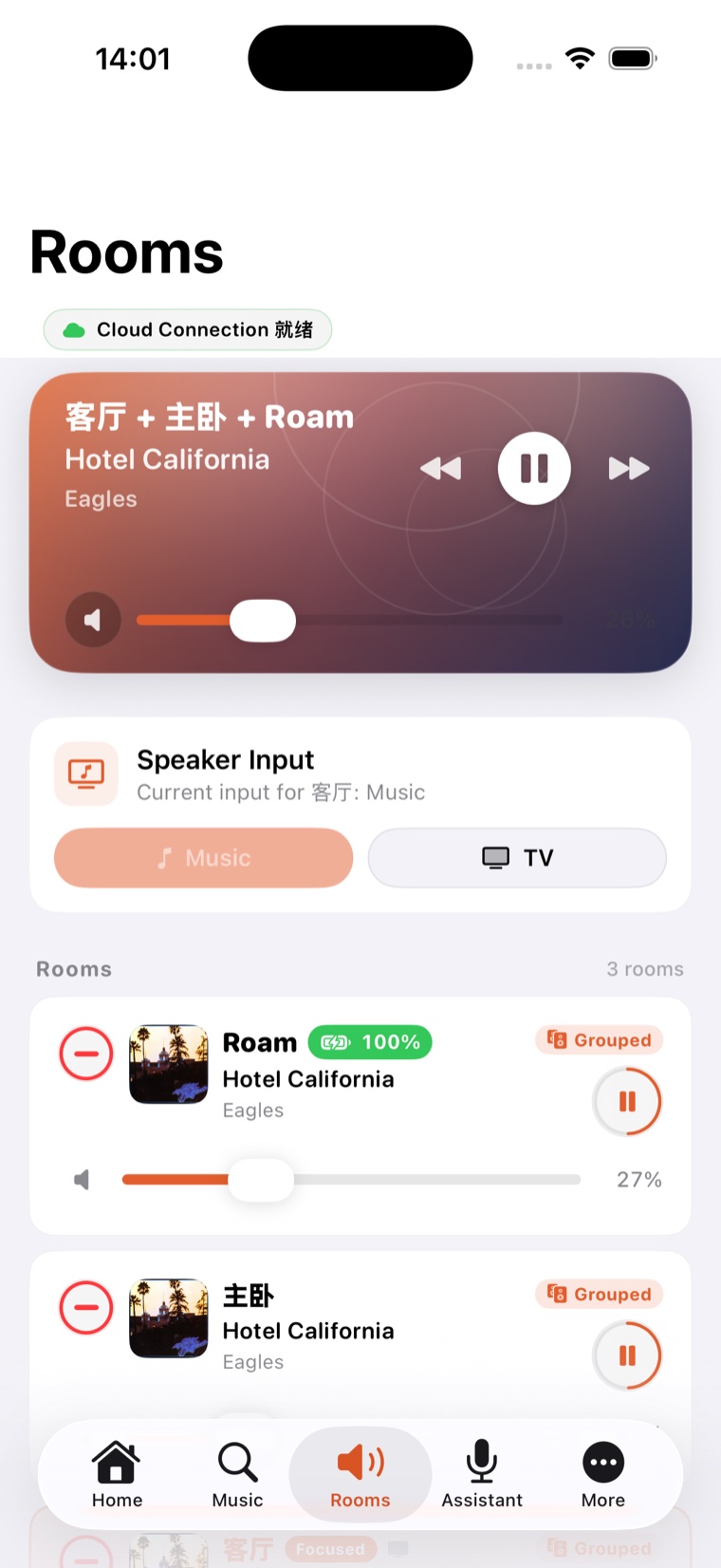
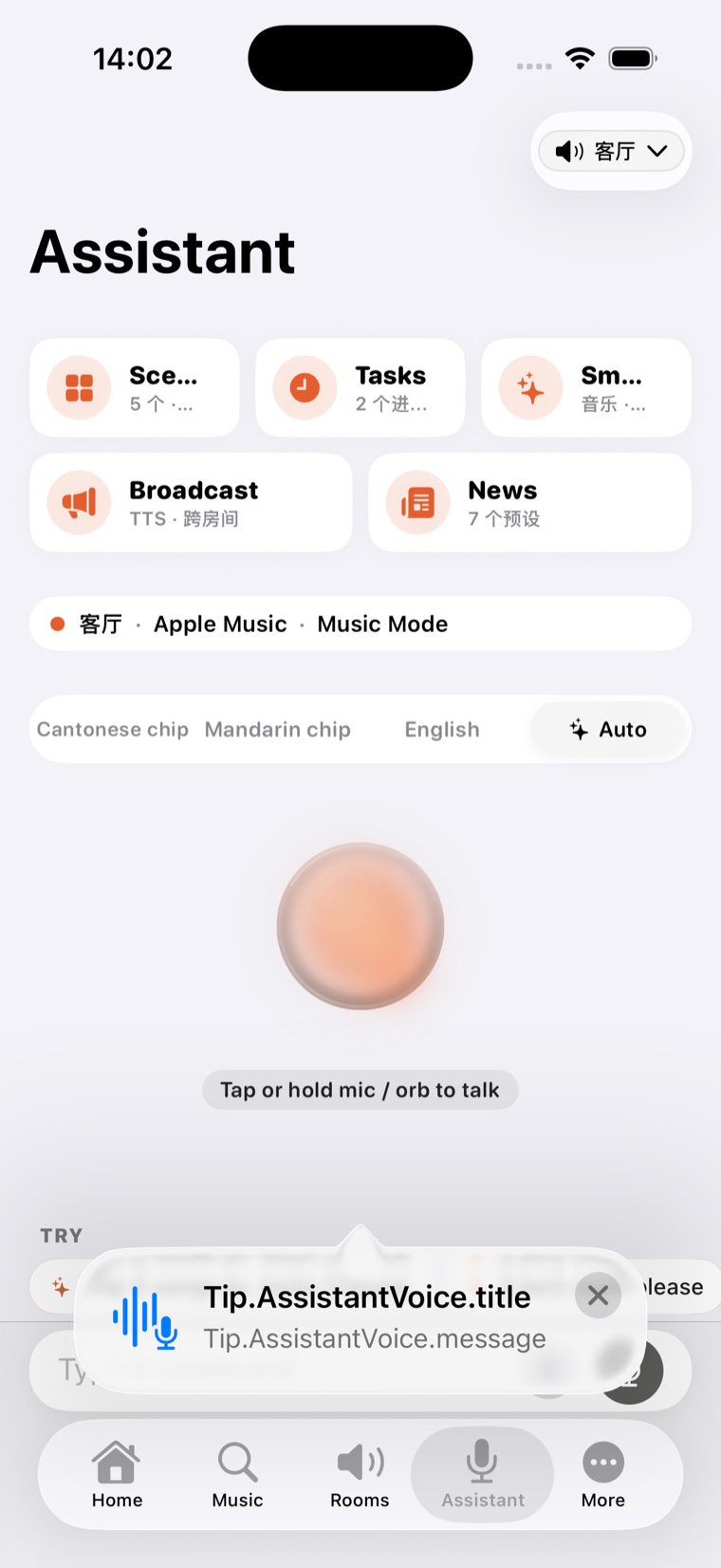
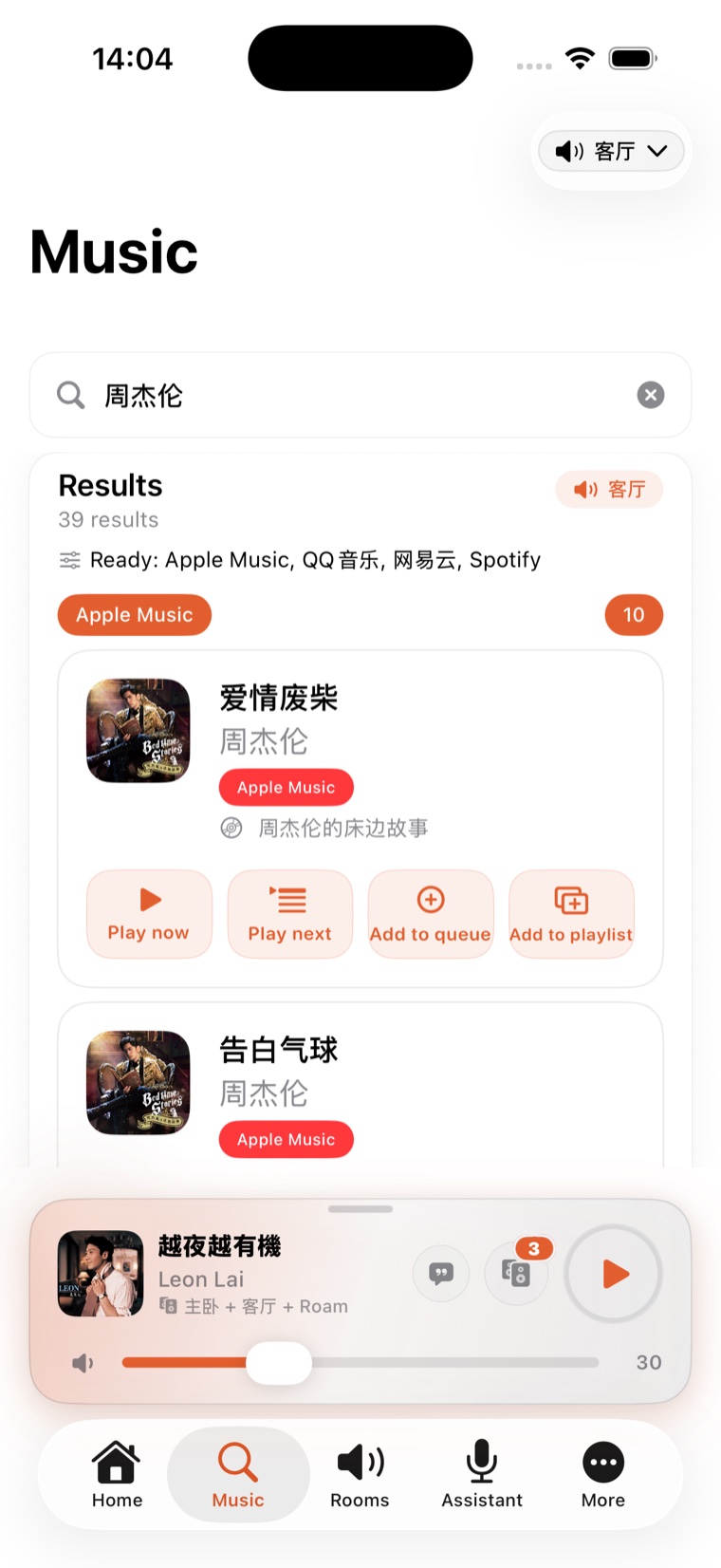
真机截图,不是渲染图真機截圖,不是渲染圖 Real screens, not renders
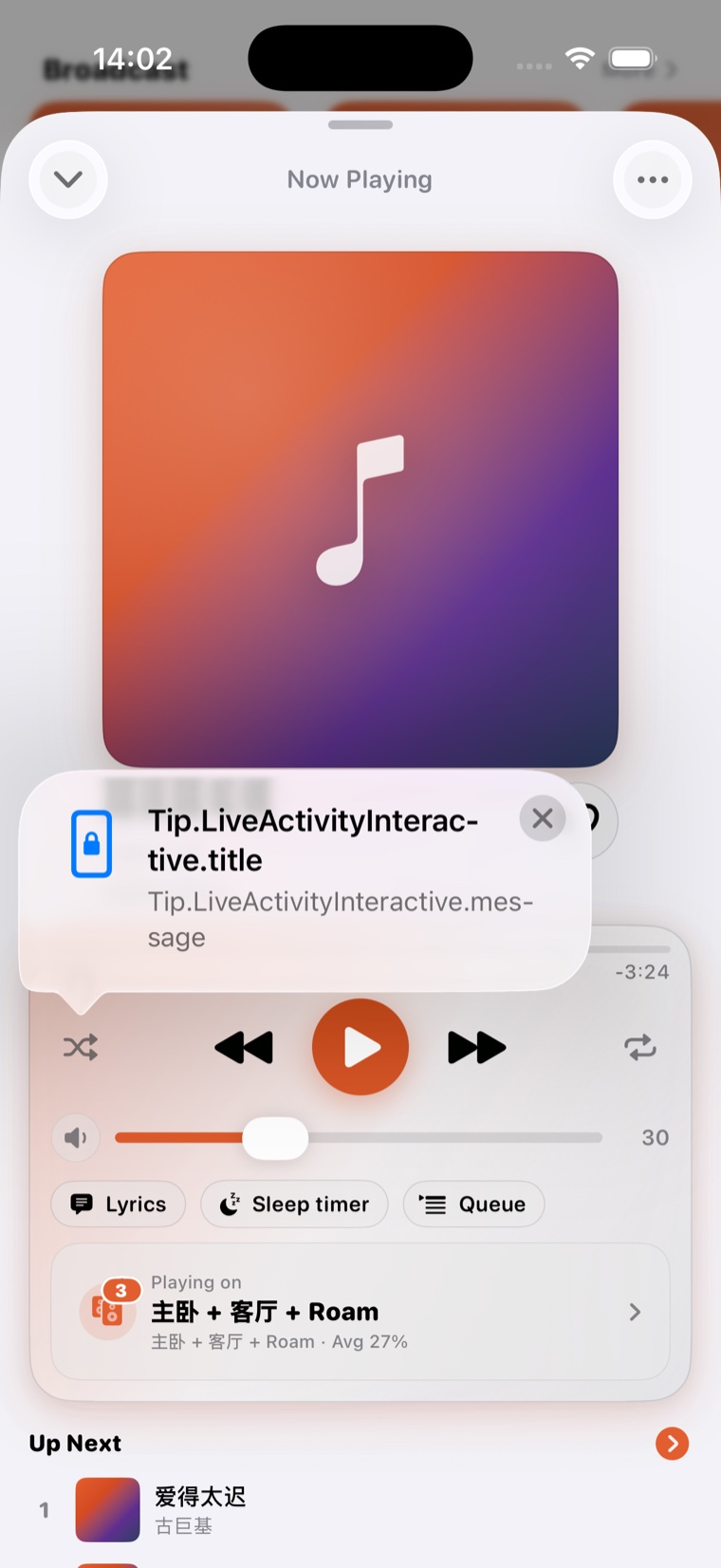
锁屏播放、完整歌词、多房间、多服务搜索、场景、广播、新闻、闹钟 — Free 开箱即用,Pro 再解锁语音与自动化。鎖屏播放、完整歌詞、多房間、多服務搜尋、場景、廣播、新聞、鬧鐘 — Free 開箱即用,Pro 再解鎖語音與自動化。 Lock-screen playback, full lyrics, multi-room, cross-service search, scenes, broadcast, news, alarms — free out of the box; Pro adds voice and automation.
为日常家庭為日常家庭For everyday homes
- 用自然语音或文字控制 Sonos用自然語音或文字控制 SonosControl Sonos with natural voice or text
- 定时新闻、提醒和家庭广播定時新聞、提醒和家庭廣播Scheduled news, reminders and announcements
- 播报后自动恢复音乐播報後自動恢復音樂Automatically restores your music
- iOS app、Web app 与消息入口逐步统一iOS app、Web app 與訊息入口逐步統一Works across iOS app, web app and messaging entry points
为高级用户為高級用戶For power users
Bridge 是可选的本地 helper。它带来更快响应、本地上下文和更可靠的自动化。 Bridge 是可選的本地 helper。它帶來更快回應、本地上下文和更可靠的自動化。 Bridge is an optional local helper. It brings faster response, local context and more reliable automation.
- 本地自动化和高级计划本地自動化和高級排程Local automation and advanced scheduling
- 更快语音和更好可靠性更快語音和更好可靠性Faster voice and better reliability
- 控制尽量留在家庭网络内控制盡量留在家庭網絡內Control stays on your home network whenever possible
可选可選Optional
隐私优先私隐優先Privacy-first
语音和 AI 功能会清楚说明哪些内容使用可信云服务。語音和 AI 功能會清楚說明哪些內容使用可信雲服務。Voice and AI features use trusted cloud services with clear disclosure.
Sonos 控制会尽量留在你的家庭网络里。Sonos 控制會盡量留在你的家庭網絡裡。Your Sonos control stays on your home network whenever possible.
选择播报什么、什么时候播、在哪个房间播。選擇播報什麼、什麼時候播、在哪個房間播。Choose what to announce, when, and where.
支持 English、繁體中文、简体中文,后续继续扩展。支援 English、繁體中文、简体中文,後續繼續擴展。English, 繁體中文, 简体中文 and more to come.
使用场景使用場景Real scenarios
家里的助手,店里的员工家裡的助手,店裡的員工 Your assistant at home, your staff at work
早晨早晨Morning
天气 + 新闻 routine天氣 + 新聞 routineWeather + news routine
7:30 自动播今天天气,接 5 条国际新闻,结束自动跳到昨天的播放列表。7:30 自動播今天天氣,接 5 條國際新聞,結束自動跳到昨天的播放列表。7:30am: weather, 5 world news, then segues into yesterday’s playlist.
07:30  weather (TTS)
07:32  news x5 (TTS)
07:39  resume "昨日歌单""昨日歌單""yesterday's queue"
洗澡时洗澡時Shower
轻音乐 scene輕音樂 sceneEasy listening scene
说一句「洗澡」— 浴室 + 卧室同步轻音乐,30 秒后渐入。出来时一句「停」即可。說一句「洗澡」— 浴室 + 臥室同步輕音樂,30 秒後漸入。出來時一句「停」即可。Say “shower” — bath + bedroom sync, 30 s fade-in. “Stop” when you’re out.
"洗澡""洗澡""shower" →
  浴室 + 卧室浴室 + 臥室bath + bedroom
  fade-in 30s · vol 22
睡眠睡眠Sleep
古典 + 自动停古典 + 自動停Classical + auto-stop
「睡觉」启动古典播放列表,45 分钟后渐淡到 0,自动停止 — 不会半夜醒着的时候还在响。「睡覺」啟動古典播放列表,45 分鐘後漸淡到 0,自動停止 — 不會半夜醒著的時候還在響。“Sleep” — classical, 45-min fade to silence, then off. No waking up to noise.
"睡觉""睡覺""sleep" →
  卧室 · 古典臥室 · 古典bedroom · classical
  fade-out @ 45min
蛋糕店蛋糕店Bakery
营业时段 schedule營業時段 scheduleBusiness-hour schedule
开门即软轻音乐,下午茶时段切爵士,烘焙时间 15 分钟低音量风琴。開門即軟輕音樂,下午茶時段切爵士,烘焙時間 15 分鐘低音量風琴。Soft acoustic at open, jazz for tea time, low-volume organ during baking hours.
08:00  acoustic · vol 14
14:00  jazz · vol 18
17:30  organ · vol 8
咖啡店咖啡店Café
爵士 scene 一键爵士 scene 一鍵One-tap jazz scene
员工进店一键启动 — 4 个区域同步爵士,吧台音量稍高,户外区低音量。員工進店一鍵啟動 — 4 個區域同步爵士,吧檯音量稍高,戶外區低音量。Staff hits one tap — 4 zones synced jazz, bar slightly louder, patio lower.
"开店""開店""open shop" →
  4 区4 區4 zones · jazz
  bar +4 · patio -6
餐厅餐廳Restaurant
动态 lunch / dinner動態 lunch / dinnerDynamic lunch / dinner
11:30 切午餐播放列表,17:30 自动切晚餐 — 周末套不同模式。11:30 切午餐播放列表,17:30 自動切晚餐 — 週末套不同模式。Lunch list at 11:30, dinner mood at 17:30 — weekends use a different schedule.
Mon-Fri  lunch @ 11:30
         dinner @ 17:30
Sat-Sun  weekend mode
常见问题常見問題Frequently asked
Sonos 已经有官方 App,为什么还要用 ZoneFoundry?Sonos 已經有官方 App,為什麼還要用 ZoneFoundry?Sonos already has an app — why use ZoneFoundry?
ZoneFoundry 加上官方 App 没有的能力:用语音或一句话发指令、一键场景、定时新闻与广播,而且广播完会自动恢复原本的播放。它补足 Sonos,不是替代你的喇叭。ZoneFoundry 加上官方 App 沒有的能力:用語音或一句話發指令、一鍵場景、定時新聞與廣播,而且廣播完會自動恢復原本的播放。它補足 Sonos,不是替代你的喇叭。ZoneFoundry adds what the official app lacks: voice and one-line commands, one-tap scenes, scheduled news and announcements — and it restores your original playback after an announcement. It complements Sonos rather than replacing your speakers.
没有 Sonos 喇叭也能用吗?沒有 Sonos 喇叭也能用嗎?Can I use it without Sonos speakers?
不能。ZoneFoundry 是用来控制你现有的 Sonos 喇叭的,它本身不是喇叭,也不外接音箱。不能。ZoneFoundry 是用來控制你現有的 Sonos 喇叭的,它本身不是喇叭,也不外接音箱。No. ZoneFoundry controls the Sonos speakers you already own — it is not a speaker and does not output audio itself.
为什么要装 Bridge,不能纯云端吗?為什麼要裝 Bridge,不能純雲端嗎?Why a Bridge instead of cloud-only?
iOS app 用云端就能日常播放控制。Bridge 是放在你家本地网络的可选增强:它做本地 Sonos 发现与直连,让语音、场景、广播这些高级动作更快、更私密。普通播放不一定需要它。iOS app 用雲端就能日常播放控制。Bridge 是放在你家本地網絡的可選增強:它做本地 Sonos 發現與直連,讓語音、場景、廣播這些高級動作更快、更私密。普通播放不一定需要它。The iOS app handles everyday playback over the cloud. The Bridge is an optional local helper on your home network — it does local Sonos discovery and direct control so voice, scenes and announcements are faster and more private. You don't need it for basic playback.
Bridge 会上传我家里的声音吗?Bridge 會上傳我家裡的聲音嗎?Does the Bridge upload audio from my home?
不会。Bridge 只发送控制指令(播放、暂停、音量、分组),不录音、不上传你家里的音频内容。语音助手等会用到云端 AI 的功能,会在使用前清楚说明。不會。Bridge 只發送控制指令(播放、暫停、音量、分組),不錄音、不上傳你家裡的音頻內容。語音助手等會用到雲端 AI 的功能,會在使用前清楚說明。No. The Bridge sends only control commands (play, pause, volume, grouping). It does not record or upload audio from your home. Features that use cloud AI (like the voice assistant) are clearly disclosed before you use them.
Bridge 离线了,iOS 还能控制 Sonos 吗?Bridge 離線了,iOS 還能控制 Sonos 嗎?If the Bridge goes offline, can iOS still control Sonos?
可以。基本的播放、暂停、音量、分组有云端兜底;Bridge 重新上线后,语音、场景这些本地高级动作会自动恢复。可以。基本的播放、暫停、音量、分組有雲端兜底;Bridge 重新上線後,語音、場景這些本地高級動作會自動恢復。Yes. Basic play, pause, volume and grouping fall back to the cloud. When the Bridge comes back online, local advanced actions like voice and scenes resume automatically.
会很耗电吗?多个房间 / 喇叭支持吗?會很耗電嗎?多個房間 / 喇叭支援嗎?Will it drain my battery? Does it handle multiple rooms?
不会刻意耗电——iOS 用锁屏播放器、小组件这类轻量控制,没有后台长驻。多房间完全支持:分组、逐房音量、全屋同步或一键拆开各房独立播放。不會刻意耗電——iOS 用鎖屏播放器、小工具這類輕量控制,沒有後台長駐。多房間完全支援:分組、逐房音量、全屋同步或一鍵拆開各房獨立播放。It is light on battery — the iOS app uses lock-screen and widget controls, with no heavy background process. Multiple rooms are fully supported: grouping, per-room volume, whole-home sync, or one tap to split rooms into independent playback.
公测之后 Pro 要收费吗?公測之後 Pro 要收費嗎?Will Pro cost money after the beta?
公测期间 Pro 功能全部免费。日后的定价会提前公布,公测期的用户会有优待。iOS app 的核心控制始终免费。公測期間 Pro 功能全部免費。日後的定價會提前公佈,公測期的用戶會有優待。iOS app 的核心控制始終免費。During the beta, all Pro features are free. Any future pricing will be announced ahead of time, and beta users will get preferential treatment. The core iOS controls stay free.
想试 iOS 版?想試 iOS 版?Want to try the iOS beta?
TestFlight 链接准备好后会放在这里。现在可以先发邮件登记。TestFlight 連結準備好後會放在這裡。現在可以先發郵件登記。The TestFlight link will live here when ready. For now, email us to join.