01
自然地说,不用背命令。自然地講,毋須背指令。Speak naturally. No command syntax.
粤语、普通话或英语都可以。指定歌手、房间、音量和播放方式,也可以直接打字。廣東話、普通話或英語都可以。指定歌手、房間、音量和播放方式,也可以直接輸入文字。Use Cantonese, Mandarin, or English. Name the artist, room, volume, and play mode—or type instead.
用粤语、普通话或英语,说出或输入你想听的内容。一次搜索多个已连接的音乐服务,包括 QQ 音乐、网易云音乐、Apple Music 和 Spotify,再把音乐送到任何一个 Sonos 房间。用廣東話、普通話或英語,講出或輸入你想聽的內容。一次搜尋多個已連接的音樂服務,包括 Apple Music 與 Spotify,再把音樂送到任何一個 Sonos 房間。Speak or type in Cantonese, Mandarin, or English. Search and play across multiple connected services, including Spotify and Apple Music, then send music to any Sonos room.
现在所有功能免费。日常功能不用装 Bridge,连上 Sonos 账号就能开始。現在所有功能免費。日常功能毋須安裝 Bridge,連接 Sonos 帳戶即可開始。Every feature is free right now. Everyday features need no Bridge — connect your Sonos account and start listening.
四个真实日常四個真實日常Four everyday moments
从开口找歌,到跨房间控制、看歌词和插播新闻,每一步都围绕正在听的音乐。由開口找歌,到跨房間控制、看歌詞和插播新聞,每一步都圍繞正在聽的音樂。From asking for a song to room control, lyrics, and news briefings, every step stays centered on what is playing.
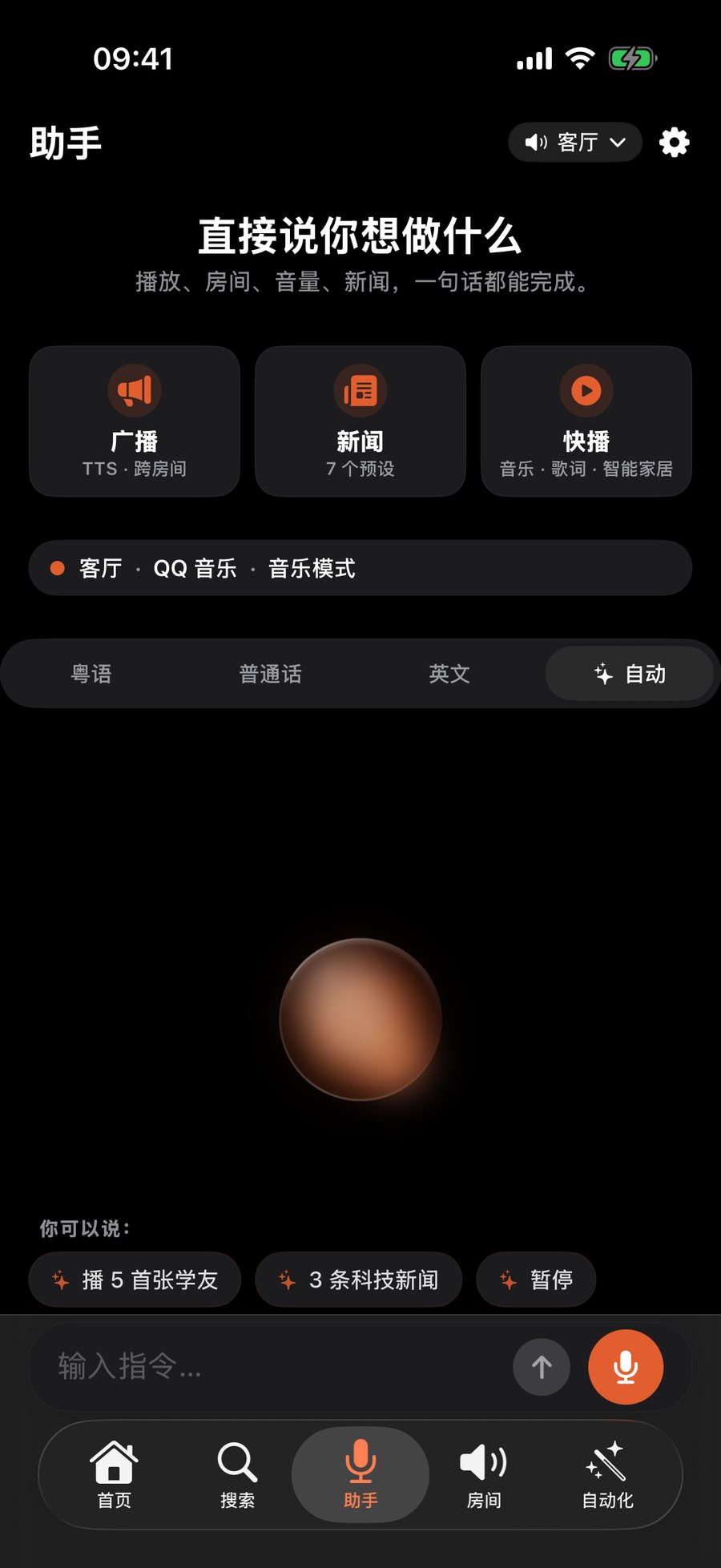
粤语、普通话或英语都可以。指定歌手、房间、音量和播放方式,也可以直接打字。廣東話、普通話或英語都可以。指定歌手、房間、音量和播放方式,也可以直接輸入文字。Use Cantonese, Mandarin, or English. Name the artist, room, volume, and play mode—or type instead.
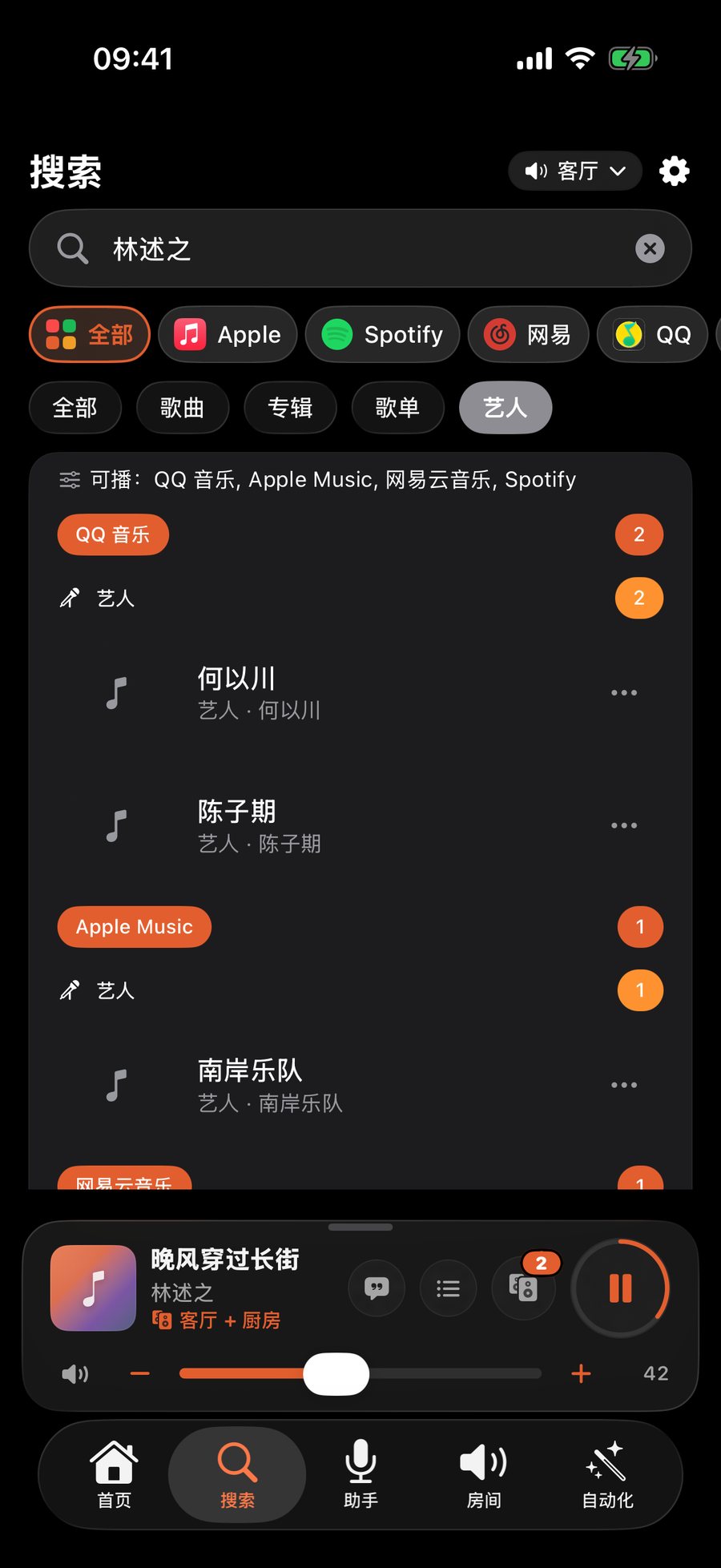
一个搜索入口并列呈现多种已连接服务,找到后直接播放、下一首或加入队列。一個搜尋入口並列呈現多種已連接服務,找到後直接播放、下一首或加入佇列。One search surface presents results from multiple connected services, ready to play or add to the queue.
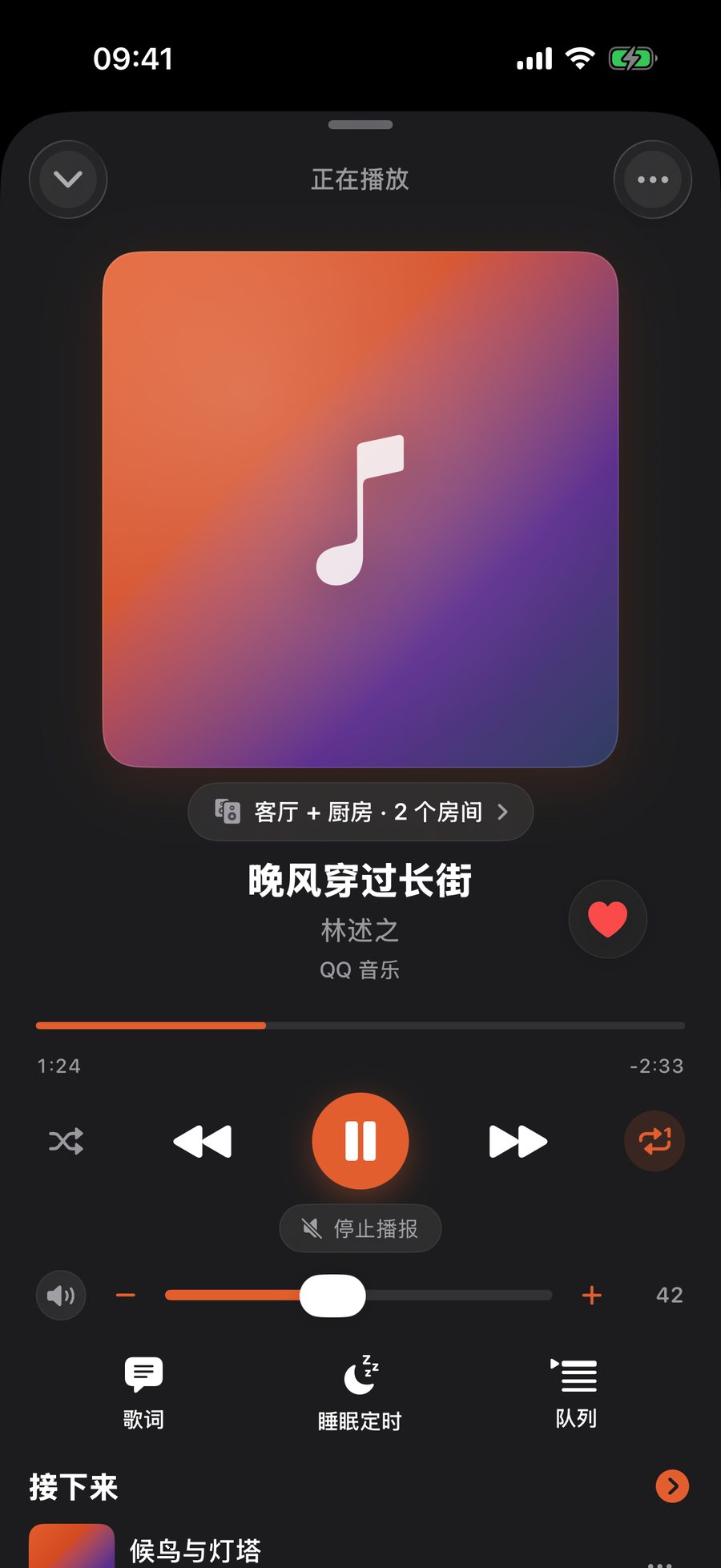
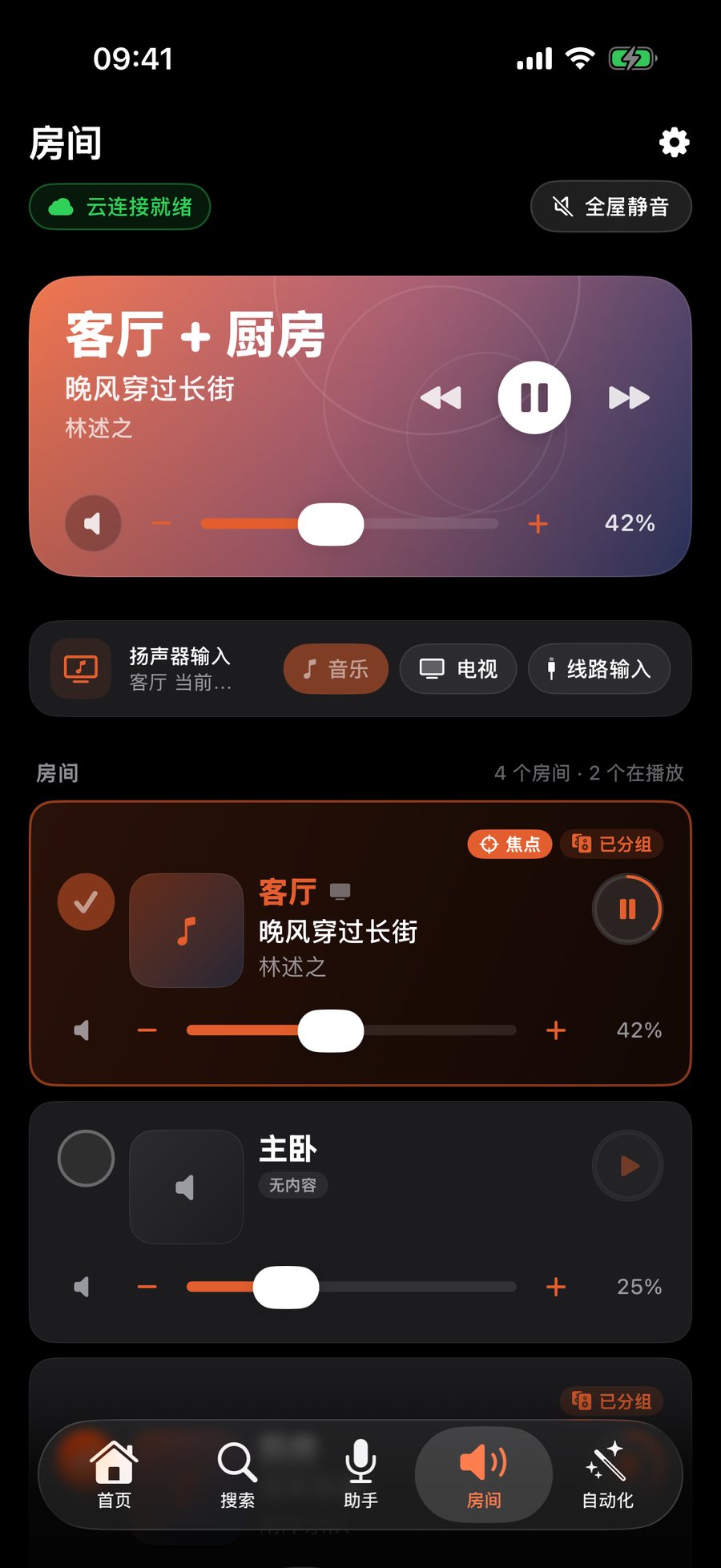
房间、编组、逐房音量、正在播放、歌词和队列,放在同一条操作路径里。房間、群組、逐房音量、正在播放、歌詞和佇列,放在同一條操作路徑。Rooms, groups, per-room volume, Now Playing, lyrics, and queue management stay in one flow.
新闻、提醒和家庭广播开始前保存播放状态,结束后恢复原来的房间、队列和进度。新聞、提醒和家庭廣播開始前保存播放狀態,結束後恢復原來的房間、佇列和進度。News, reminders, and household announcements preserve rooms, queue, and progress before playback resumes.
微信控制 · 也支持 Telegram / QQ微信控制 · 亦支援 Telegram / QQWeChat · also Telegram and QQ
不用打开 App、不用装桥接器,出门在外也能用:点歌、调音量、播新闻、全屋广播、提醒、问天气都可以。支持 QQ 音乐、网易云音乐、Apple Music 和 Spotify;打字、粤语、繁体、英文都听得懂。家里人用自己的微信扫一次码,也能一起控制,不用装 App。毋須打開 App、毋須安裝橋接器,出門在外也能使用:點歌、調音量、播新聞、全屋廣播、提醒、問天氣都可以。支援 QQ 音樂、網易雲音樂、Apple Music 和 Spotify;打字、粵語、繁體、英文都聽得懂。家人用自己的微信掃一次碼,也可以一起控制,毋須安裝 App。No need to open the app or install a bridge, and it works when you're out: play music, change the volume, hear the news, make whole-home announcements, set reminders or ask about the weather. Works with QQ Music, NetEase Cloud Music, Apple Music and Spotify, and understands Mandarin, Cantonese, Traditional Chinese and English. Family members can scan once with their own WeChat and control it too, without installing the app.
需要先在 App 里连接 Sonos 账户;点 QQ 音乐、网易云要先在 App 里连接对应服务。Telegram、QQ 用绑定码开通,功能相同。需要先在 App 內連接 Sonos 帳戶;點 QQ 音樂、網易雲要先在 App 內連接對應服務。Telegram、QQ 以綁定碼開通,功能相同。Link your Sonos account in the app first; to play from QQ Music or NetEase, link those services in the app too. Telegram and QQ work the same way with a bind code.
声音大一点
🔊 好的,主卧音量从 30 调到 35 了
全屋暂停
⏸️ 好的,已暂停全部房间(主卧、客厅、厨房)。
播三条新闻
📰 收到,正在为主卧整理新闻,大约 20 秒后开始播报。
10分钟后提醒我关火
⏰ 好的,10分钟后(今天 19:48)在主卧提醒你。 💡 发送「取消提醒」可以取消。
示例对话:回复为机器人实际回复原文(示例家庭:主卧、客厅、厨房)。示例對話:回覆為機械人實際回覆原文,以簡體顯示(示例家庭:主卧、客廳、廚房)。Example conversation. Replies are the bot's actual wording; it answers in the language you write in (sample home: 主卧 / 客厅 / 厨房).
再往前一步再往前一步Go further
让音乐进入时间、场景、个人资料库和你已经在用的智能工作流。讓音樂進入時間、場景、個人資料庫和你已經在用的智能工作流。Bring music into your schedule, your scenes, your library and the smart workflows you already use.
下面这些都不需要 Bridge,连上 Sonos 账号就能用;纯 Wi-Fi 模式连账号都不用。以下功能都毋須 Bridge,連接 Sonos 帳戶即可使用;純 Wi-Fi 模式連帳戶都不用。None of these need a Bridge — just connect your Sonos account. Wi-Fi-only mode doesn’t even need that.
在微信、QQ、Telegram 发一句话就能点歌、调音量、播新闻;也可以把 Sonos 接进 Claude、ChatGPT 等支持 MCP 的助手。在微信、QQ、Telegram 發一句話就能點歌、調音量、播新聞;也可以把 Sonos 接入 Claude、ChatGPT 等支援 MCP 的助手。Message it on WeChat, QQ or Telegram to play songs, change the volume or hear the news — or connect Sonos to MCP assistants like Claude and ChatGPT.
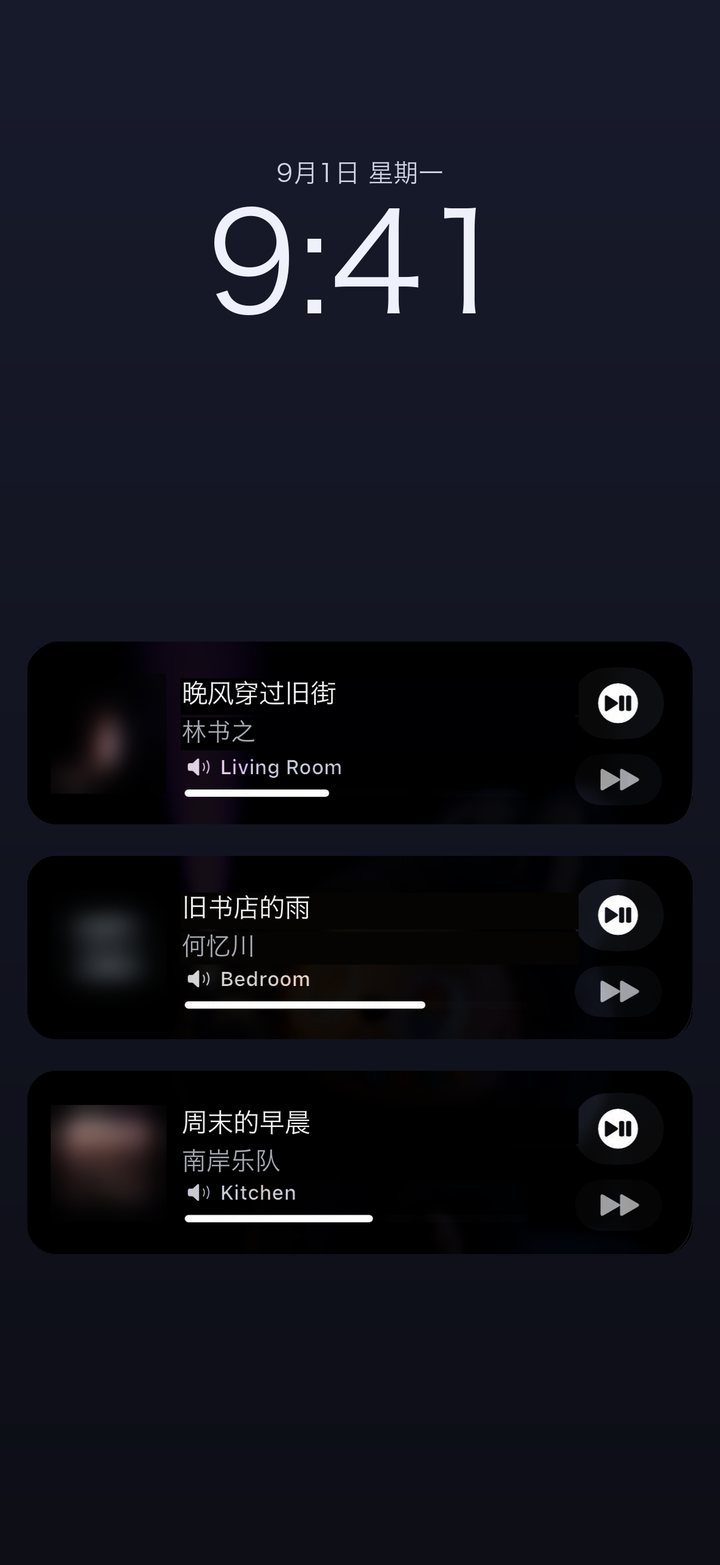
封面、歌名、房间和控制按钮直接出现在锁屏、灵动岛和小组件上,不用解锁进 App。封面、歌名、房間和控制按鈕直接出現在鎖屏、動態島和小工具上,不用解鎖進入 App。Artwork, track, room and controls right on the Lock Screen, Dynamic Island and widgets — no need to unlock.
把房间、音乐、音量和时间组合成一次操作。把房間、音樂、音量和時間組合成一次操作。Combine rooms, music, volume and time into one tap.
App 在场时,音乐跟着你换房间;装了 Bridge 还能在后台持续运行。App 在場時,音樂跟著你換房間;安裝 Bridge 後可在背景持續運行。Music moves with you while the app is around; add a Bridge to keep it running in the background.
记住你常用的房间、音量习惯和说法,重复的请求越来越短。記住你常用的房間、音量習慣和說法,重複的請求越來越短。Remembers your usual rooms, volume habits and phrasing, so repeat requests get shorter.
不登录、不装 Bridge,和音箱在同一个 Wi-Fi 就能播放、调音量和分组。不登入、不裝 Bridge,和音箱在同一個 Wi-Fi 就能播放、調音量和分組。No sign-in, no Bridge — on the same Wi-Fi you can play, set volume and group rooms.
连接 Plex 账号和可访问的媒体服务器,播放你自己的收藏。連接 Plex 帳戶和可存取的媒體伺服器,播放你自己的收藏。Connect a Plex account and a reachable media server to play your own collection.
在浏览器里连接 Sonos、绑定音乐服务、配置 IM 和 MCP —— 上面这些设置都在这里改。在瀏覽器裡連接 Sonos、綁定音樂服務、設定 IM 和 MCP —— 以上設定都在這裡修改。Connect Sonos, link music services and set up chat apps and MCP from your browser.
三步开始三步開始Three steps
不用装 Bridge。连上 Sonos 账号,大部分日常功能马上就能用。不用裝 Bridge。連接 Sonos 帳戶後,大部分日常功能立即可用。No Bridge needed. Connect your Sonos account and most everyday features work right away.
一个 App 覆盖 iPhone、iPad 和 Apple Watch。一個 App 覆蓋 iPhone、iPad 和 Apple Watch。One app across iPhone, iPad and Apple Watch.


 02
02登录一次,就能看到你家的房间和已连接的音乐服务。登入一次,就能看到你家的房間和已連接的音樂服務。Sign in once to see your rooms and connected music services.
看这一步怎么做 →看這一步怎麼做 →See how this step works →选好房间,说一句、搜一下,或者直接点播放。選好房間,說一句、搜一下,或者直接點播放。Pick a room, then say it, search for it, or just tap play.
看语音怎么用 →看語音怎麼用 →See voice in action →使用教程使用教學Guides
1上手上手Start第一天,先播出第一首歌第一天,先播出第一首歌Day one: get the first song playing
10 分钟播出第一首歌10 分鐘播出第一首歌Your first song in 10 minutes第一次播放第一次播放First play登录 Sonos,解锁搜歌和语音登入 Sonos,解鎖搜歌和語音Sign in to Sonos — unlock search & voice连接 Sonos連接 SonosSonos login一个搜索框,搜完所有服务一個搜尋框,搜完所有服務One search box for every service音乐服务音樂服務Music services2日常日常Everyday每天都会用到的几件事每天都會用到的幾件事The things you'll do every day
说一句就播:粤语、普通话、英语說一句就播:粵語、普通話、英語Say it in Cantonese, Mandarin or English语音点歌語音點歌Voice control把音乐送到任何一个房间把音樂送到任何一個房間Send music to any room房间与编组房間與編組Rooms & groups广播完,音乐自己接回去廣播完,音樂自己接回去Announce — then the music comes back广播恢复廣播恢復Announce & restore3进阶進階Advanced想多玩一点的时候再看想多玩一點的時候再看When you want to do more
让 Claude、ChatGPT 直接控制音箱讓 Claude、ChatGPT 直接控制喇叭Let Claude or ChatGPT run your speakersAI · MCPAI · MCPAI · MCP锁屏和灵动岛上直接控制鎖屏和動態島上直接控制Control from the Lock Screen锁屏控制鎖屏控制Lock Screen接进 Apple 家庭,交给 Siri接進 Apple 家庭,交給 SiriInto Apple Home, driven by SiriApple 家庭Apple 家庭Apple Home绝大多数日常控制无需 Bridge。需要家庭持续在线、无人值守时,再安装它。絕大多數日常控制毋須 Bridge。需要家庭持續在線、無人值守時,再安裝它。Most everyday control needs no Bridge. Install it when your home needs an always-on, unattended layer.
把房间和场景发布为 Apple Home 配件,用于家庭自动化与 HomePod 语音。把房間和場景發佈為 Apple Home 配件,用於家庭自動化與 HomePod 語音。Publish rooms and scenes as Apple Home accessories for household automation and HomePod voice control.
让家庭成员的到达或离开触发场景与播放行为。讓家庭成員的到達或離開觸發場景與播放行為。Trigger scenes and playback as household members arrive or leave.
即使 iPhone 不在前台,也能持续感知并执行音乐跟随。即使 iPhone 不在前台,也能持續感知並執行音樂跟隨。Keep presence detection and music-following active even when the iPhone app is not in the foreground.
FAQ
ZoneFoundry 在 Sonos 之上加入语音和一句话指令、一键场景、定时新闻和广播,以及广播后自动恢复原来的播放。它是 Sonos 的补充,不会取代你的喇叭。ZoneFoundry 在 Sonos 之上加入語音和一句話指令、一鍵場景、定時新聞和廣播,以及廣播後自動恢復原本的播放。它是 Sonos 的補充,不會取代你的喇叭。ZoneFoundry adds voice and one-line commands, one-tap scenes, scheduled news and announcements, and automatic restore after announcements. It complements Sonos rather than replacing your speakers.
不需要。播放、搜索、房间、编组、逐房音量、Siri 快捷指令、控制中心场景、广播和自动恢复等绝大多数日常能力,在连接 Sonos Cloud 后即可使用。不需要。播放、搜尋、房間、群組、逐房音量、Siri 捷徑、控制中心場景、廣播和自動恢復等絕大多數日常能力,在連接 Sonos Cloud 後即可使用。No. Playback, search, rooms, groups, per-room volume, Siri Shortcuts, Control Center scenes, announcements, and automatic resume work through Sonos Cloud.
支持多种已连接服务,包括 QQ 音乐、网易云音乐、Apple Music 和 Spotify;可用服务视 Sonos 账户地区及已连接服务而定。Plex 作为个人资料库单独连接。支援多種已連接服務,包括 Apple Music、Spotify、QQ 音樂和網易雲音樂;可用服務視 Sonos 帳戶地區及已連接服務而定。Plex 作為個人資料庫單獨連接。Multiple connected services are supported, including Spotify, Apple Music, QQ Music, and NetEase Cloud Music. Availability depends on your Sonos account region and connected services. Plex connects separately as a personal library.
不一定。App 在场或前台时可以免 Bridge 使用;Bridge 的作用是让它持续、无人值守地运行。不一定。App 在場或前台時可以免 Bridge 使用;Bridge 的作用是讓它持續、無人值守地運行。Not always. It works without Bridge while the app is present or foregrounded. Bridge keeps it running continuously and unattended.
不是。ZoneFoundry 是独立产品,与 Sonos、Apple、Spotify、QQ 音乐或网易云音乐没有官方隶属关系。不是。ZoneFoundry 是獨立產品,與 Sonos、Apple、Spotify、QQ 音樂或網易雲音樂沒有官方隸屬關係。No. ZoneFoundry is an independent product and is not affiliated with Sonos, Apple, Spotify, QQ Music, or NetEase Cloud Music.
App 免费下载,上架初期全部功能免费。日后如果推出进阶订阅,价格、计费周期和包含内容会在购买前于 App 内清楚标示,核心控制保持免费。App 免費下載,上架初期全部功能免費。日後如果推出進階訂閱,價格、計費週期和包含內容會在購買前於 App 內清楚標示,核心控制保持免費。The app is free to download and every launch feature is free. If an advanced subscription arrives later, its price, billing period and contents will be shown clearly in the app before purchase, and core control stays free.
不能。ZoneFoundry 是用来控制你已经拥有的 Sonos 喇叭的,它本身不是喇叭,也不从手机输出声音。不能。ZoneFoundry 是用來控制你已經擁有的 Sonos 喇叭的,它本身不是喇叭,也不從手機輸出聲音。No. ZoneFoundry controls Sonos speakers you already own. It is not a speaker and does not output audio from your phone.
核心的喇叭控制不需要任何账号,同一个 Wi-Fi 下就能用。Sonos 账号用于云端搜歌、语音和场景;ZoneFoundry 账号只用于跨网络远程控制和多设备同步,两者都可以之后再加。核心的喇叭控制不需要任何賬號,同一個 Wi-Fi 下就能用。Sonos 賬號用於雲端搜歌、語音和場景;ZoneFoundry 賬號只用於跨網絡遙控和多裝置同步,兩者都可以之後再加。Core speaker control needs no account at all — the same Wi-Fi is enough. A Sonos account unlocks cloud search, voice and scenes; a ZoneFoundry account is only for remote control across networks and multi-device sync. Both can be added later.
使用语音或自然语言功能时,指令会交给第三方云端服务做识别和意图解析。App 会在首次使用前明确请求你同意;不同意则相关功能保持关闭,其他功能照常。详细说明见隐私政策。使用語音或自然語言功能時,指令會交給第三方雲端服務做識別和意圖解析。App 會在首次使用前明確請求你同意;不同意則相關功能保持關閉,其他功能照常。詳細說明見私隱政策。Voice and natural-language features send your command to third-party cloud services for recognition and intent parsing. The app asks for explicit consent before first use; decline and those features stay off while everything else keeps working. The privacy policy has the full detail.
上架初期全部功能免费。支持 iPhone、iPad 和 Apple Watch;Apple 芯片(M1 及以上)的 Mac 可在 Mac App Store 的「iPhone 与 iPad App」分页搜索 ZoneFoundry 直接安装,原生 Mac 版正在开发中。上架初期全部功能免費。支援 iPhone、iPad 和 Apple Watch;搭載 Apple 晶片(M1 或以上)的 Mac 可在 Mac App Store 的「iPhone 與 iPad App」分頁搜尋 ZoneFoundry 直接安裝,原生 Mac 版正在開發中。All launch features are free. Available on iPhone, iPad and Apple Watch. On a Mac with Apple silicon (M1 or later), search for ZoneFoundry under the “iPhone & iPad Apps” tab in the Mac App Store to install it; a native Mac app is in development.
早期用户早期用戶Early users
ZoneFoundry 刚上架,现在提的每一条都还来得及进产品。缺了什么功能、哪一步别扭、哪句话看不懂 —— 都想听。ZoneFoundry 剛剛上架,現在提出的每一條都還來得及納入產品。缺少哪些功能、哪一步彆扭、哪句話看不明白 —— 都想聽。ZoneFoundry just launched, so anything you raise now can still make it into the product. Missing features, awkward steps, confusing wording — we want to hear it.
ZoneFoundry 已在 175 个国家和地区上架。想让它说你的语言?发邮件告诉我们,哪种语言呼声最高,就先加哪种。ZoneFoundry 已在 175 個國家和地區上架。想讓它說你的語言?發電郵告訴我們,哪種語言呼聲最高,就先加入哪種。ZoneFoundry is available in 175 countries and regions. Want it in your language? Email us — the most-requested language gets added next.
被采纳的反馈,我们会送 3 个月 Pro(在付费功能上线后生效)。被採納的反饋,我們會送 3 個月 Pro(在付費功能上線後生效)。If we ship your suggestion, we'll send you 3 months of Pro (once paid features launch).
也可以在 App 里「首页右上角齿轮 → 关于 → 反馈问题」(旧版本叫「帮助与反馈」)直接发,会带上你的版本号,我们更快定位。亦可在 App 內「首頁右上角齒輪 → 關於 → 反饋問題」(舊版本叫「幫助與反饋」)直接發送,會附上你的版本號,我們可以更快定位。You can also send it from the app: tap the gear at the top right of Home → About → Report a problem (called "Help & Feedback" in older versions) — it attaches your build number so we can pinpoint issues faster.