为什么这件事很特别為何這一點特別Why this is special
- 不用打开 App:锁屏上直接播放、暂停、切歌。iPhone 会先要你用面容或指纹解锁,但不用打开 App、也不用等它连上。毋須打開 App:在鎖定畫面直接播放、暫停、切歌。iPhone 會先要求你用 Face ID 或指紋解鎖,但毋須開啟 App,也不用等它連線。No need to open the app: play, pause and skip right from the lock screen. iPhone asks for Face ID or Touch ID first, but you don't have to open the app or wait for it to connect.
- 灵动岛也能点:长按展开,封面和按钮就在手边。動態島也能操作:長按展開,封面與按鈕就在手邊。A Dynamic Island you can use: long-press to expand, with the cover and buttons right there.
- 锁屏、灵动岛、小组件都能控制:锁屏和灵动岛显示的是同一张「正在播放」卡片,多个群组同时播就有多张卡片,各管各的房间;主屏小组件则可以固定一个房间,或跟随 App 当前的房间。鎖定畫面、動態島、小工具都能控制:鎖定畫面與動態島顯示的是同一張「正在播放」卡片,多個群組同時播就有多張卡片,各管各的房間;主畫面小工具則可以固定一個房間,或跟隨 App 當前的房間。Lock screen, Dynamic Island and widgets: the lock screen and Dynamic Island show the same Now Playing card — with several groups playing you get several cards, each minding its own room. The Home-screen widget can be pinned to one room, or follow the room you have selected in the app.
开始前你需要開始前你需要Before you start
- iPhone(灵动岛需要带灵动岛的 iPhone,iPhone 14 Pro 起的大部分机型都有;锁屏实时活动需要 iOS 18 或以上)iPhone(動態島需要設有動態島的 iPhone,iPhone 14 Pro 起的大部分型號都有;鎖屏即時動態需要 iOS 18 或以上)An iPhone (Dynamic Island needs an iPhone that has one — most models from iPhone 14 Pro onward; lock-screen Live Activities need iOS 18 or later)
- ZoneFoundry 已经能控制到至少一个 Sonos 房间ZoneFoundry 已經控制到至少一個 Sonos 房間ZoneFoundry already controlling at least one Sonos room
- 系统「设置 → ZoneFoundry → 实时活动」保持打开(默认就是开,一般首次播放会自动出现,无需额外设置)系統「設定 → ZoneFoundry → 即時動態」保持開啟(預設已開,一般首次播放會自動出現,毋須額外設定)Settings → ZoneFoundry → Live Activities left on (it is on by default and usually appears automatically on first playback — no extra setup needed)
步骤步驟Steps
先在某个房间放点音乐先在某個房間播點音樂Start playing in a room
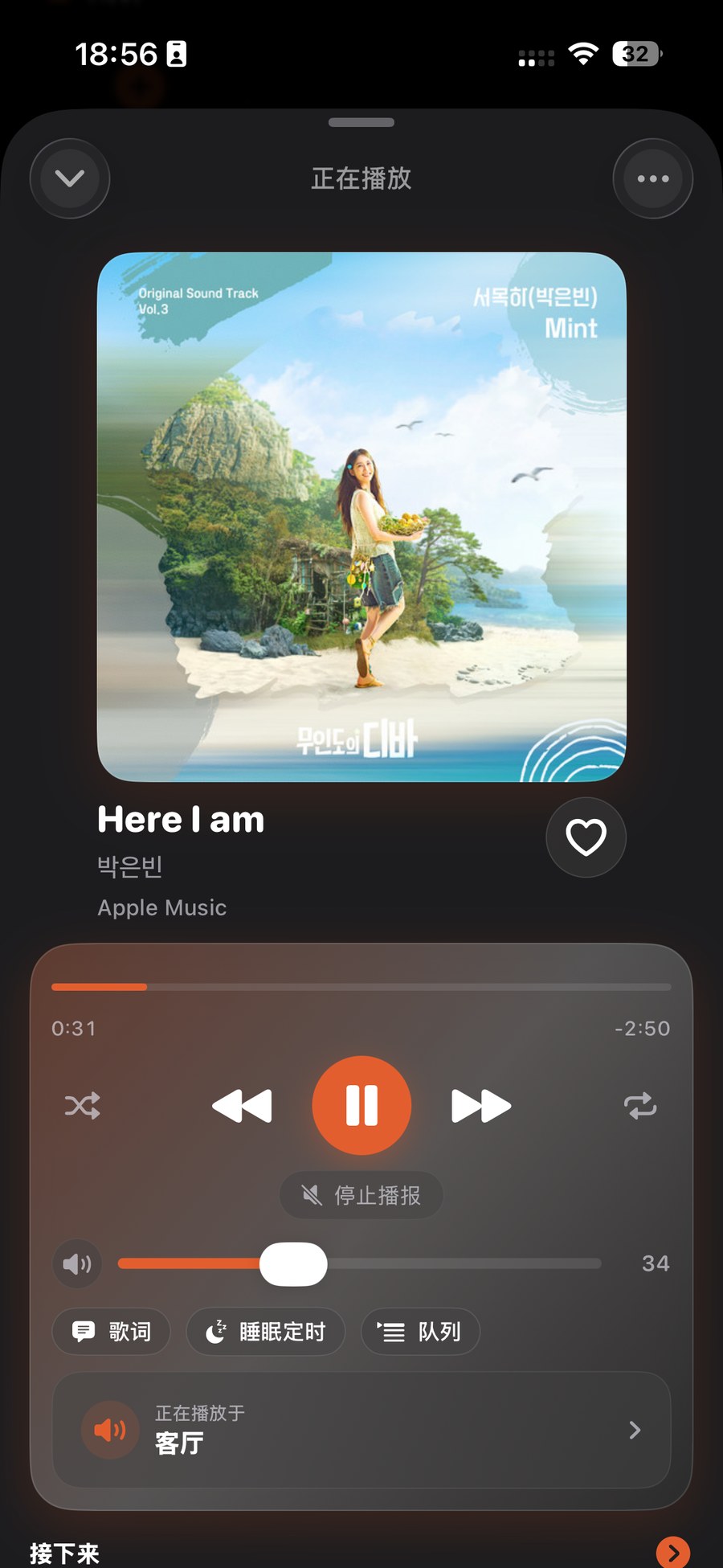
打开 ZoneFoundry,选一个房间(例如「客厅」),随便播一首歌或一个歌单。只要开始播放,「正在播放」卡片就会被点亮——这就是接下来锁屏和灵动岛上要出现的东西。打開 ZoneFoundry,選一個房間(例如「客廳」),隨便播一首歌或一個歌單。只要開始播放,「正在播放」卡片就會亮起——這就是接下來鎖定畫面與動態島上會出現的東西。Open ZoneFoundry, pick a room (say "Living room") and play any song or playlist. Once it's playing, the Now Playing card lights up — that's exactly what shows up next on your lock screen and Dynamic Island.
锁屏看一眼,直接控制鎖屏望一眼,直接控制Glance at the lock screen and control it
把 iPhone 锁屏(或下拉到锁屏),你会看到一张实时活动卡片:左边封面,中间歌名和房间名,还有播放/暂停、下一首、调音量和静音按钮。点一下就生效;iPhone 会先要你用面容或指纹解锁,不用打开 App。把 iPhone 鎖上(或下拉到鎖定畫面),你會看到一張即時動態卡片:左邊封面,中間歌名與房間名,另有播放/暫停、下一首、調音量與靜音按鈕。點一下就生效;iPhone 會先要求你用 Face ID 或指紋解鎖,毋須開啟 App。Lock your iPhone (or pull down to the lock screen) and you'll see a Live Activity card: cover on the left, song title and room in the middle, play/pause, next, volume and mute on the right. One tap and it works — iPhone asks for Face ID or Touch ID first, but you don't need to open the app.
灵动岛:长按展开,轻点回到 App動態島:長按展開,輕點回到 AppDynamic Island: long-press to expand, tap to open the app
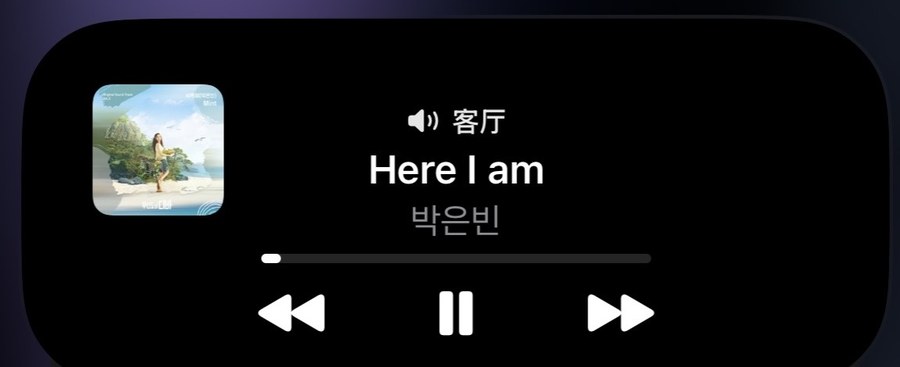
在主屏或别的 App 里用着,灵动岛收起时显示一个橙色音符(电视模式是电视图标)和播放状态,提醒你还在放歌。长按它就展开成完整卡片,封面、歌名、房间、上一首/播放/暂停/下一首、静音和调音量全都能点;轻点则打开 App 并切到那个房间。在主畫面或別的 App 使用時,動態島收起時會顯示一個橙色音符(電視模式是電視圖示)和播放狀態,提示你仍在播歌。長按它就展開成完整卡片,封面、歌名、房間、上一首/播放/暫停/下一首、靜音與調音量全部可以點按;輕點則開啟 App 並切換到該房間。While you are on the Home screen or in another app, the collapsed Dynamic Island shows an orange music note (a TV icon in TV mode) and the playback state. Long-press to expand it into the full card — cover, title, room, previous / play / pause / next, mute and volume are all tappable; a quick tap opens the app focused on that room.
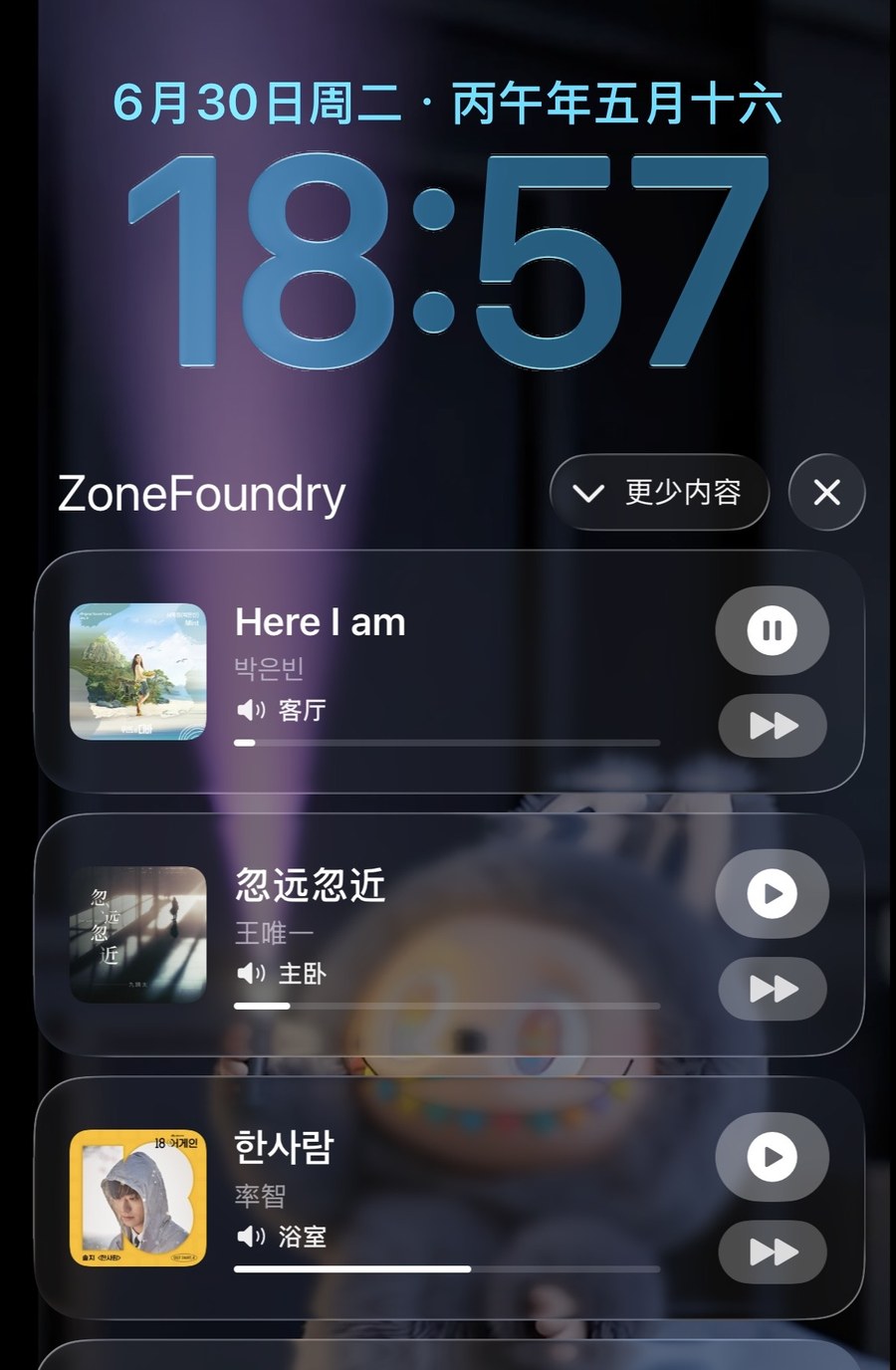
提示:同时有好几个房间在放?每个 Sonos 群组各占一张独立卡片——客厅一张、主卧一张,切哪首、停哪个,都只影响那一组,不会牵连别的房间。提示:同時有幾個房間在播?每個 Sonos 群組各佔一張獨立卡片——客廳一張、主臥一張,切哪首、停哪個,都只影響那一組,不會影響其他房間。Tip: Several rooms playing at once? Each Sonos group gets its own card — one for the living room, one for the bedroom. Skipping or pausing on one only affects that group, never the others.
(可选)把「Now Playing」(正在播放)小组件放上桌面(可選)把「Now Playing」(正在播放)小工具放上桌面(Optional) Add the Now Playing widget
想随时都看得到?长按主屏幕,点「编辑 → 添加小组件」→ 找到 ZoneFoundry →「Now Playing」(正在播放)小组件 → 添加,添加时可以选一个房间,或跟随 App 当前的房间。锁屏也一样:长按锁屏 →「自定」→ 加一个 ZoneFoundry 小组件。这样不点亮屏幕也能瞄一眼现在在放什么。想隨時都看到?長按主畫面,點「編輯 → 加入小工具」→ 找到 ZoneFoundry →「Now Playing」(正在播放)小工具 → 加入,加入時可以選一個房間,或跟隨 App 當前的房間。鎖定畫面也一樣:長按鎖定畫面 →「自訂」→ 加一個 ZoneFoundry 小工具。這樣毋須點亮整個螢幕都可以瞄一眼現在在播甚麼。Want it visible all the time? Long-press the Home screen, tap Edit → Add Widget → find ZoneFoundry → the Now Playing widget → Add; when adding it you can pick a room, or have it follow the room selected in the app. Same for the lock screen: long-press it → Customize → add a ZoneFoundry widget. Now you can glance at what is playing without even waking the full screen.
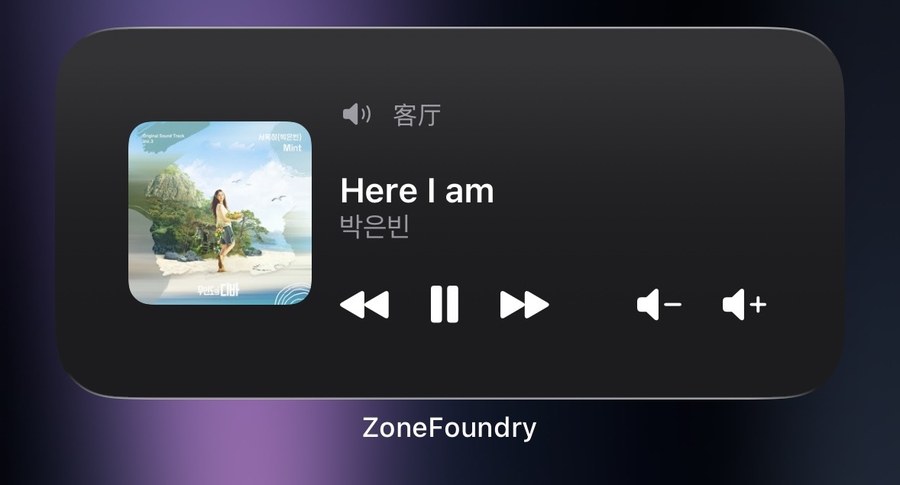
锁屏没出现卡片?先确认音乐确实在播(暂停后卡片最多保留 30 分钟,停止播放才会消失)。如果还是没有,到「设置 → ZoneFoundry → 实时活动」确认开关已打开;偶尔重新开始播放一次,卡片就会回来。鎖定畫面沒有出現卡片?先確認音樂真的在播(暫停後卡片最多保留 30 分鐘,停止播放才會消失)。如果仍然沒有,去「設定 → ZoneFoundry → 即時動態」確認開關已開;有時重新開始播放一次,卡片就會回來。No card on the lock screen? First make sure music is actually playing (after a pause the card stays for up to 30 minutes; it disappears when playback stops). If it's still missing, go to Settings → ZoneFoundry → Live Activities and confirm it's switched on; restarting playback once usually brings the card back.
常见问题常見問題FAQ
能在 iPhone 锁屏上控制 Sonos 吗?能在 iPhone 鎖定畫面控制 Sonos 嗎?Can I control Sonos from the iPhone lock screen?
可以。锁屏卡上能播放/暂停、下一首、调音量和静音;灵动岛展开后还多一个上一首。点卡片会打开 App 并切到对应的房间。iPhone 会先要你用面容或指纹解锁,但不用打开 App。可以。鎖定畫面卡片上可播放/暫停、下一首、調音量與靜音;動態島展開後還多一個上一首。點卡片會開啟 App 並切換到相應房間。iPhone 會先要求你用 Face ID 或指紋解鎖,但毋須開啟 App。Yes. The Lock Screen card can play/pause, skip to the next track, change volume and mute; the expanded Dynamic Island adds a previous-track button. Tap the card to open the app focused on that room. iPhone asks for Face ID or Touch ID first, but you don't need to open the app.
为什么要先解锁?為甚麼要先解鎖?Why does iPhone ask me to unlock first?
这是 iOS 对锁屏实时活动按钮的规定,Sonos 官方 App 的锁屏控制也一样要解锁。解锁后按钮直接生效,不用打开 App。這是 iOS 對鎖定畫面即時動態按鈕的規定,Sonos 官方 App 的鎖定畫面控制同樣需要解鎖。解鎖後按鈕直接生效,毋須開啟 App。That is how iOS handles buttons on lock-screen Live Activities. The official Sonos app's lock-screen controls ask to unlock too. You still don't need to open the app.
怎样让卡片出现?怎樣讓卡片出現?How do I make it appear?
打开 ZoneFoundry,选一个房间,播任意一首歌或歌单。开始播放后,「正在播放」卡片就会出现。打開 ZoneFoundry,選一個房間,播放任何一首歌或歌單。開始播放後,「正在播放」卡片就會出現。Open ZoneFoundry, pick a room and play any song or playlist. Once it is playing, the Now Playing card lights up.
锁屏、快捷指令都能接上;装了家庭桥接,还能接 Apple 家庭鎖屏、捷徑都能接上;裝了家庭橋接,還能接 Apple 家庭Lock screen and Shortcuts, plus Apple Home with the bridge
ZoneFoundry 把 Sonos 接进快捷指令和锁屏,不用为了换首歌先打开 App;装了家庭桥接,还能接进 Apple「家庭」。ZoneFoundry 把 Sonos 接進捷徑和鎖屏,不用為了換首歌先打開 App;裝了家庭橋接,還能接進 Apple「家庭」。ZoneFoundry brings Sonos into Shortcuts and onto your lock screen — no opening the app just to change a track. With the home bridge installed, it also joins Apple Home.