为什么这功能值得一试為何這個功能值得一試Why this is worth trying
- 全屋对讲,一句话到位:不用挨个房间跑、也不用大声喊,选好房间打一句话,所有音箱同时说出来(多房间 / 全屋需要登录 Sonos 账户)。全屋對講,一句話到位:毋須逐間房走、也毋須大聲喊,選好房間打一句話,所有音箱同時說出來(多房間 / 全屋需要登入 Sonos 帳戶)。House-wide intercom in one line: no running room to room, no shouting — pick the rooms, type a line, and every speaker says it at once (several rooms / whole home needs you signed in to your Sonos account).
- 不打断正在听的音乐:广播会接管音箱说话,说完会把刚才在放的内容、音量、播放进度尽量接回去,像什么都没发生过。不打斷正在聽的音樂:廣播會接管音箱說話,說完會把剛才播放的內容、音量、播放進度盡量接回,像甚麼都沒發生過一樣。Doesn't kill your music: the broadcast takes over to speak, then puts back whatever was playing — content, volume and position — as if nothing happened.
- 不用桥也能用:没登录 Sonos 时,整套流程在手机本地完成,家里断了外网也能播到当前房间;登录后改由云端合成,要联网,但可以多房间、全屋,人不在家也能广播。两种情况都不需要桥,也不需要 Sonos 订阅。毋須橋接也能用:未登入 Sonos 時,整個流程在手機本機完成,家中斷了外網也能播到目前的房間;登入後改由雲端合成,需要連線,但可以多房間、全屋,人不在家也能廣播。兩種情況都毋須橋接,亦毋須 Sonos 訂閱。No bridge needed: when you're not signed in to Sonos, the whole thing happens on your phone and still plays to the current room if your internet is down; once signed in, speech is made in the cloud and needs internet, but can go to several rooms or the whole home, even when you're away. Neither needs a bridge or a Sonos subscription.
开始前你需要開始前你需要Before you start
- iPhone 装好 ZoneFoundry。没登录 Sonos 时,手机要和音箱在同一个 Wi-Fi 下;登录 Sonos 账户后,不在家也能广播iPhone 裝好 ZoneFoundry。未登入 Sonos 時,手機要與音箱在同一個 Wi-Fi 之下;登入 Sonos 帳戶後,不在家也能廣播ZoneFoundry installed on your iPhone. If you're not signed in to Sonos, your phone must be on the same Wi-Fi as the speakers; once signed in to your Sonos account, you can broadcast from anywhere
- 至少一台已经识别到的 Sonos 音箱(不需要桥接、也不需要 Sonos 订阅)至少一部已識別到的 Sonos 音箱(毋須橋接,也毋須 Sonos 訂閱)At least one Sonos speaker that's been detected (no bridge and no Sonos subscription needed)
- 想用语音输入的话(登录后的广播页才有「说话」按钮),给 ZoneFoundry 开一下麦克风权限;打字输入则不需要想用語音輸入的話(登入後的廣播頁才有「說話」按鈕),為 ZoneFoundry 開啟一次麥克風權限;打字輸入則毋須If you'd like to dictate by voice (the Speak button is only on the signed-in broadcast screen), allow ZoneFoundry microphone access; not needed if you type
步骤步驟Steps
在首页点「广播」在首頁點「廣播」Tap Broadcast on Home
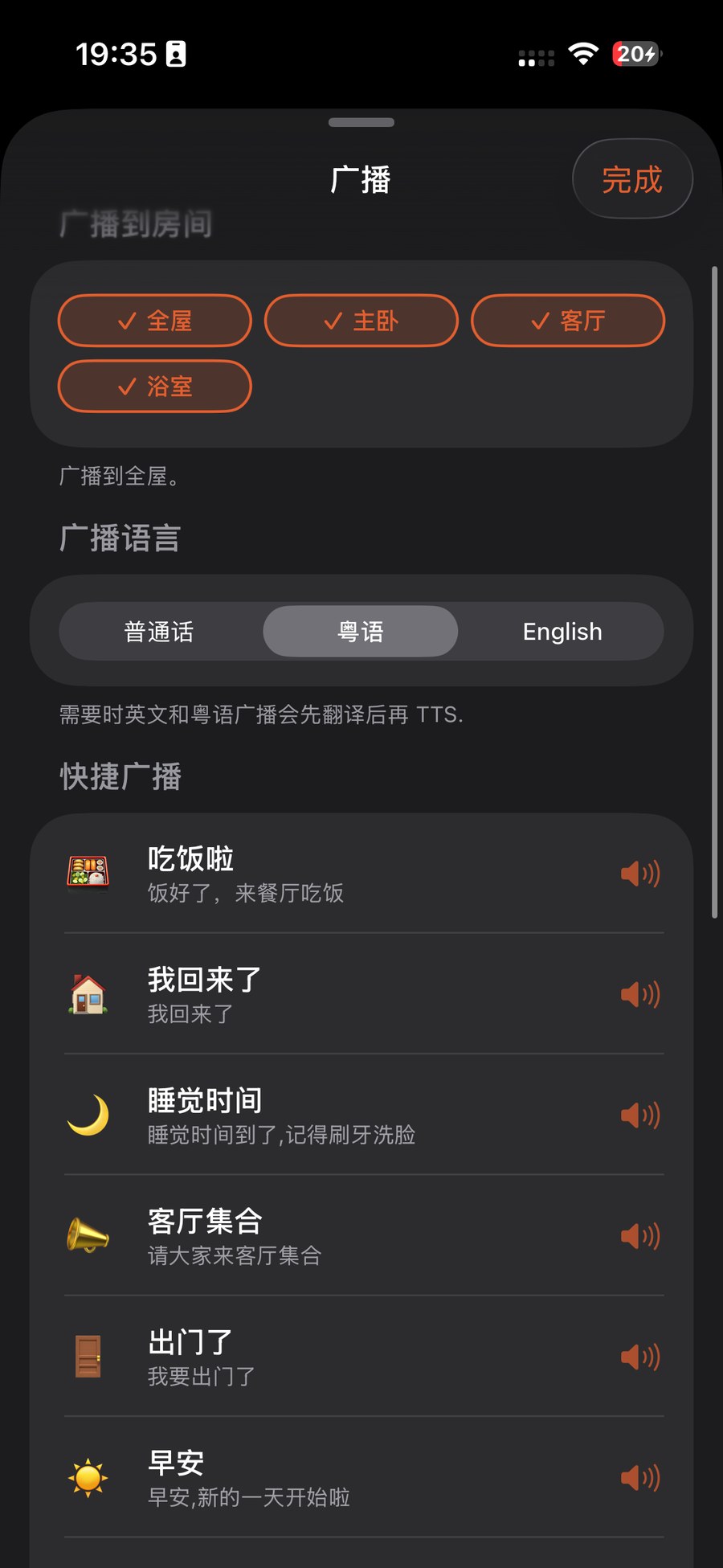
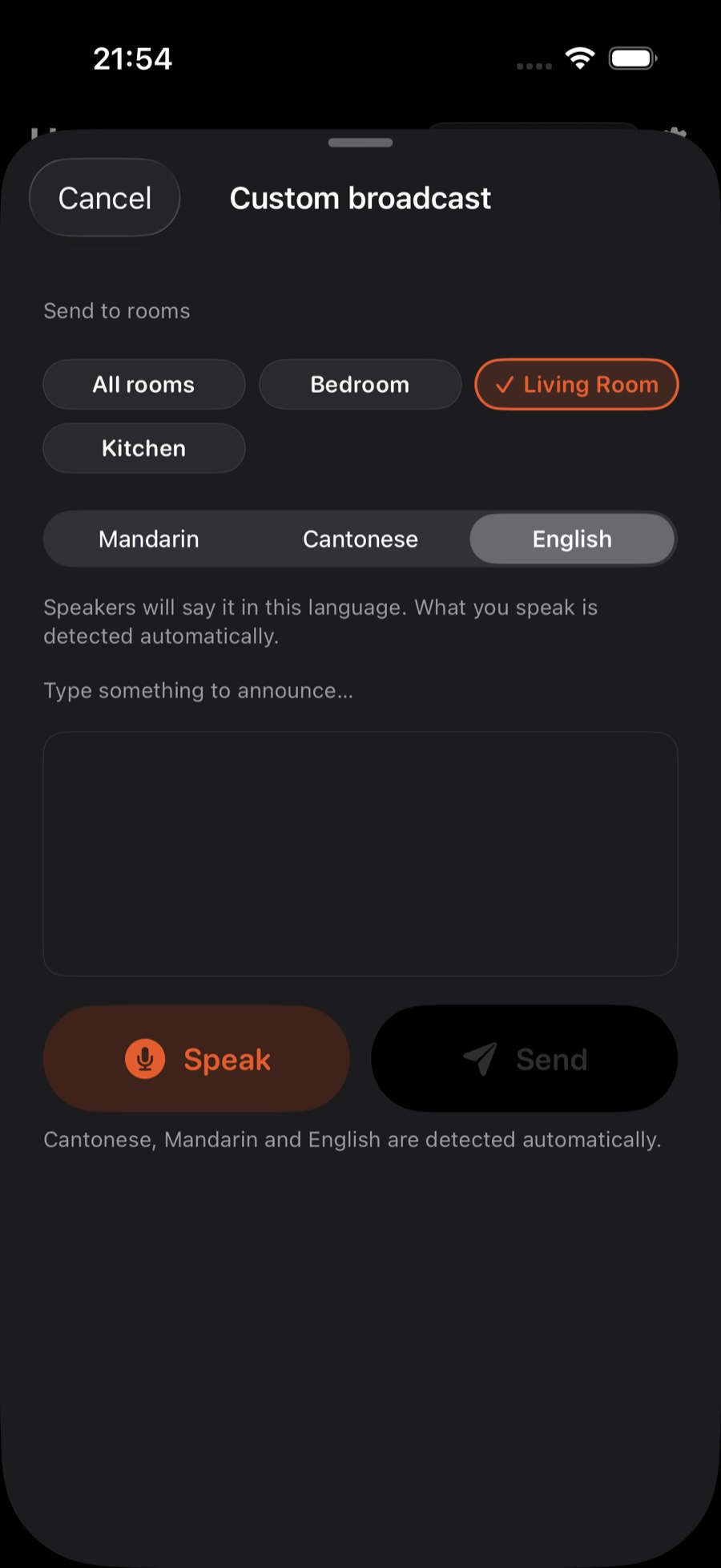
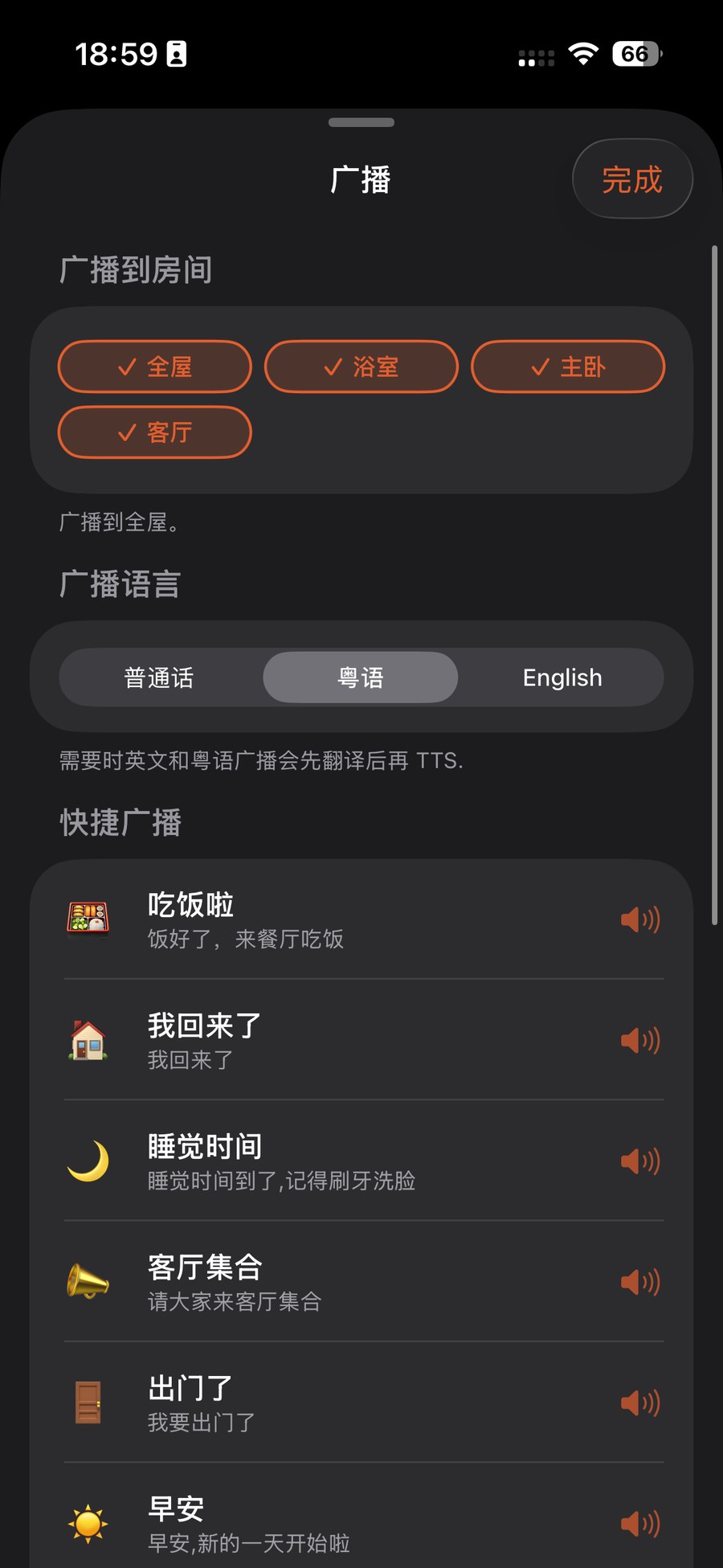
打开 ZoneFoundry,点首页「快捷执行」里的「广播」格。没登录 Sonos 时,打开的是简单广播页,只要手机和音箱在同一个 Wi-Fi 就行;登录 Sonos 账户后,首页「广播」格直接打开「自定义广播」(选房间、选语言、打字或说话);在助手页点「广播」,可以先用「快捷广播」预设,也能从那里进「自定义广播…」。打開 ZoneFoundry,點首頁「快捷執行」裡的「廣播」格。未登入 Sonos 時,打開的是簡單廣播頁,只要手機與音箱在同一個 Wi-Fi 即可;登入 Sonos 帳戶後,首頁「廣播」格直接打開「自訂廣播」(選房間、選語言、打字或說話);在助手頁點「廣播」,可以先用「快速廣播」預設,也能從那裡進入「自訂廣播…」。Open ZoneFoundry and tap the Broadcast tile under Quick Execution on Home. If you're not signed in to Sonos, this opens the simple broadcast screen — your phone and speakers just need to be on the same Wi-Fi. Once signed in to your Sonos account, the Home tile opens Custom broadcast directly (pick rooms and language, then type or speak); tap Broadcast on the Assistant tab instead to use the Quick broadcast presets first, with "Custom broadcast…" also available there.
选房间,再打一句或说一句话選房間,再打一句或說一句話Pick rooms, then type or say a line
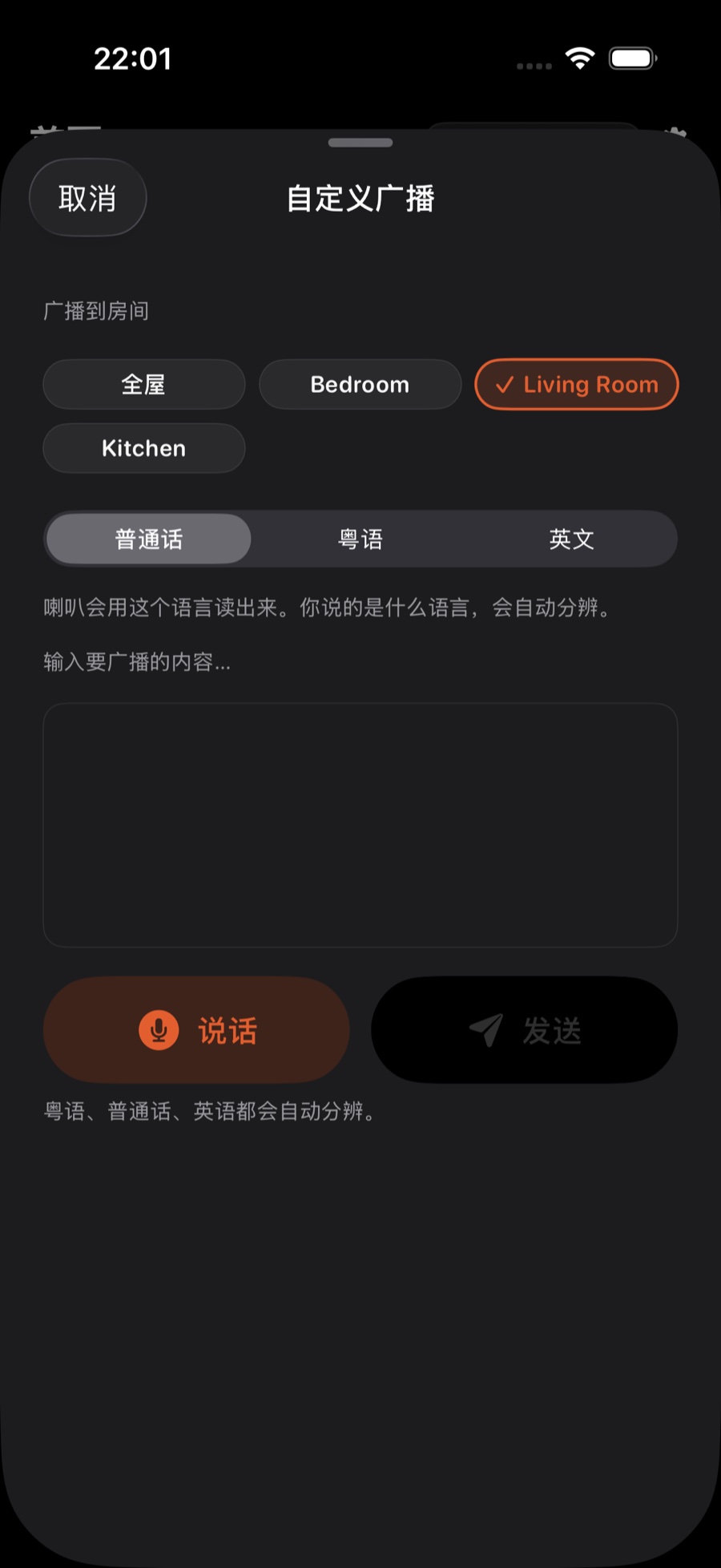
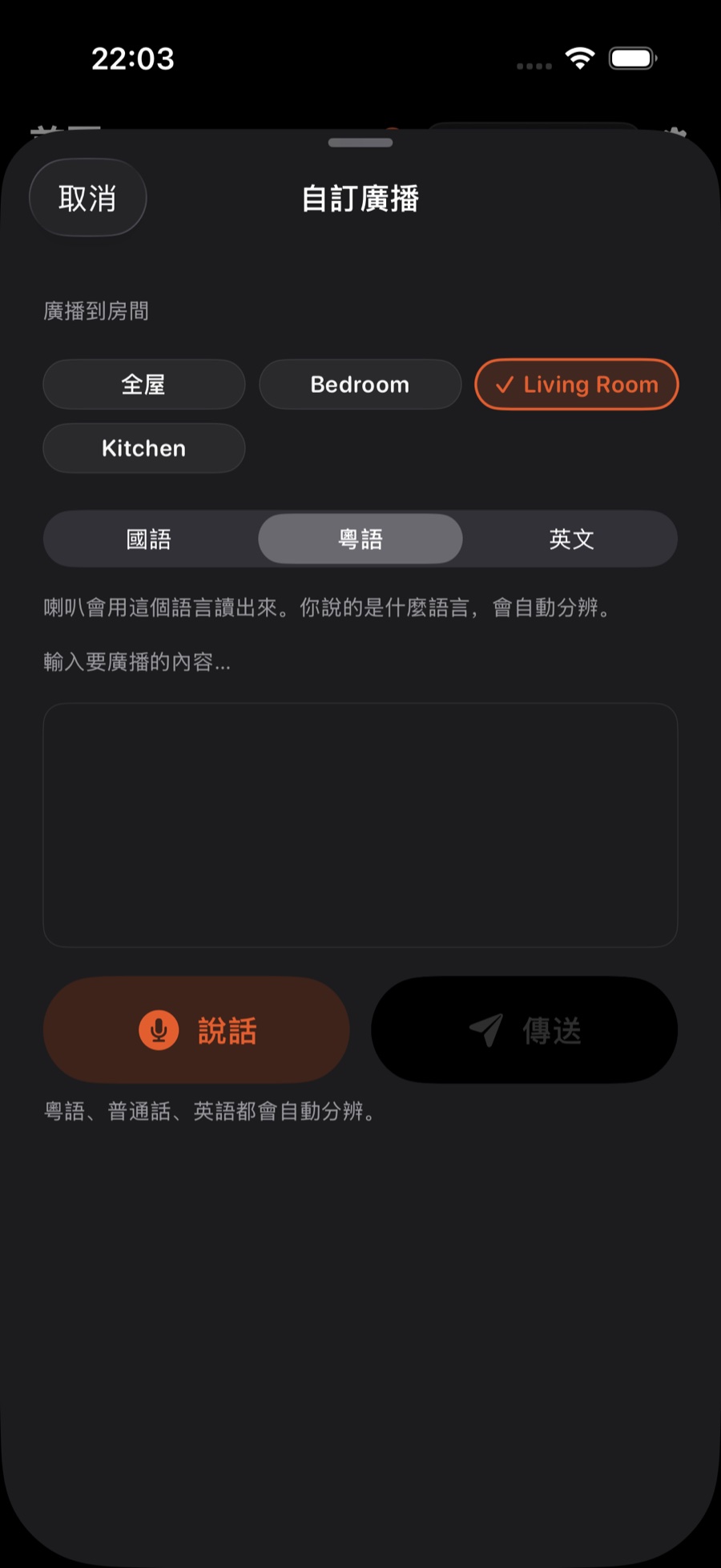
登录 Sonos 账户后:勾选你想广播到的房间——可以只选一间,也可以全屋一起;然后直接打字,或点「说话」按钮说出来(粤语、普通话、英语会自动分辨),例如「吃饭了」或「快递到门口了」。没登录时:页面只有文字框,打字即可,会播到当前房间;广播语言跟随 设置 → 新闻与广播(1.0.10 及更早在「声音与语音」里)→「新闻与广播语言」。登入 Sonos 帳戶後:勾選你想廣播到的房間——可以只選一間,也可以全屋一起;然後直接打字,或點「說話」按鈕說出來(粵語、普通話、英語會自動分辨),例如「吃飯了」或「速遞到門口了」。未登入時:頁面只有文字欄,打字即可,會播到目前的房間;廣播語言跟隨 設定 → 新聞與廣播(1.0.10 及更早版本在「聲音與語音」裡)→「新聞與廣播語言」。Signed in to your Sonos account: tick the rooms you want — just one, or the whole house together — then type your line, or tap Speak and say it (Cantonese, Mandarin and English are detected automatically), e.g. "Dinner's ready" or "Parcel's at the door". Not signed in: the screen has a text box only; type your line and it plays in the current room, in the language set under Settings → News & Broadcasts (Audio & Voice in 1.0.10 and earlier) → News & broadcast language.
发送,让它播报發送,等它播報Send it and let it speak
点发送。没登录 Sonos 时,ZoneFoundry 会直接在你手机上把这句话合成成语音、由手机当作临时来源播给音箱,不经云端语音服务。登录后,这句话由云端合成,再通过 Sonos 播到你选的房间。如果当时音箱正在放音乐,它会先轻轻让位给广播。點發送。未登入 Sonos 時,ZoneFoundry 會直接在你手機上把這句話合成語音、由手機當作臨時來源播給音箱,不經雲端語音服務。登入後,這句話由雲端合成,再經 Sonos 播到你選的房間。如果當時音箱正在播音樂,它會先輕輕讓位給廣播。Tap send. If you're not signed in to Sonos, ZoneFoundry synthesises the line into speech right on your phone and hosts it from there for the speaker — no cloud voice service involved. Once signed in, the line is synthesised in the cloud and played through Sonos to the rooms you picked. If music is playing, it gently steps aside for the announcement first.
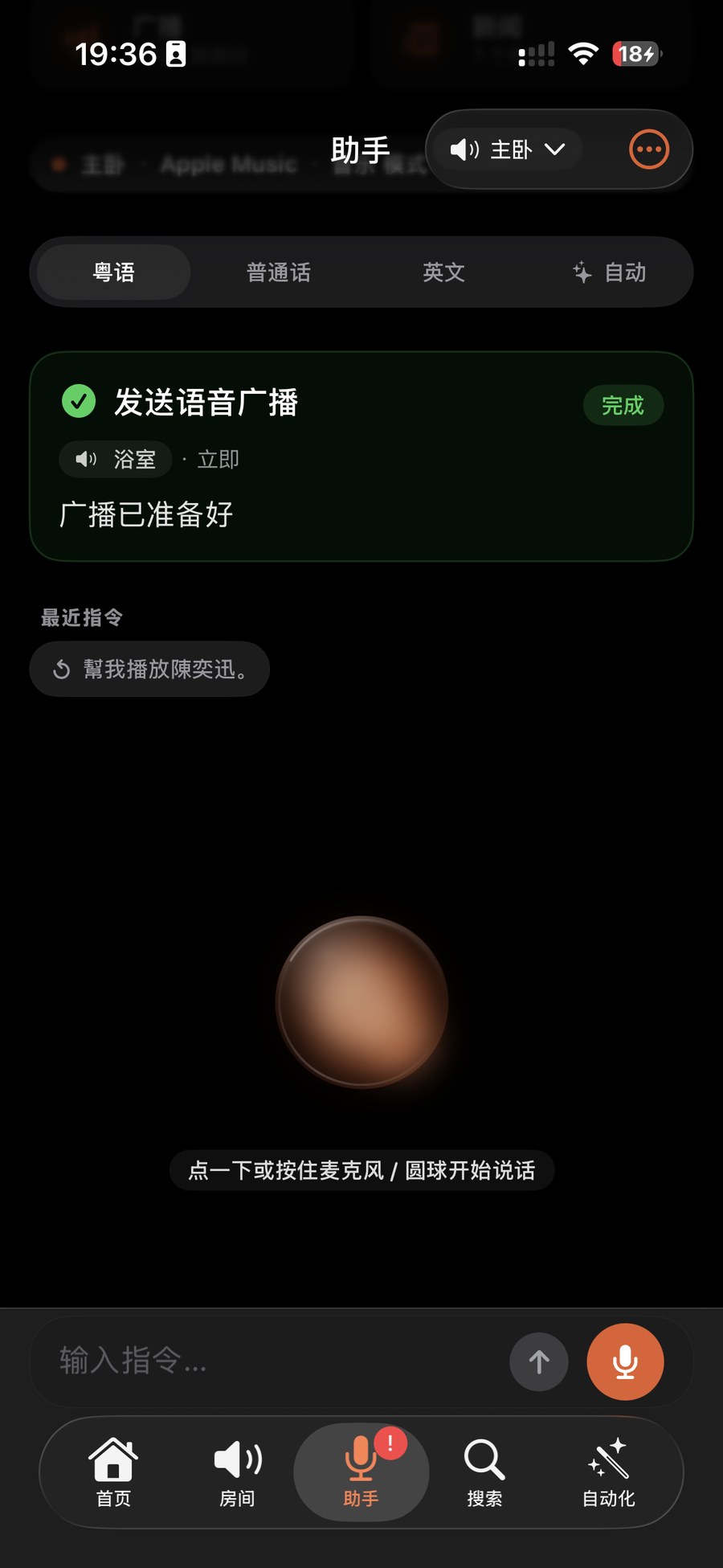
提示:没登录 Sonos 时,合成与托管都在你手机本地完成,所以即使家里断了外网,只要家里的 Wi-Fi 还通,广播照样能用。登录后要联网,但人不在家也能广播。提示:未登入 Sonos 時,合成與託管都在你手機本機完成,所以即使家中斷了外網,只要家中的 Wi-Fi 仍然暢通,廣播照樣能用。登入後需要連線,但人不在家也能廣播。Tip: when you're not signed in to Sonos, synthesis and hosting happen on your phone, so broadcast still works if your home loses internet, as long as the home Wi-Fi is up. Once signed in, it needs internet, but you can broadcast when you're away.
播完,音乐自动接回来播完,音樂自動接回來It finishes, the music comes back
这句话播完后,你什么都不用做。ZoneFoundry 会自动把刚才被打断的内容、音量和进度尽量恢复,让音箱回到广播前的样子。本来没在放音乐的房间,则会安静地回到原状。這句話播完之後,你甚麼都不用做。ZoneFoundry 會自動把剛才被打斷的內容、音量與進度盡量還原,讓音箱回到廣播之前的狀態。本來沒有播音樂的房間,就會安靜地回復原狀。Once the line finishes, you don't have to do anything. ZoneFoundry automatically restores the interrupted content, volume and position as best it can, putting the speakers back to how they were before. Rooms that weren't playing simply go quiet again.
没声音或没恢复?没登录 Sonos 时,先确认手机和音箱在同一个 Wi-Fi、且这台音箱在 ZoneFoundry 里已被识别;登录后,确认手机能上网。音量太小,可以在 设置 → 新闻与广播(1.0.10 及更早在「设备」里)→「广播与新闻音量」调。若刚才在放的是某些第三方串流,恢复可能从头开始而非接着进度——这通常是来源本身不支持续播所致,并非广播出错。沒有聲音或沒有還原?未登入 Sonos 時,先確認手機與音箱在同一個 Wi-Fi、而且這部音箱在 ZoneFoundry 裡已被識別;登入後,確認手機可以上網。音量太小,可以在 設定 → 新聞與廣播(1.0.10 及更早版本在「裝置」裡)→「廣播與新聞音量」調整。若剛才播的是某些第三方串流,還原可能由頭開始而不是接住進度——這通常是來源本身不支援續播所致,並非廣播出錯。No sound, or no restore? If you're not signed in to Sonos, first check that your phone and the speaker are on the same Wi-Fi and that the speaker is detected in ZoneFoundry; if you're signed in, check your phone is online. Too quiet? Adjust Settings → News & Broadcasts (Devices in 1.0.10 and earlier) → Broadcast & News Volume. If you were playing certain third-party streams, restore may start from the top rather than the exact position — that's usually because the source itself doesn't support resuming, not a broadcast fault.
播不出来?播不出來?Not playing?
登录 Sonos 后,广播经 Sonos 云端发出,但不是每台音箱都支持云端播报:运行 S2 软件的都支持,只能用 S1 的早期旧款可能不支持。没有桥接时,ZoneFoundry 会告诉你是哪个房间播不了;连着桥接时,改由桥接经局域网播。怎么认出这台音箱、怎么解决,见 Sonos 播报没声音、播不出来?登入 Sonos 後,廣播經 Sonos 雲端發出,但並非每部揚聲器都支援雲端播報:運行 S2 軟件的都支援,只能使用 S1 的早期舊款則可能不支援。沒有橋接時,ZoneFoundry 會告訴你是哪個房間無法播放;已連接橋接時,則改由橋接經區域網絡播放。如何認出這部揚聲器、如何解決,請看 Sonos 播報沒有聲音、播不出來?Once you're signed in to Sonos, broadcasts go through the Sonos cloud, and not every speaker supports cloud announcements: every player running S2 software does, while early models that only work with S1 may not. Without a bridge, ZoneFoundry tells you which room can't play it; with the bridge connected, the bridge plays it over your home network instead. To spot the speaker and fix it, see Sonos announcement not playing?
这一串动作,可以合成一个场景這一串動作,可以合成一個場景A whole routine can collapse into one scene
起床、回家、睡前——ZoneFoundry 可以把房间、音量、音乐、播报打包成一个场景,一句话或一个按钮触发,不用每次重排一遍。起床、回家、睡前——ZoneFoundry 可以把房間、音量、音樂、廣播打包成一個場景,一句話或一個按鈕觸發,不用每次重新排一遍。Waking up, coming home, winding down — ZoneFoundry can bundle rooms, volume, music and announcements into one scene, triggered by a sentence or a button instead of rebuilt each time.