
一分钟看懂一分鐘看懂The one-minute version
在微信里给 ZoneFoundry 发一句话,家里的 Sonos 就照做。在微信裡給 ZoneFoundry 發一句話,家中的 Sonos 就會照做。Send ZoneFoundry one line in WeChat, and your Sonos at home does it.
① 不用桥接器:指令经 Sonos 官方云端执行,只要在 App 里连接了 Sonos 账号。① 不用橋接器:指令經 Sonos 官方雲端執行,只需在 App 內連接 Sonos 帳戶。1. No bridge: commands run through Sonos's official cloud. You only need your Sonos account connected in the app.
② 出门也能用:不在家也能控制,比如下班路上先把客厅的音乐放起来。② 外出也能用:不在家也可以控制,例如下班途中先讓客廳播起音樂。2. Works when you're out: control it from anywhere, for example start the living-room music on your way home.
③ 支持国内音乐服务:QQ 音乐、网易云音乐,以及 Apple Music、Spotify。③ 支援內地音樂服務:QQ 音樂、網易雲音樂,以及 Apple Music、Spotify。3. Chinese music services: QQ Music and NetEase Cloud Music, plus Apple Music and Spotify.
④ 说法随意:打字、错别字(「播方周杰伦」)、繁体、粤语(「大聲啲」)、英文都能懂。④ 說法隨意:打字有錯別字(「播方周杰倫」)、繁體、粵語口語(「大聲啲」)、英文都能理解。4. Say it your way: typos, Traditional Chinese, colloquial Cantonese (「大聲啲」, "louder") and English all work.
为什么用微信控制 Sonos為甚麼用微信控制 SonosWhy control Sonos from WeChat
- 微信本来就每天开着。不用切到 ZoneFoundry,也不用记语音唤醒词,顺手发一句就行。微信本來就每天開著。不用切換到 ZoneFoundry,也不用記住語音喚醒詞,順手發一句就可以。WeChat is already open all day. No switching to ZoneFoundry and no wake word to remember. Just send a line.
- 不需要桥接器。指令经 Sonos 官方云端执行,所以不在家也能控制。不需要橋接器。指令經 Sonos 官方雲端執行,所以不在家也可以控制。No bridge needed. Commands go through Sonos's official cloud, so you can control your speakers when you're not home.
- 支持 QQ 音乐和网易云音乐。在 App「设置 → 音乐」里连接后就能点,Apple Music 和 Spotify 也可以。支援 QQ 音樂和網易雲音樂。在 App「設定 → 音樂」連接後即可點歌,Apple Music 和 Spotify 同樣可以。QQ Music and NetEase Cloud Music work. Connect them in the app under Settings → Music. Apple Music and Spotify work too.
- 不用背命令。打错字、用繁体、说粤语、写英文,都能听懂。不用背指令。打錯字、用繁體、寫粵語口語或英文,都能理解。No commands to memorise. Typos, Traditional Chinese, Cantonese and English are all understood.
开始前你需要開始前你需要Before you start
- ZoneFoundry iOS App,并已在 App 里连接 Sonos 账号。ZoneFoundry iOS App,並已在 App 內連接 Sonos 帳戶。The ZoneFoundry iOS app, with your Sonos account connected.
- 想点 QQ 音乐、网易云音乐:先在 App「设置 → 音乐」里连接对应服务。想點 QQ 音樂、網易雲音樂:先在 App「設定 → 音樂」連接相應服務。For QQ Music or NetEase Cloud Music: connect the service first in the app under Settings → Music.
- 微信(也可以用 Telegram 或 QQ,见下文)。微信(也可以用 Telegram 或 QQ,見下文)。WeChat (or Telegram or QQ; see below).
怎么开通(三步)如何開通(三步)How to set it up (three steps)
在 App 里打开「消息接入」在 App 內開啟「訊息接入」Open Messaging entrances in the app
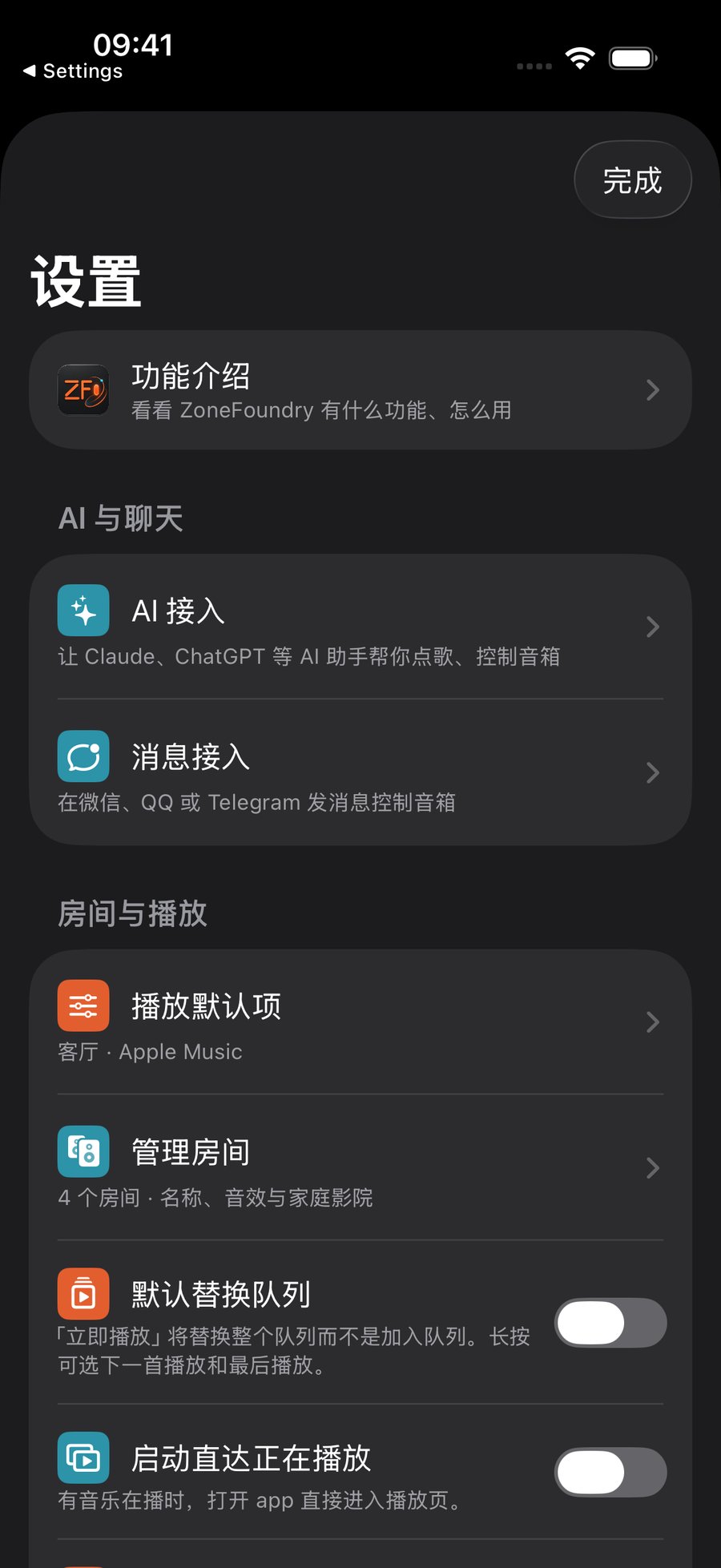
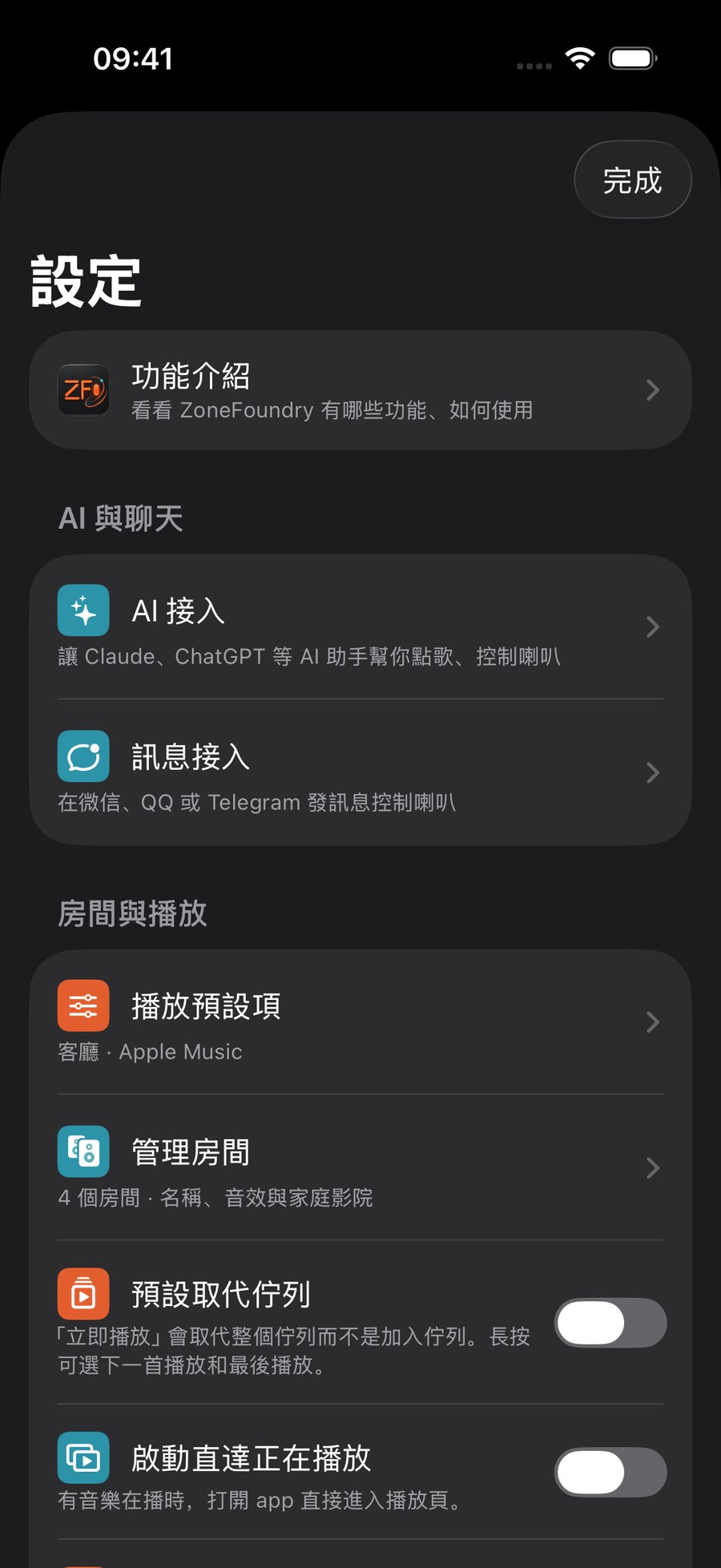
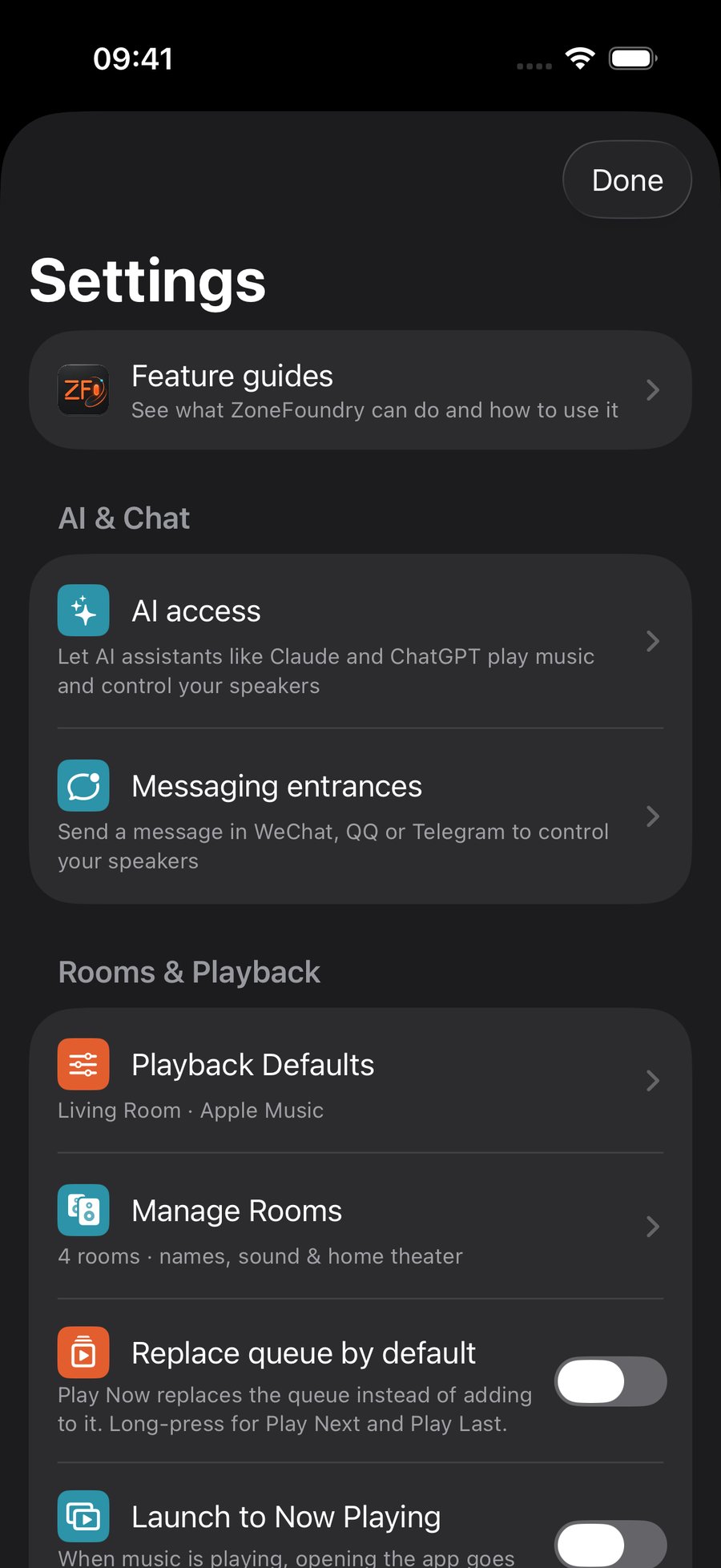
打开 ZoneFoundry App,点右上角 ⚙️ 进入「设置」,在「AI 与聊天」下面点「消息接入」。「自动化」页里也有同一个入口。開啟 ZoneFoundry App,點右上角 ⚙️ 進入「設定」,在「AI 與聊天」下方點「訊息接入」。「自動化」頁內也有相同的入口。Open the ZoneFoundry app, tap ⚙️ at the top right to open Settings, then under AI & Chat tap Messaging entrances. The Automations tab has the same entry.
在「微信」卡片上绑定在「微信」卡片上綁定Bind on the WeChat card
在「消息接入」页找到「微信」卡片,两种方式任选一种:点「开始二维码登录」,用微信扫码;或者点「生成绑定码」,在微信里把绑定码发给 ZoneFoundry。在「訊息接入」頁找到「微信」卡片,兩種方式任選其一:點「開始二維碼登入」,用微信掃碼;或者點「產生綁定碼」,在微信裡把綁定碼傳給 ZoneFoundry。On the Messaging entrances page, find the WeChat card and use either method: tap Start QR and scan with WeChat, or tap Generate code and send the code to ZoneFoundry in WeChat.
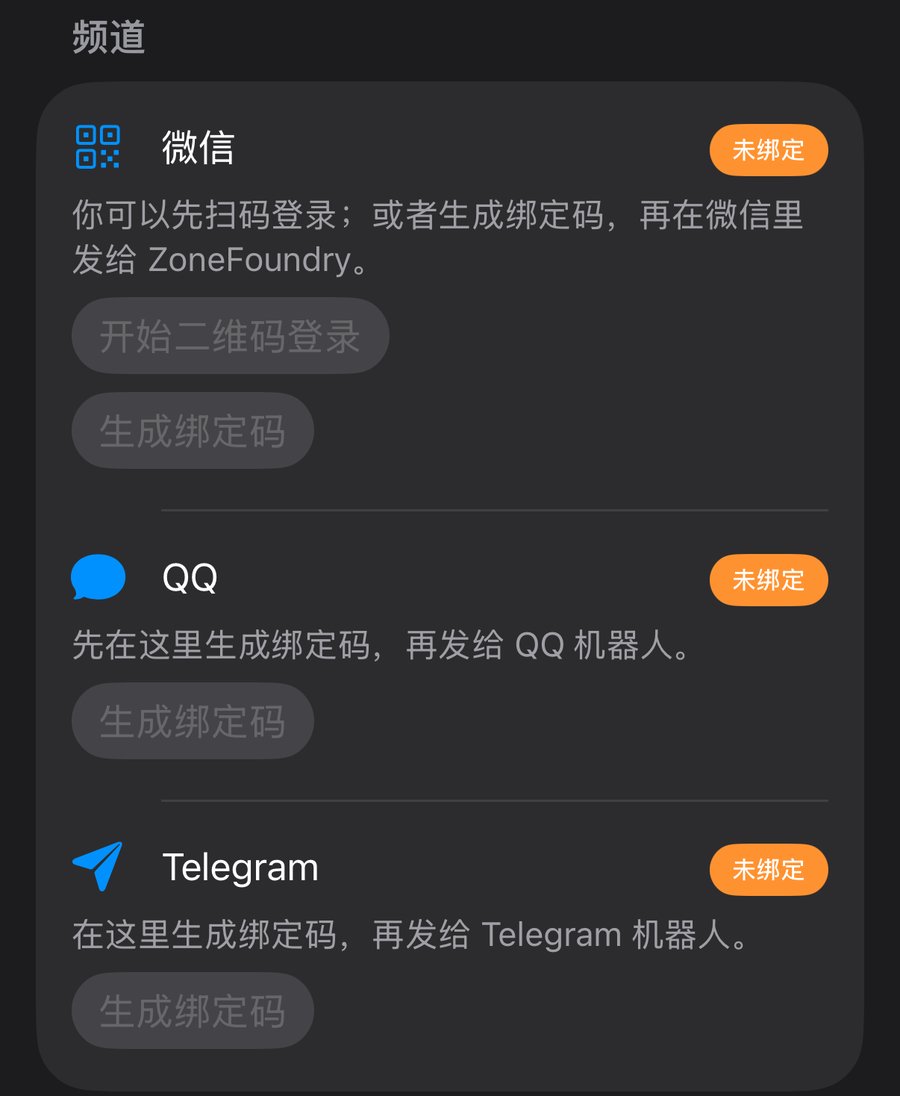
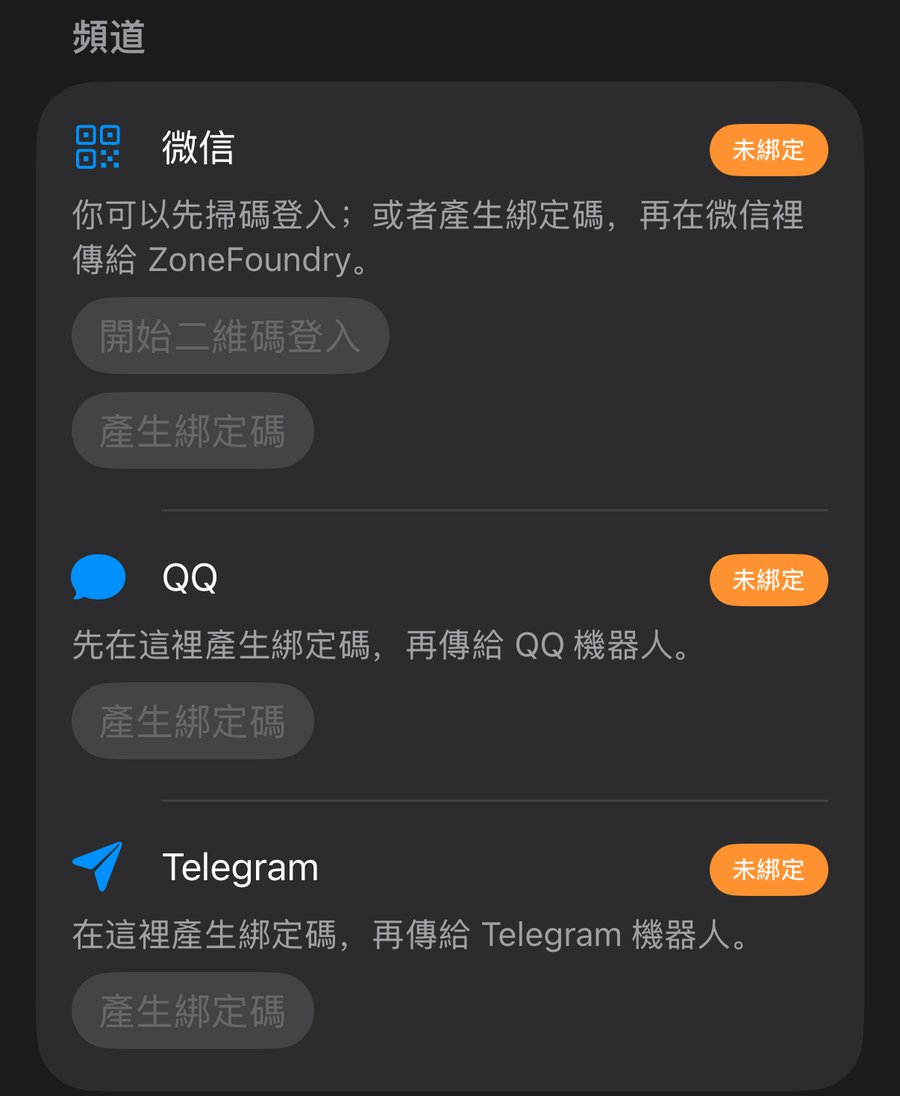
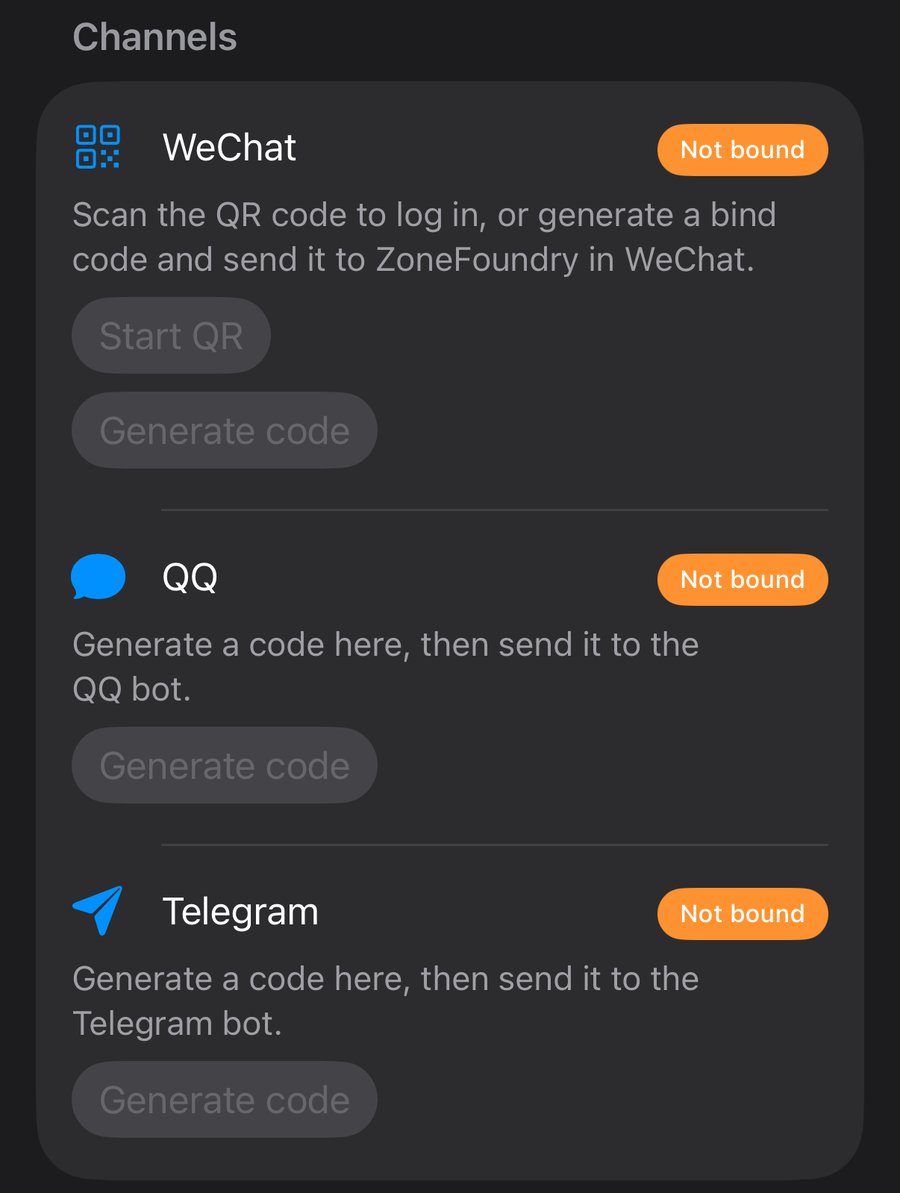
截图来自演示模式,所以按钮是灰色的,演示模式下无法绑定。正常登录后即可绑定。截圖取自示範模式,所以按鈕呈灰色,示範模式下無法綁定。正常登入後即可綁定。These screenshots were taken in demo mode, which is why the buttons are grey: binding isn't available in demo mode. Once you're signed in normally, you can bind.
收到欢迎消息后,发「帮助」收到歡迎訊息後,發送「帮助」After the welcome message, send 「帮助」 (help)
绑定成功后,微信里会收到一条欢迎消息,告诉你默认控制哪个房间。发「帮助」就能看到可以怎么说:綁定成功後,微信會收到一則歡迎訊息,告訴你預設控制哪個房間。發送「帮助」即可看到可以怎樣說:Once bound, you get a welcome message in WeChat telling you which room it controls by default. Send 「帮助」 ("help") to see what you can say:
能做什么可以做甚麼What you can do
下面按类别列出,每类都附一段实测对话。对话来自测试环境里的示例家庭(主卧为默认房间,另有客厅、厨房),机器人的回复一字未改。没说房间时,默认控制你设的默认房间。以下按類別列出,每類都附上一段實測對話。對話來自測試環境中的示例家庭(房間名為「主卧」(預設)、「客厅」、「厨房」,與對話一致),機器人的回覆一字未改。沒有指明房間時,會控制你設定的預設房間。Below, by category, each with a real test conversation. The conversations come from a sample home in our test setup (主卧, the master bedroom, is the default room; there are also 客厅, the living room, and 厨房, the kitchen), and the bot's replies are unedited. If you don't name a room, your default room is used. Example phrases in the tables are translated; the tested phrases were in Chinese.
点歌、指定房间點歌、指定房間Play music, in any room
| 类别類別Category | 可以这样说可以這樣說Try saying | 效果效果What happens |
|---|---|---|
| 点歌點歌Play music | 播放周杰伦 / 播放晴天 / 放一首陈奕迅的十年 / 播放10首周杰伦播放周杰倫 / 播放晴天 / 放一首陳奕迅的十年 / 播放10首周杰倫play Jay Chou / play Sunny Day / play Eason Chan's Ten Years / play 10 Jay Chou songs | 在默认房间播放,回复会列出前几首歌名。「放一首陈奕迅的十年」会先播《十年》,再接着播他的其他歌。在預設房間播放,回覆會列出頭幾首歌名。「放一首陳奕迅的十年」會先播《十年》,再接著播他的其他歌曲。Plays in your default room and lists the first few tracks. Asking for Ten Years plays that song first, then more of his songs. |
| 指定房间指定房間A specific room | 在客厅播放周杰伦 / 客厅暂停在客廳播放周杰倫 / 客廳暫停play Jay Chou in the living room / pause the living room | 直接在那个房间执行,不用先切换。直接在該房間執行,不用先切換。Acts in that room directly, no switching first. |
| 情景 / 风格情境 / 風格Mood / style | 来点轻音乐 / 放点适合睡觉的音乐 / 我想听粤语歌 / 播放抖音热歌來點輕音樂 / 放點適合睡覺的音樂 / 我想聽粵語歌 / 播放抖音熱歌some light music / music for sleeping / I want Cantonese songs / play Douyin hits | 按场合选歌。按場合選歌。Picks music to suit the request. |
| 收藏 / 歌单收藏 / 歌單Favorites / playlists | 播放我的收藏 / 播放晨间爵士(Sonos 收藏名)/ 播放跑步歌单播放我的收藏 / 播放晨間爵士(Sonos 收藏名稱)/ 播放跑步歌單play my favorites / play Morning Jazz (a Sonos favorite) / play my running playlist | 按名字播 Sonos 里的收藏和歌单。按名稱播放 Sonos 內的收藏和歌單。Plays your Sonos favorites and playlists by name. |
| 默认音乐服务預設音樂服務Default music service | 默认用网易云 / 用QQ音乐播放晴天預設用網易雲 / 用QQ音樂播放晴天use NetEase by default / play Sunny Day on QQ Music | 记住你的偏好,或者只这一次指定服务。記住你的偏好,或只在這一次指定服務。Remembers your preference, or uses that service just this once. |
播放控制、音量、全屋、多房间播放控制、音量、全屋、多房間Playback, volume, whole home and grouping
| 类别類別Category | 可以这样说可以這樣說Try saying | 效果效果What happens |
|---|---|---|
| 播放控制播放控制Playback | 暂停 / 继续 / 下一首 / 上一首 / 换一首暫停 / 繼續 / 下一首 / 上一首 / 換一首pause / resume / next / previous / play something else | 即时执行,回复会讲明是哪个房间。即時執行,回覆會說明是哪個房間。Done right away; the reply says which room. |
| 音量音量Volume | 音量调到40 / 声音大一点 / 音量加20 / 静音 / 现在音量多少 / 现在多大声音量調到40 / 聲音大一點 / 音量加20 / 靜音 / 現在音量多少 / 現在多大聲set volume to 40 / a bit louder / volume up 20 / mute / what's the volume | 相对调节会告诉你调前调后:「声音大一点」一般一次调 5(和 Sonos 官方 App 按一下一样),「音量加20」就加 20。相對調校會告訴你調前調後:「聲音大一點」一般每次調 5(與 Sonos 官方 App 按一下相同),「音量加20」就加 20。Relative changes tell you the before and after: "a bit louder" usually moves the volume by 5 (the same as one tap in the official Sonos app), and "volume up 20" adds 20. |
| 全屋全屋Whole home | 全屋暂停 / 所有房间都暂停全屋暫停 / 所有房間都暫停pause everywhere / pause all rooms | 每个房间都停。每個房間都會停止。Every room stops. |
| 多房间同步多房間同步Group rooms | 把客厅和主卧一起播 / 全屋一起播放 / 厨房单独播放 / 取消分组把客廳和主臥一起播 / 全屋一起播放 / 廚房單獨播放 / 取消分組play the living room and bedroom together / play everywhere together / kitchen on its own / ungroup | 不需要桥接器,经 Sonos 云端完成。不需要橋接器,經 Sonos 雲端完成。Done through the Sonos cloud, no bridge. |
| 播放模式播放模式Play mode | 随机播放 / 单曲循环 / 关闭随机隨機播放 / 單曲循環 / 關閉隨機shuffle / repeat one / shuffle off | 即时执行。即時執行。Done right away. |
| 一句多件事一句多件事Several things at once | 暂停客厅然后在主卧播放周杰伦 / 播放周杰伦 音量调到30暫停客廳然後在主臥播放周杰倫 / 播放周杰倫 音量調到30pause the living room, then play Jay Chou in the bedroom / play Jay Chou, volume 30 | 按顺序完成,逐项回报。按次序完成,逐項回報。Done in order, with a report for each step. |
| 房间房間Rooms | 有哪些房间 / 切到客厅有哪些房間 / 切到客廳which rooms are there / switch to the living room | 列出房间;切换之后的指令默认控制那个房间。列出房間;切換後的指令會預設控制該房間。Lists your rooms; after switching, later commands go to that room by default. |
| 输入源(有回音壁时)輸入源(有條形音箱時)Input (with a soundbar) | 切到电视模式 / 切到线路输入 / 切回音乐切到電視模式 / 切到線路輸入 / 切回音樂switch to TV / switch to line-in / back to music | Arc / Beam / Ray 等可以切电视,限制见常见问题。Arc / Beam / Ray 等可切換至電視,限制見常見問題。Arc, Beam, Ray and similar can switch to TV; see the FAQ for limits. |
新闻和天气新聞和天氣News and weather
说「播三条新闻」「播放新闻」,或者「帮我用粤语播三条新闻」。新闻需要现场整理:机器人先回一句「大约 20 秒后开始播报」,AI 把新闻整理成播报稿再在音箱上播。开了位置权限的话,会先播一句本地天气。问「今天天气怎么样」「上海天气」则用文字回复,开了位置就是本地天气。說「播三條新聞」「播放新聞」,或者「幫我用粵語播三條新聞」。新聞需要即時整理:機器人會先回覆「大約 20 秒後開始播報」,由 AI 把新聞整理成播報稿,再在喇叭上播出。如已開啟位置權限,會先播一句本地天氣。問「今天天氣怎麼樣」「上海天氣」則以文字回覆,開啟位置後就是本地天氣。Say "play three news stories", "play the news", or ask for them in Cantonese. The news is prepared on the spot: the bot first says it will start in about 20 seconds, AI turns the news into a spoken briefing, and it plays on your speaker. With location access on, it starts with a line of local weather. Ask "what's the weather today" or "weather in Shanghai" for a text reply (local weather if location is on).
广播、提醒、正在播什么廣播、提醒、正在播甚麼Announcements, reminders and what's playing
- 广播:「广播 吃饭了」「告诉客厅的人吃饭了」。在音箱上用语音播出来,播完恢复原来的音乐。廣播:「廣播 吃飯了」「告訴客廳的人吃飯了」。在喇叭上以語音播出,播完後恢復原來的音樂。Announcements: "announce: dinner's ready" or "tell the living room dinner's ready". It's spoken on the speaker, then your music comes back.
- 提醒:「10分钟后提醒我关火」「明天早上7点叫我起床」。到点在音箱上语音提醒;发「取消提醒」可以取消。提醒:「10分鐘後提醒我關火」「明天早上7點叫我起床」。時間到了會在喇叭上以語音提醒;發送「取消提醒」即可取消。Reminders: "remind me to turn off the stove in 10 minutes" or "wake me at 7 tomorrow". The speaker reminds you out loud at that time; send "cancel reminder" to cancel.
- 闹钟:「每天早上7点叫我起床」「工作日早上7点半的闹钟」。直接设成 Sonos 自带闹钟(Sonos 提示音,响 10 分钟),不需要桥接器。鬧鐘:「每天早上7點叫我起床」「工作日早上7點半的鬧鐘」。直接設定為 Sonos 內置鬧鐘(Sonos 提示音,響 10 分鐘),不需要橋接器。Alarms: "wake me at 7 every day" or "weekday alarm at 7:30". Sets a built-in Sonos alarm (Sonos chime, rings for 10 minutes), no bridge needed.
- 定时停止:「30分钟后停止播放」,睡前用。定時停止:「30分鐘後停止播放」,適合睡前使用。Sleep timer: "stop playing in 30 minutes", handy at bedtime.
- 定时场景:「后天晚上11点在主卧放白噪音」「每晚11点在主卧放白噪音」。建好场景并开好定时,回复写明时间和日子;10 分钟内在同一个对话发「取消」可以撤回。详见 一句话让 Sonos 定时播放。定時場景:「後天晚上11點在主臥放白噪音」「每晚11點在主臥放白噪音」。建立場景並開啟定時,回覆寫明時間和日子;10 分鐘內在同一個對話發送「取消」可以撤回。詳見 一句話讓 Sonos 定時播放。Scheduled scenes: "every night at 11 pm play white noise in the bedroom". The scene and its schedule are created and the reply gives the time and day; send "cancel" in the same chat within 10 minutes to undo. See Schedule Sonos with one sentence.
- 正在播什么:「现在放的是什么」「这首歌叫什么」「谁唱的」,回复歌名、歌手和音量。正在播甚麼:「現在放的是甚麼」「這首歌叫甚麼」「誰唱的」,回覆歌名、歌手和音量。What's playing: "what's this song", "who sings this". The reply gives the title, artist and volume.
贴心的地方貼心的地方Small things that help
播不出来会说真话。比如 Sonos 里没登录 Apple Music、登录过期、网络断了,机器人会补发一句原因和建议(例如「可以发『用网易云音乐播放X』」),不会只说「正在播放」然后没声音。播不出來會如實告知。例如 Sonos 內未登入 Apple Music、登入已過期或網絡中斷,機器人會補發一句原因和建議,不會只說「正在播放」然後沒有聲音。It tells you when playback fails. If Apple Music isn't signed in on Sonos, the sign-in has expired or the network is down, the bot follows up with the reason and a suggestion (such as trying NetEase Cloud Music instead) rather than saying "playing" to silence.
等待有提示。新闻需要现场整理,会先说「大约 20 秒后开始播报」。需要等候時會先提示。新聞需要即時整理,會先告訴你大約 20 秒後開始播報。It tells you when to wait. The news is prepared on the spot, so it first says the briefing starts in about 20 seconds.
音箱掉线会讲清楚。如果某个音箱最近反复和 Sonos 云断开,会直接告诉你是它的网络问题,以及怎么处理(重启路由器 / 让音箱靠近路由器)。喇叭斷線會說清楚。如果某個喇叭最近反覆與 Sonos 雲端斷開,會直接告訴你是它的網絡問題,以及如何處理(重新啟動路由器,或把喇叭移近路由器)。It explains dropouts. If a speaker keeps disconnecting from the Sonos cloud, the bot tells you it's that speaker's network and what to do (restart the router, or move the speaker closer to it).
不会误删正在放的歌。音乐正在播放时说「加一首到队列」,不会把正在放的歌替换掉,而是说明原因和做法。不會誤刪正在播放的歌曲。音樂播放期間要求「加一首到佇列」,不會把正在播放的歌曲替換掉,而是說明原因和做法。It won't wipe what's playing. Ask to add a song to the queue while music is playing and it won't replace the current song; it explains why and what to do instead.
支持的语言支援的語言Languages
简体中文、繁体中文、粤语口语、英文都能听懂。大多数回复会跟随你说话的语言:实测「大聲啲」回的是繁体,「turn it up」回的是英文。新闻播报的语言跟随 App 里的「新闻与广播语言」设置(可以选粤语),也可以一句话指定,比如「帮我用粤语播三条新闻」。簡體中文、繁體中文、粵語口語、英文都能理解。大多數回覆會跟隨你所用的語言:實測「大聲啲」回覆的是繁體,「turn it up」回覆的是英文。新聞播報的語言跟隨 App 內的「新聞與廣播語言」設定(可選粵語),也可以在一句話中指定,例如「幫我用粵語播三條新聞」。It understands Simplified Chinese, Traditional Chinese, colloquial Cantonese and English. Most replies follow the language you write in: in testing, 「大聲啲」 got a Traditional Chinese reply and "turn it up" got an English one. The news briefing language follows the app's News & broadcast language setting (Cantonese is an option), or you can name it in the request, such as asking for three news stories in Cantonese.
Telegram 和 QQTelegram 和 QQTelegram and QQ
- 功能和微信相同:用的是同一套理解和执行,本页的说法在 Telegram、QQ 里一样能用。功能與微信相同:使用同一套理解和執行方式,本頁的說法在 Telegram、QQ 同樣適用。Same features as WeChat: the same understanding and execution, so everything on this page works in Telegram and QQ too.
- Telegram 还支持语音消息:直接发一条语音也可以。Telegram 亦支援語音訊息:直接傳送語音訊息也可以。Telegram also takes voice messages: you can just send a voice note.
- 怎么开通:在同一个「消息接入」页的 Telegram 卡片上点「生成绑定码」,把码发给 ZoneFoundry 的 Telegram 机器人。QQ 同理,在 QQ 卡片上生成绑定码,发给 QQ 机器人。如何開通:在同一個「訊息接入」頁的 Telegram 卡片上點「產生綁定碼」,把碼傳給 ZoneFoundry 的 Telegram 機器人。QQ 做法相同,在 QQ 卡片上產生綁定碼,再傳給 QQ 機器人。Setup: on the same Messaging entrances page, tap Generate code on the Telegram card and send the code to ZoneFoundry's Telegram bot. QQ works the same way: generate a code on the QQ card and send it to the QQ bot.
常见问题常見問題FAQ
需要桥接器吗?需要橋接器嗎?Do I need a bridge?
不需要。指令经 Sonos 官方云端执行,只要先在 App 里连接 Sonos 账号。少数操作(见下面几条)需要手机和音箱在同一个 Wi-Fi 并打开 App。不需要。指令經 Sonos 官方雲端執行,只需先在 App 內連接 Sonos 帳戶。少數操作(見以下幾條)需要手機和喇叭連接同一個 Wi-Fi 並開啟 App。No. Commands run through Sonos's official cloud; you just need your Sonos account connected in the app first. A few actions (below) need your phone on the same Wi-Fi as your speakers with the app open.
出门在外能用吗?身在外面也能用嗎?Does it work when I'm away from home?
能。因为走的是 Sonos 云端,不在家也能控制,比如下班路上先把客厅的音乐放起来。可以。因為經 Sonos 雲端執行,不在家也可以控制,例如下班途中先讓客廳播起音樂。Yes. It goes through the Sonos cloud, so you can control your speakers from anywhere, for example start the living-room music on your way home.
能把歌加到播放列表最后、或者查看播放队列吗?可以把歌曲加到播放列表最後,或查看播放佇列嗎?Can I add a song to the end of the queue, or see the queue?
这两项 Sonos 云端不提供,需要手机和音箱在同一个 Wi-Fi、并打开 ZoneFoundry App。這兩項 Sonos 雲端並不提供,需要手機和喇叭連接同一個 Wi-Fi,並開啟 ZoneFoundry App。The Sonos cloud doesn't offer these two, so they need your phone on the same Wi-Fi as your speakers with ZoneFoundry open.
能在微信里设闹钟、叫我起床吗?可以在微信設定鬧鐘、叫我起床嗎?Can I set an alarm or a wake-up call from WeChat?
可以,不需要桥接器,人不在家也能设。发「每天早上7点叫我起床」「工作日早上7点半的闹钟」,会直接设成 Sonos 自带闹钟,回复类似「⏰ 好的,已在主卧设好每天 07:00 的 Sonos 闹钟(Sonos 提示音,响 10 分钟)。」只叫一次的,比如「明天早上7点叫我起床」,会回「⏰ 好的,明天 07:00 在主卧叫你起床。」到点在音箱上用语音叫你,发「取消提醒」可以取消。想用收藏的歌当闹铃需要桥接器;没有桥接器时会先用 Sonos 提示音把闹钟设好,并说明原因。可以,不需要橋接器,不在家也可以設定。發送「每天早上7點叫我起床」「工作日早上7點半的鬧鐘」,會直接設定為 Sonos 內置鬧鐘,回覆類似「⏰ 好的,已在主卧设好每天 07:00 的 Sonos 闹钟(Sonos 提示音,响 10 分钟)。」只叫醒一次的,例如「明天早上7點叫我起床」,會回覆「⏰ 好的,明天 07:00 在主卧叫你起床。」時間到了會在喇叭上以語音叫醒你,發送「取消提醒」即可取消。如想用收藏的歌曲作鬧鈴,則需要橋接器;沒有橋接器時會先用 Sonos 提示音設定好鬧鐘,並說明原因。Yes, with no bridge, and you can set it from anywhere. A repeating request such as “wake me at 7 every day” or “weekday alarm at 7:30” sets a built-in Sonos alarm (Sonos chime, rings for 10 minutes). A one-off such as “wake me at 7 tomorrow” is a spoken wake-up on the speaker at that time; send “cancel reminder” to cancel it. Using a favorite song as the alarm sound needs a bridge; without one, the alarm is still set with the Sonos chime and the bot tells you why.
家里人能用自己的微信控制吗?家人可以用自己的微信控制嗎?Can family members use their own WeChat?
能,而且家里人不用装 App。装了 ZoneFoundry 的那台 iPhone 打开「设置 → AI 与聊天 → 消息接入 → 微信」(旧版本在「设置 → 连接」里),屏幕上会出一个二维码;家里人用自己手机的微信扫一下、确认,就绑到同一个家了,之后各自在自己的微信里发就行。二维码 5 分钟有效,过期会自动换新。可以,而且家人不需要安裝 App。在安裝了 ZoneFoundry 的 iPhone 上開啟「設定 → AI 與聊天 → 訊息接入 → 微信」(舊版本在「設定 → 連接」內),畫面會顯示一個二維碼;家人用自己手機的微信掃描並確認,便會綁定到同一個家,之後各自在自己的微信發訊息即可。二維碼 5 分鐘內有效,過期會自動更新。Yes, and they don't need to install anything. On the iPhone that has ZoneFoundry, open Settings → AI & Chat → Messaging entrances → WeChat (on older versions, Settings → Connections) to show a QR code; each family member scans it with WeChat on their own phone and confirms, and they're linked to the same home. The QR code is valid for 5 minutes and refreshes on its own.
安卓手机、电脑版微信能用吗?Android 手機、電腦版微信可以用嗎?Does it work from Android or WeChat on a computer?
机器人认的是微信账号,不认设备。微信官方的这个插件支持 iPhone、安卓(微信 8.0.70 及以上)和电脑版微信;手机连上以后,电脑版的聊天列表里也会出现同一个对话。機器人識別的是微信帳號,而不是裝置。微信官方的這個插件支援 iPhone、Android(微信 8.0.70 或以上)和電腦版微信;手機連接後,電腦版的聊天列表也會出現同一個對話。The bot recognizes your WeChat account, not the device. WeChat's official plug-in supports iPhone, Android (WeChat 8.0.70 or later) and WeChat on a computer; once your phone is linked, the same chat appears in the desktop app too.
能把音乐从一个房间移到另一个房间吗?可以把音樂由一個房間移到另一個房間嗎?Can I move the music from one room to another?
能。说「把客厅的歌移到主卧」,客厅停下,歌从刚才的位置在主卧接着放,详见一句话把音乐移到另一个房间。可以。說「把客厅的歌移到主卧」,客廳停下,歌曲由剛才的位置在主人房繼續播放,詳見一句話把音樂移到另一個房間。Yes. Say "move the music from the living room to the bedroom": the living room stops and the song carries on in the bedroom from the same spot. See Move the music to another room.
切到电视模式没成功?切換到電視模式不成功?Switching to TV didn't work?
Arc、Beam、Ray 等回音壁可以切电视模式,但部分情况需要手机在家里的 Wi-Fi 上打开 App 才能完成。Arc、Beam、Ray 等條形音箱可以切換到電視模式,但部分情況需要手機連接家中 Wi-Fi 並開啟 App 才能完成。Soundbars such as Arc, Beam and Ray can switch to TV, but in some cases this only completes with your phone on your home Wi-Fi and the app open.
「来点轻音乐」用的是哪个音乐服务?「來點輕音樂」會用哪個音樂服務?Which music service does a mood request like some light music use?
情景类点歌(轻音乐、助眠等)用哪个服务,取决于你连接了哪些服务。也可以说「默认用网易云」记住偏好,或者「用QQ音乐播放晴天」单次指定。情境類點歌(輕音樂、助眠等)使用哪個服務,取決於你連接了哪些服務。也可以說「預設用網易雲」記住偏好,或「用QQ音樂播放晴天」只在這一次指定。For mood requests (light music, sleep music and so on), it depends on which services you've connected. You can also set a default service, or name a service for a single request.
点 QQ 音乐、网易云的歌没声音?點 QQ 音樂、網易雲的歌曲沒有聲音?No sound when I ask for QQ Music or NetEase songs?
要先在 App「设置 → 音乐」里连接对应服务。播不出来时,机器人会补发一句原因和建议,比如服务没登录、登录过期或网络断了。需要先在 App「設定 → 音樂」連接相應服務。播不出來時,機器人會補發一句原因和建議,例如服務未登入、登入已過期或網絡中斷。Connect that service first in the app under Settings → Music. If playback fails, the bot follows up with the reason and a suggestion, such as the service not being signed in, the sign-in having expired, or the network being down.


