
一分钟看懂一分鐘看懂The one-minute version
① 说清四样:哪个房间、放什么、几点、哪天。说清楚了,就直接建好场景并开好定时。① 說清四樣:哪個房間、播甚麼、幾點、哪一天。說清楚了,就直接建立場景並開啟定時。1. Say four things: which room, what to play, what time, which days. Once they're clear, the scene and its schedule are created straight away.
② 回复写明时间和日子:24 小时制,加上每天 / 每晚 / 工作日 / 每周几,或者具体日期,一眼看出有没有听错。② 回覆寫明時間和日子:24 小時制,加上每日 / 每晚 / 工作日 / 每週幾,或者具體日期,一眼看出有沒有聽錯。2. The reply spells out the time and day: 24-hour time plus every day / every night / weekdays / a weekday, or a date, so you can spot a mistake at a glance.
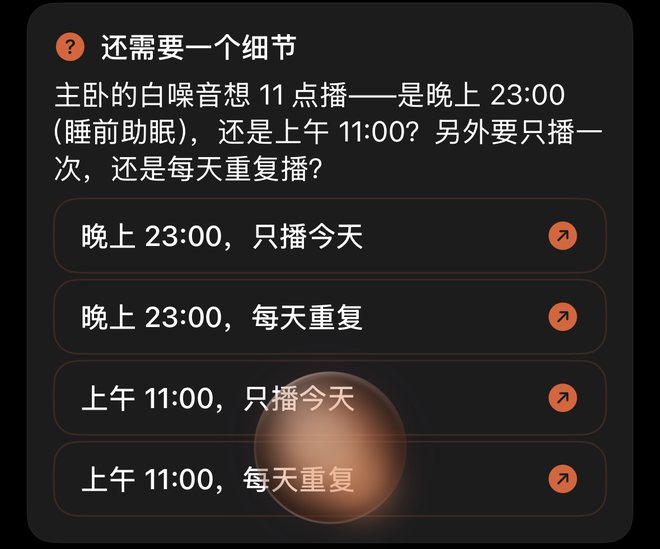
③ 说不清就先问:没说上午还是晚上、没说哪天,它会先问你,这时不会建任何东西。③ 說不清就先問:沒有說上午還是晚上、沒有說哪一天,它會先問你,這時不會建立任何東西。3. Unclear means it asks: no morning or evening, or no day, and it asks first. Nothing is created at that point.
④ 10 分钟内可以撤回:在同一个对话里说「取消」,刚建的场景和定时一起删掉。④ 10 分鐘內可以撤回:在同一個對話內說「取消」,剛建立的場景和定時會一併刪除。4. Undo within 10 minutes: say “cancel” in the same chat and the new scene and its schedule are both removed.
App 版本提示App「自动化」页的「场景」一栏,要 1.0.16 或以上才会列出助手建的场景。定时由服务器执行,跟 App 版本无关:现在说一句,到点就会播放。App 版本提示App「自動化」頁的「場景」一欄,要 1.0.16 或以上才會列出助手建立的場景。定時由伺服器執行,與 App 版本無關:現在說一句,時間到了就會播放。App version noteThe Scenes row on the app's Automations tab lists scenes the assistant created from 1.0.16 onwards. The schedule itself runs on the server, whatever app version you have: say it now and it plays on time.
① 怎么说:房间、内容、时间、哪天① 怎樣說:房間、內容、時間、哪一天① What to say: room, content, time, day
一句话里带上这四样,就能直接建好。时间可以说「晚上11点」「早上7点」,也可以直接说 24 小时制,例如「23:00」。下面是几种说法,以及回复里会写的日子:一句話內包含這四樣,就可以直接建立。時間可以說「晚上11點」「早上7點」,也可以直接用 24 小時制,例如「23:00」。以下是幾種說法,以及回覆內會寫的日子:Put those four things in one sentence and it's created right away. Say the time as “11 pm” or “7 am”, or in 24-hour form such as “23:00”. Some ways to say it, with the day the reply will show:
- 「每晚11点在主卧放白噪音」→ 回复写「每晚」「每晚11點在主臥放白噪音」→ 回覆寫「每晚」“Every night at 11 pm play white noise in the bedroom” → the reply says “every night”
- 「工作日早上7点在厨房播新闻」→ 回复写「工作日」「工作日早上7點在廚房播新聞」→ 回覆寫「逢工作日」“Every weekday at 7 am play the news in the kitchen” → the reply says “on weekdays”
- 「每周六上午9点在客厅放爵士乐」→ 回复写「每周六」「逢星期六上午9點在客廳放爵士樂」→ 回覆寫「逢星期六」“Every Saturday at 9 am play jazz in the living room” → the reply says “every Sat”
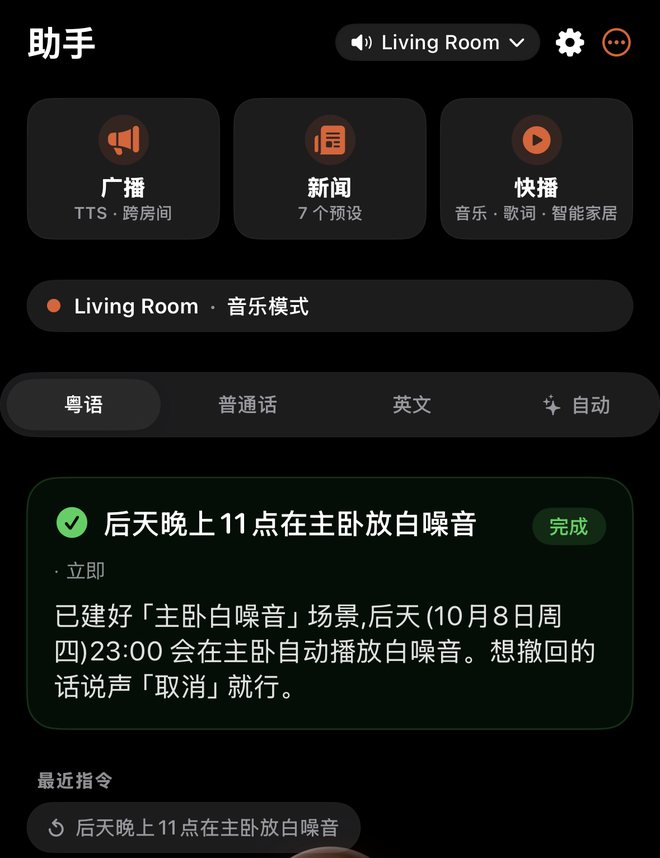
- 「后天晚上11点在主卧放白噪音」(只放一次) → 回复写具体日期,例如「10月8日(周四)」「後天晚上11點在主臥放白噪音」(只播一次) → 回覆寫具體日期,例如「10月8日(星期四)」“Play white noise in the bedroom at 11 pm the day after tomorrow” (just once) → the reply gives the date, e.g. “Thu Oct 8”
只说「周六」不够:它会问你是只这一次,还是每周都要。想每周重复,就说「每周六」。只說「星期六」不足夠:它會問你是只此一次,還是每週都要。想每週重複,就說「逢星期六」。Just “Saturday” isn't enough: it asks whether you mean this once or every week. For every week, say “every Saturday”.
② 它会怎么回:成功、撤回、反问② 它會怎樣回覆:成功、撤回、反問② What it replies: created, undone, or a question
下面三段是同一天的实测对话(10月6日,所以「后天」是 10月8日):以下三段是同一天的實測對話(10月6日,所以「後天」是 10月8日),原文為簡體中文:Below is the same three-step exchange, shown in English as an illustration. The real test was run in Chinese on October 6, so “the day after tomorrow” was October 8:
回复里的时间一律是 24 小时制,日子写成每天、每晚、工作日、每周几,只放一次的就写具体日期,例如「10月8日(周四)」。看到时间或日子不对,马上说「取消」重来。回覆內的時間一律用 24 小時制,日子寫成每日、每晚、工作日、每週幾,只播一次的就寫具體日期,例如「10月8日(星期四)」。看到時間或日子不對,立即說「取消」再來一次。Times in the reply are always 24-hour, and the day is written as every day, every night, weekdays or a weekday, or as a date for a one-off, such as “Thu Oct 8”. If the time or day is wrong, say “cancel” straight away and try again.
③ 说得不清楚时,它会先问③ 說得不清楚時,它會先問③ When something's unclear, it asks first
- 没说上午还是晚上(又不是 24 小时制):例如「11点」,它会问是上午还是晚上。沒有說上午還是晚上(又不是 24 小時制):例如「11點」,它會問是上午還是晚上。No morning or evening (and not 24-hour time): for “at 11”, it asks whether you mean a.m. or p.m.
- 没说哪天:它会问只放一次还是每天重复。沒有說哪一天:它會問只播一次還是每天重複。No day: it asks whether to play just once or every day.
问的时候不会建任何东西,也不会替你猜一个时间。按它的问题补上;或者把整句完整再说一次,例如「每晚11点在主卧放白噪音」。提問期間不會建立任何東西,也不會替你猜一個時間。按它的問題補充;或者把整句完整再說一次,例如「每晚11點在主臥放白噪音」。While it's asking, nothing is created and it won't guess a time for you. Answer the question, or say the whole request again, such as “every night at 11 pm play white noise in the bedroom”.
④ 说错了怎么办④ 說錯了怎麼辦④ Got it wrong?
- 撤回:建好后 10 分钟内,在同一个对话里说「取消」「撤销」「撤回」,或者英文「cancel」「undo」,刚建的场景和定时一起删掉。撤回:建立後 10 分鐘內,在同一個對話內說「取消」「撤銷」「撤回」,或者英文「cancel」「undo」,剛建立的場景和定時會一併刪除。Undo: within 10 minutes, in the same chat, say “cancel” or “undo” (or 取消 / 撤销 / 撤回 in Chinese) and the new scene and its schedule are both removed.
- 改时间:说「不对,改成晚上10点」,它会先撤回刚才那个,再请你把新的要求完整说一次。改時間:說「不對,改成晚上10點」,它會先撤回剛才那個,再請你把新的要求完整說一次。Change the time: say something like “no, change it to 10 pm”. It undoes the one it just made, then asks you to say the new request in full.
- 超过 10 分钟,或者中间说了别的指令:「取消」就按平常的意思理解,不再撤回刚才建的场景。超過 10 分鐘,或者中間說了其他指令:「取消」會按平常的意思理解,不再撤回剛才建立的場景。After 10 minutes, or if you've asked for something else in between, “cancel” is read the usual way and no longer undoes that scene.
⑤ 在哪里说⑤ 在哪裡說⑤ Where to say it
下面几个地方都可以说,都不需要家庭桥接:以下幾個地方都可以說,全部不需要家庭橋接:Any of these work, and none of them need the home bridge:
- ZoneFoundry App 里的助手:打字或用语音球说,见 用语音控制 Sonos。ZoneFoundry App 內的助手:輸入文字或用語音球說,見 用語音控制 Sonos。The assistant in the ZoneFoundry app: type, or use the voice orb. See Control Sonos by voice.
- 微信 / QQ / Telegram:给 ZoneFoundry 发一句话,见 用微信控制 Sonos。微信 / QQ / Telegram:向 ZoneFoundry 傳送一句話,見 用微信控制 Sonos。WeChat / QQ / Telegram: send ZoneFoundry one line. See Control Sonos from WeChat or Telegram.
- Claude / ChatGPT:添加 ZoneFoundry 连接器(MCP)后直接对它说,见 让 Claude / ChatGPT 控制你的 Sonos。Claude / ChatGPT:加入 ZoneFoundry 連接器(MCP)後直接對它說,見 讓 Claude / ChatGPT 控制你的 Sonos。Claude / ChatGPT: add the ZoneFoundry connector (MCP), then just ask. See Let Claude or ChatGPT control your Sonos.
ZoneFoundry 会提示 Claude / ChatGPT 把反问原样转给你、不要代答,一般会转问你;但 AI 偶尔仍会自己补上时间(例如自己当成「今晚」)。所以建好后看一眼回复里的时间和日子,不对就说「取消」。ZoneFoundry 會提示 Claude / ChatGPT 把反問原樣轉告你、不要代答,一般會轉問你;但 AI 間中仍會自行補上時間(例如自行當作「今晚」)。所以建立後請看一看回覆寫的時間和日子,不對就說「取消」。ZoneFoundry tells Claude and ChatGPT to pass its follow-up question to you word for word rather than answer it, so they usually ask you. Now and then the AI still fills in a time on its own (for example assuming "tonight"), so glance at the time and day in the reply and say "cancel" if it's wrong.
撤回只认同一个对话:在微信里建的,要在微信里说「取消」。撤回只限同一個對話:在微信建立的,要在微信說「取消」。Undo only works in the same chat: if you created it in WeChat, say “cancel” in WeChat.
⑥ 和闹钟、提醒有什么不同⑥ 與鬧鐘、提醒有甚麼不同⑥ How this differs from alarms and reminders
定时场景是「到点在某个房间放某样东西」。下面这些说法不会建定时场景:定時場景是「時間到了在某個房間播某樣東西」。以下這些說法不會建立定時場景:A scheduled scene means “at this time, play this in that room”. These don't create one:
- 「明早7点用新闻叫醒我」:仍然是闹钟。「明早7點用新聞叫醒我」:仍然是鬧鐘。“Wake me with the news at 7 tomorrow”: still an alarm.
- 「10分钟后提醒我关火」:仍然是提醒。「10分鐘後提醒我關火」:仍然是提醒。“Remind me to turn off the stove in 10 minutes”: still a reminder.
- 「取消每晚11点……」这类取消、否定的话:不会新建定时场景。「取消每晚11點……」這類取消、否定的說法:不會新建定時場景。“Cancel the 11 pm …” and other cancelling or negative requests: no new scheduled scene.
- 「7点了,放点音乐」:说的是现在几点,不会建定时场景。「7點了,播點音樂」:說的是現在幾點,不會建立定時場景。“It's 7, put some music on”: that's the time now, so no scheduled scene.
- 「广播:明天早上8点出发」:时间是广播的内容,不会建定时场景。「廣播:明天早上8點出發」:時間是廣播的內容,不會建立定時場景。“Announce: we leave at 8 tomorrow morning”: the time is part of the announcement, so no scheduled scene.
闹钟、提醒、新闻计划各在哪里设和取消,见 闹钟、提醒、新闻计划、睡眠定时。鬧鐘、提醒、新聞排程各在哪裡設定和取消,見 鬧鐘、提醒、新聞排程、睡眠定時。For where to set and cancel alarms, reminders and scheduled news, see Alarms, reminders, scheduled news and sleep timers.
⑦ 在 App 哪里看到⑦ 在 App 哪裡看到⑦ Where it shows up in the app
助手建的场景放在「自动化」页的「场景」一栏,和你自己建的场景在一起。这一栏要 1.0.16 或以上才会列出助手建的场景。定时由服务器执行,锁屏或关掉 App 也照样到点播放,不用等 App 更新。场景本身怎么用,见 场景:把房间、音量和音乐存成一键。助手建立的場景放在「自動化」頁的「場景」一欄,與你自己建立的場景在一起。這一欄要 1.0.16 或以上才會列出助手建立的場景。定時由伺服器執行,鎖定畫面或關閉 App 也會準時播放,不用等待 App 更新。場景本身的用法,見 場景:把房間、音量和音樂存成一鍵。Scenes the assistant creates sit in the Scenes row on the Automations tab, alongside your own. That row lists them from 1.0.16 onwards. The schedule runs on the server, so it plays on time with your iPhone locked or the app closed, without waiting for an app update. For how scenes work, see Scenes: save rooms, volume and music as one tap.
常见问题常見問題FAQ
说了「取消」,为什么没有撤回?說了「取消」,為甚麼沒有撤回?I said “cancel”. Why wasn't it undone?
撤回只在建好后 10 分钟内、在同一个对话里有效,中间也不能说别的指令。超出这个范围,「取消」会按平常的意思理解。撤回只在建立後 10 分鐘內、在同一個對話內有效,中間亦不能說其他指令。超出這個範圍,「取消」會按平常的意思理解。Undo only works within 10 minutes of creating it, in the same chat, with no other request in between. Outside that, “cancel” is read the usual way.
一定要说上午还是晚上吗?一定要說上午還是晚上嗎?Do I have to say morning or evening?
要说清上午还是晚上,或者直接用 24 小时制,例如「23:00」。没说的话,它会先问你,不会猜。要說清上午還是晚上,或者直接用 24 小時制,例如「23:00」。沒有說的話,它會先問你,不會猜測。Say morning or evening, or use 24-hour time such as “23:00”. If you don't, it asks you first rather than guessing.
App 里看不到刚建的场景,到点还会播吗?App 內看不到剛建立的場景,時間到了還會播放嗎?I can't see the new scene in the app. Will it still play on time?
会。定时由服务器执行,现在就会到点播放。App「自动化」页的「场景」一栏要 1.0.16 或以上才会列出助手建的场景。會。定時由伺服器執行,現在已經會準時播放。App「自動化」頁的「場景」一欄要 1.0.16 或以上才會列出助手建立的場景。Yes. The schedule runs on the server and already plays on time. The Scenes row on the app's Automations tab lists assistant-created scenes from 1.0.16 onwards.
说一句,到点就播說一句,時間到了就播Say it once, and it plays on time
ZoneFoundry 是一个 iOS App,直接连你现在的 Sonos。在 App、微信或 Claude / ChatGPT 里说一句,场景和定时一起建好。ZoneFoundry 是一個 iOS App,直接連接你現在的 Sonos。在 App、微信或 Claude / ChatGPT 內說一句,場景和定時一併建立。ZoneFoundry is an iOS app that works with your existing Sonos. Say one sentence in the app, WeChat, or Claude / ChatGPT, and the scene and its schedule are set up together.



下一步下一步Next
场景:把房间、音量和音乐存成一键 →場景:把房間、音量和音樂存成一鍵 →Scenes: save rooms, volume and music as one tap →
闹钟、提醒、新闻计划、睡眠定时 →鬧鐘、提醒、新聞排程、睡眠定時 →Alarms, reminders, scheduled news and sleep timers →
用微信控制 Sonos →用微信控制 Sonos →Control Sonos from WeChat or Telegram →
让 Claude / ChatGPT 控制你的 Sonos →讓 Claude / ChatGPT 控制你的 Sonos →Let Claude or ChatGPT control your Sonos →
← 返回所有教程← 返回所有教程← Back to all guides