
Why you'll love it
- Truly hands-free: changing rooms takes no phone, no voice command, no wall panel. You walk over and the music follows on its own — as if it had always been playing there.
- Only one room plays at a time: the music is handed to the room you're in, and the room you left goes quiet — no whole-house blasting, no wasted power.
- You can't get this elsewhere: music that tracks where you are is unique to ZoneFoundry. The Sonos app and most third-party controllers simply don't do it.
Is this the right guide for you? Three things can run the room hand-off. The bridge and a device at home with the app open are set up in exactly the same way — that's this guide: tick your rooms, pair a sensor, done in a few minutes. If you have neither (no bridge, and no device you want to leave running), you need the cloud executor instead — different setup, a bit longer: see Follow-Me in the cloud.
Before you start
- A motion / presence sensor in each room you want in Follow-Me, already added to the Apple Home app (Linptech ES5, Aqara FP series, etc.)
- Something to run the hand-off: either the ZoneFoundry bridge on your home network, or a device left at home with ZoneFoundry open in the foreground (a dedicated iPad or spare iPhone both work). Setup is identical either way — the steps below.
- The Sonos speakers in those rooms already play normally in ZoneFoundry
Motion vs mmWave sensors? A plain infrared (PIR) sensor only senses motion — sit still and it assumes the room is empty, so the music may hand off too early. For steady following even while sitting or lying down, use a mmWave presence sensor (like the Linptech ES5), which continuously senses whether anyone is in the room.
Steps
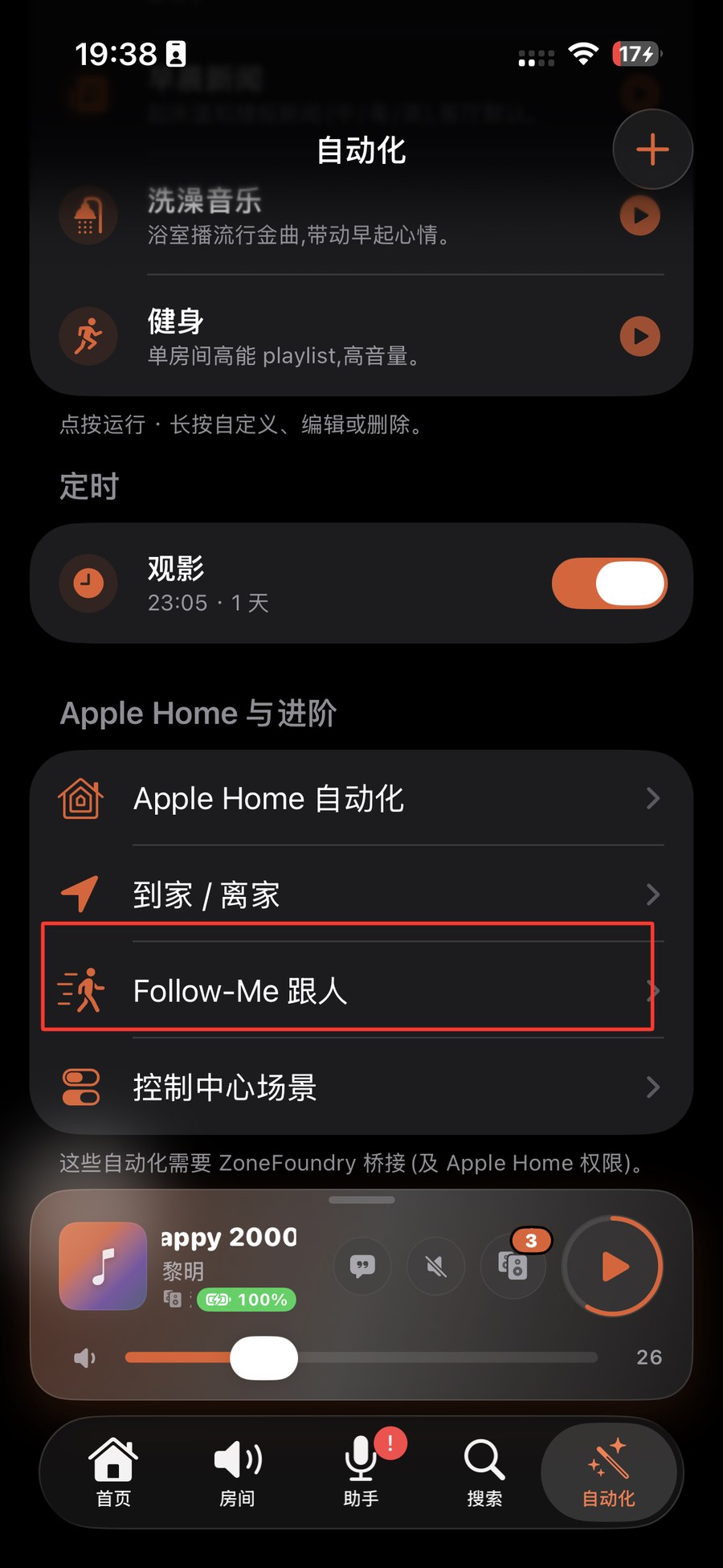
Open the Automations tab, choose Follow-Me
Open ZoneFoundry, go to the Automations tab at the bottom, and tap "Follow-Me" in the list. The first time you'll see a short intro — just follow it through.
Pick rooms and pair each with a sensor
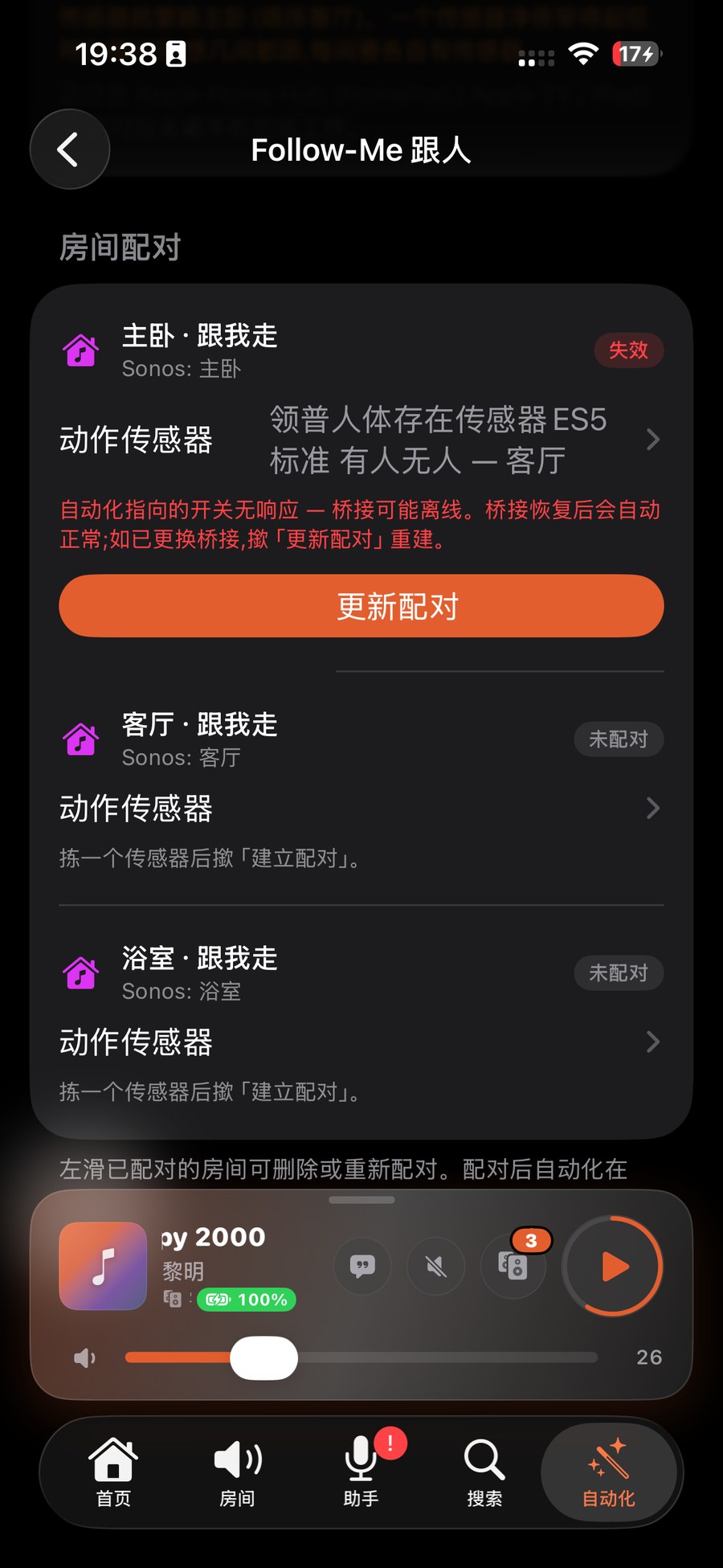
Tick the rooms you want in Follow-Me (e.g. living room, kitchen, study), then pick a matching motion sensor for each — the one in that room from Apple Home. Pairing tells ZoneFoundry: "When this sensor senses someone, bring the music to this room."
Start playing something, then walk around
Play a song normally in one room, leave Follow-Me on, and get up to change rooms. As you enter another room, its sensor senses you and that room takes over — the room you just left goes quiet. Keep walking and the music keeps following.
Tip: Handoff isn't instant — sensing plus the bridge acting on it takes a second or two, which is normal. If it feels too jumpy or too slow, it's usually the sensor's own "keep occupied" timeout being too short or too long; adjust that sensor in Apple Home.
Fine-tune once it feels right
Once you've got the hang of it, head back to Follow-Me settings to add or drop rooms, or switch it off temporarily — say when you have guests or want several rooms playing together. Turn Follow-Me off and your rooms go back to normal manual control, with nothing left behind.
Works with Apple Home: Follow-Me runs on the motion sensors already in Apple Home. Once the ZoneFoundry bridge is connected, it maps your Sonos rooms into Apple Home (they appear there as accessories), so Follow-Me's room-handoff runs on Apple's mature home-automation engine alongside your other HomeKit devices — no separate background system of ours required.
Music not following? Check three things: ① the room's sensor is really in Apple Home and can sense you (watch it flip to "occupied" in the Home app); ② the bridge is running on your home network; ③ that room has its matching sensor paired in Follow-Me. With all three in place, following stays reliable.
Grouping rooms can be one sentence
“Play the living room and bedroom together” is a single sentence in ZoneFoundry — no tapping through rooms one by one. It is an iOS app that works with your existing Sonos, no extra hardware needed.