
Why it's handy
- Seven categories, one tap: world, China, Hong Kong, business, tech, sports, entertainment — each plays 3/5/10 items instantly.
- Three languages: Mandarin, Cantonese and English — translated first when needed, then read aloud.
- Any room: play to the focused room, a specific room, or the whole home.
- Automatable: as a scene, it can fire every morning on its own.
Before you start
- An iPhone and at least one Sonos room
- (Optional) grant location permission for weather
Steps
Open "News"
In ZoneFoundry's Assistant tab (or the "News" card on Home), open "News". Pick a language at the top: Mandarin, Cantonese or English.
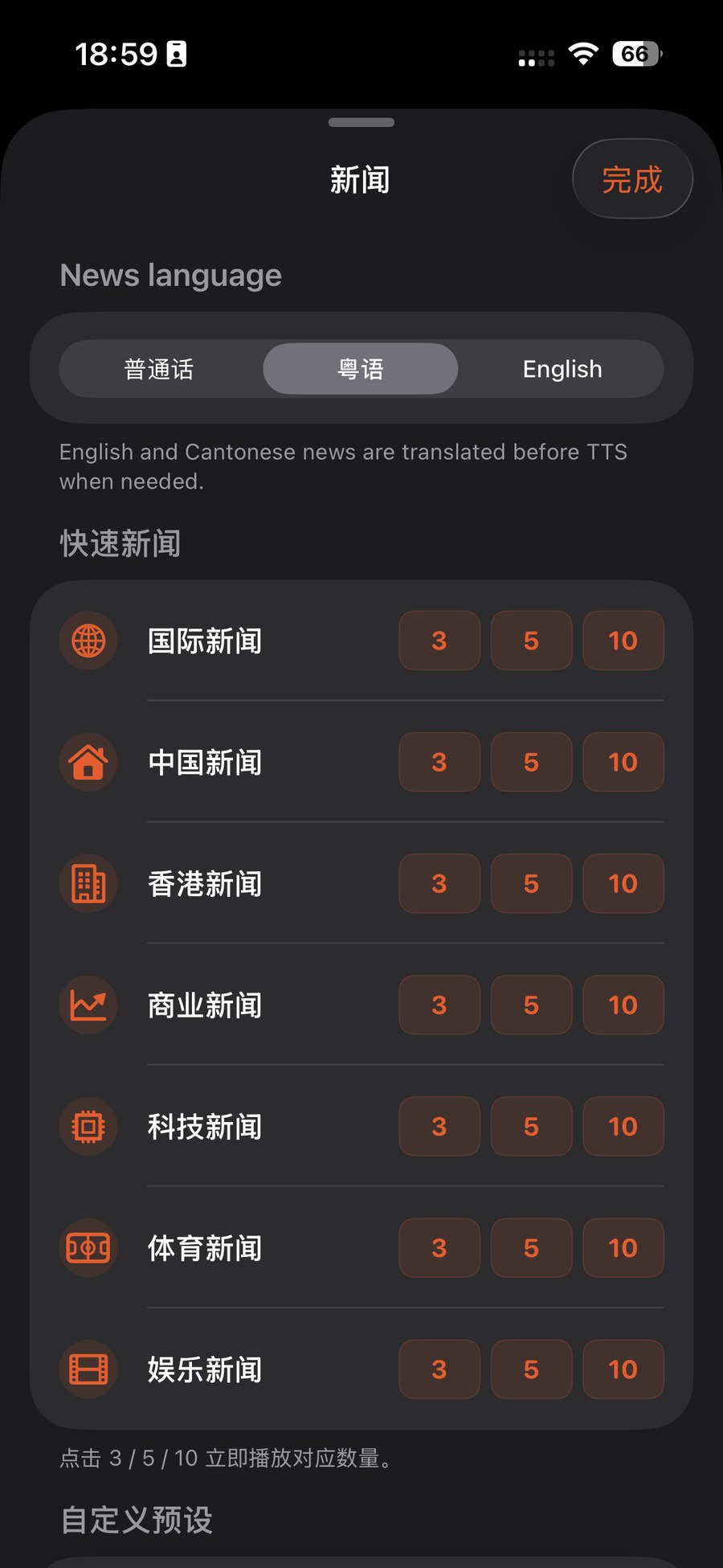
Pick a category, tap 3/5/10
On the category you want, tap 3, 5 or 10 to read that many items right away. To keep your own mix, scroll down to "Custom presets" and save it for one-tap playback next time.
Choose rooms (or whole home)
Like broadcast, news can play to the focused room, a specific room, or the whole home — follow how you move around the house.
Heads up: the weather briefing needs location permission to report your local weather — you'll be prompted the first time.
Want it every morning? Set news as a scene's source, then use a scheduled template like "Wake-up music" under Automations so it fires in a chosen room each morning. See Automation presets.
A whole routine can collapse into one scene
Waking up, coming home, winding down — ZoneFoundry can bundle rooms, volume, music and announcements into one scene, triggered by a sentence or a button instead of rebuilt each time.