
开始前你需要開始前你需要Before you start
- 小米 17 / K90 / 小米平板 8,已升级澎湃OS 4,超级小爱 8.2.3.1619 或更新。版本在超级小爱的「关于超级小爱」页面看,那里有「检查更新」。其他机型小米会陆续推送。小米 17 / K90 / 小米平板 8,已升級澎湃OS 4,超級小愛 8.2.3.1619 或更新。版本在超級小愛的「關於超級小愛」頁面查看,那裡有「檢查更新」。其他機型小米會陸續推送。A Xiaomi 17 / K90 / Xiaomi Pad 8 on HyperOS 4 with Super XiaoAi 8.2.3.1619 or later. Check the version on Super XiaoAi's About page, which also has Check for updates. Other models are rolling out.
- iPhone 或 iPad 上装了 ZoneFoundry 1.0.14 或更新(旧版请先在 App Store 更新;1.0.11–1.0.13 也能用,步骤见文末「旧版本 App」),并已登录 Sonos 账户(ZoneFoundry 目前只有 iOS 版,链接要在这里生成)。iPhone 或 iPad 上已安裝 ZoneFoundry 1.0.14 或更新(舊版請先在 App Store 更新;1.0.11–1.0.13 亦可使用,步驟見文末「舊版本 App」),並已登入 Sonos 帳戶(ZoneFoundry 目前只有 iOS 版,連結要在這裡產生)。ZoneFoundry 1.0.14 or later on an iPhone or iPad (update from the App Store if needed; 1.0.11–1.0.13 also work, see Older app versions at the end), signed in to your Sonos account (ZoneFoundry is iOS-only; that's where you generate the link).
- 小爱音箱暂时不行,只限手机、平板上的超级小爱。小愛音箱暫時不行,只限手機、平板上的超級小愛。XiaoAi smart speakers aren't supported yet; only Super XiaoAi on phones and tablets.
在 iPhone 上生成专用链接在 iPhone 上產生專用連結Generate the link on your iPhone
ZoneFoundry →「设置」(首页右上角齿轮)→「AI 接入」→ 在「AI 应用」里点「超级小爱」卡片 →「怎么连接」第 1 步「生成超级小爱专用链接:」下点「生成链接」。ZoneFoundry →「設定」(首頁右上角齒輪)→「AI 接入」→ 在「AI 應用程式」點「超級小愛」卡片 →「如何連接」第 1 步「產生超級小愛專用連結:」下點「產生連結」。ZoneFoundry → Settings (gear at the top right of Home) → AI access → under AI apps, tap the Super XiaoAi card → in How to connect, step 1 "Generate a link for Super XiaoAi:", tap Generate link.
链接里已经带着密钥(https://relay.zonefoundry.dev/mcp/zh?token=zfagt_…),不用再自己拼网址。屏幕上只显示打码的版本;点「复制网址」或「分享」得到的才是完整链接。連結內已帶有密鑰(https://relay.zonefoundry.dev/mcp/zh?token=zfagt_…),毋須再自行組合網址。畫面上只顯示遮蔽版本;點「複製網址」或「分享」得到的才是完整連結。The key is already inside the link (https://relay.zonefoundry.dev/mcp/zh?token=zfagt_…), so there's no address to build by hand. The screen only shows a masked version; Copy link or Share gives you the full link.
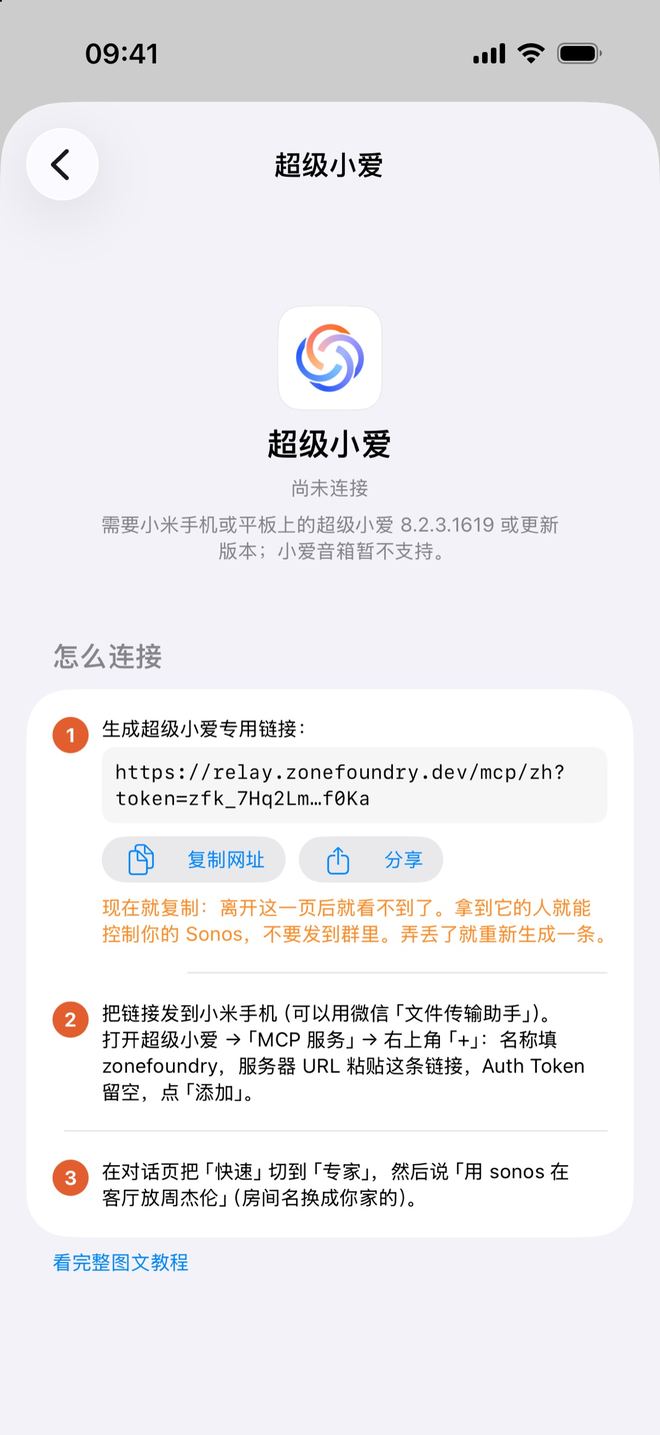
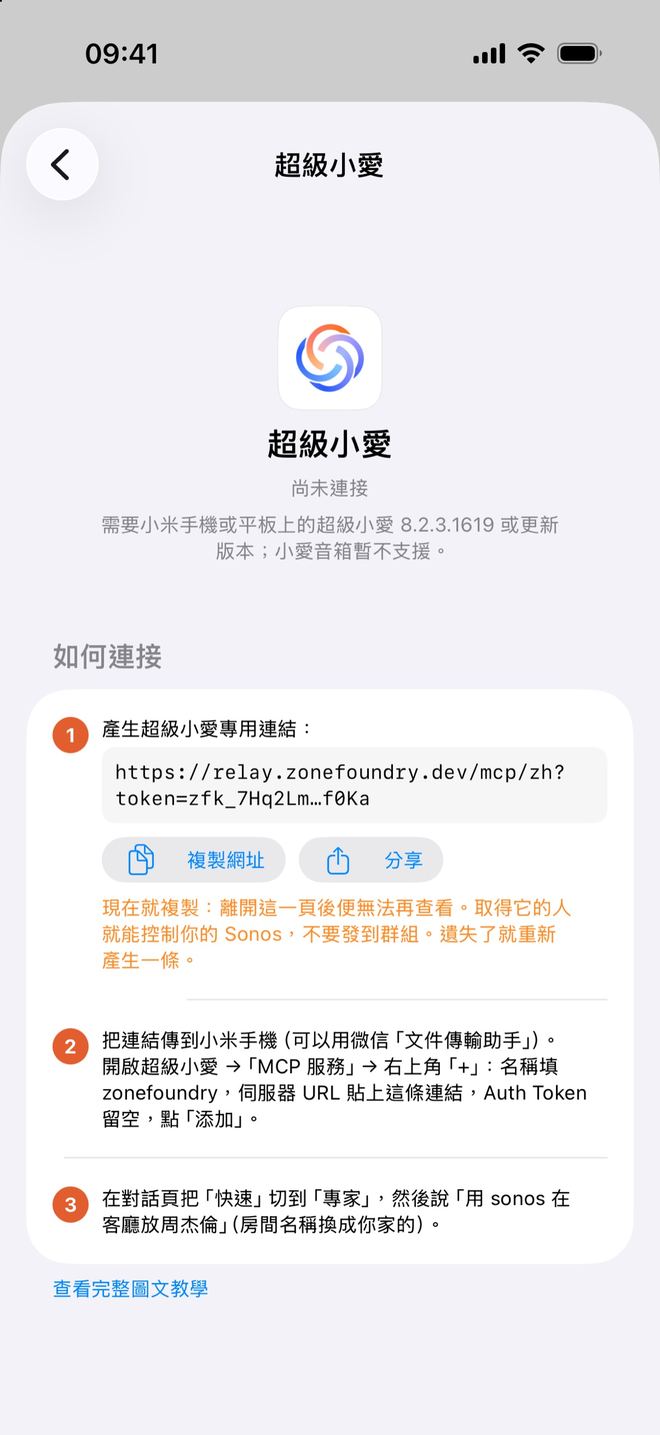
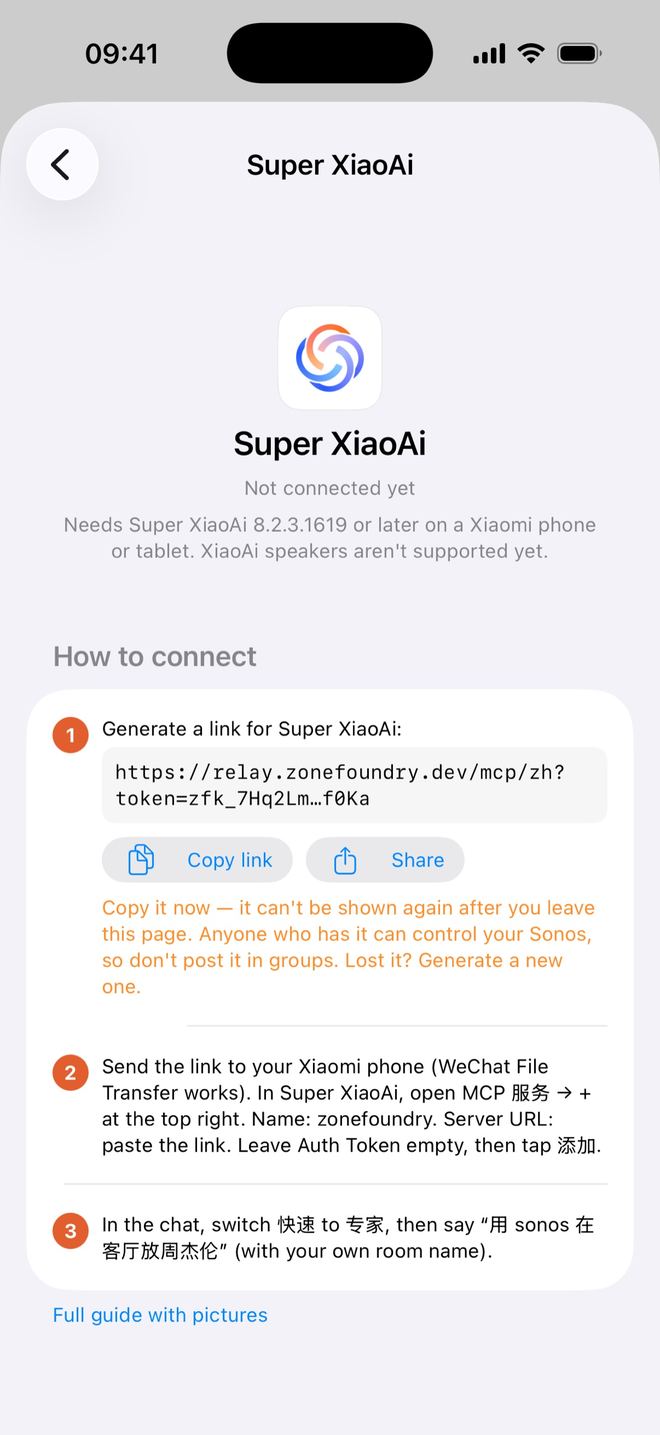
链接只显示这一次:离开这一页后就看不到了。不小心关掉了也没关系,再点一次「生成链接」生成一条新的就行(旧的可以在卡片的「已连接」列表里撤销)。連結只顯示這一次:離開這一頁後便無法再查看。不小心關掉了也沒關係,再點一次「產生連結」產生一條新的即可(舊的可以在卡片的「已連線」列表撤銷)。The link is shown this once only: it can't be shown again after you leave the page. If you close it by accident, just tap Generate link again for a new one (you can revoke the old one from the card's Connected list).
把链接传到小米手机把連結傳到小米手機Get the link onto the Xiaomi phone
点「分享」直接发出去,或者点「复制网址」后发到微信「文件传输助手」,在小米手机上打开,复制整条链接(以 https://relay.zonefoundry.dev/mcp/zh?token= 开头)。點「分享」直接發送,或者點「複製網址」後發到微信「文件傳輸助手」,在小米手機上打開,複製整條連結(以 https://relay.zonefoundry.dev/mcp/zh?token= 開頭)。Tap Share to send it straight over, or tap Copy link and send it to yourself (for example WeChat File Transfer), then open it on the Xiaomi phone and copy the whole link (it starts with https://relay.zonefoundry.dev/mcp/zh?token=).
拿到这条链接的人就能控制你家的 Sonos,不要发到群里或公开的地方。取得這條連結的人就能控制你家的 Sonos,不要發到群組或公開的地方。Anyone who has this link can control your home's Sonos. Don't post it in groups or anywhere public.
在超级小爱里添加 MCP 服务在超級小愛裡加入 MCP 服務Add the MCP service in Super XiaoAi
超级小爱 →「MCP 服务」→ 右上角「+」,打开「添加 MCP 服务」,按下面填:超級小愛 →「MCP 服務」→ 右上角「+」,打開「添加 MCP 服務」,按下面填寫:In Super XiaoAi open MCP 服务 (MCP services) → + at the top right, then fill in:
- 名称:zonefoundry名稱:zonefoundryName: zonefoundry
- 服务器 URL:粘贴第 2 步的整条链接(中间不要有空格)伺服器 URL:貼上第 2 步的整條連結(中間不要有空格)Server URL: paste the whole link from step 2 (no spaces)
- Auth Token:留空Auth Token:留空Auth Token: leave empty
点「添加」。如果连不上,换另一种填法:服务器 URL 只填下面这条,Auth Token 填 Bearer 加一个空格,再加链接里 token= 后面那一串(zfagt_…,这就是你的密钥):點「添加」。如果連不上,換另一種填法:伺服器 URL 只填下面這條,Auth Token 填 Bearer 加一個空格,再加連結內 token= 後面那一串(zfagt_…,這就是你的密鑰):Tap Add. If it won't connect, try the other way: put only the line below in Server URL, and in Auth Token put Bearer, a space, then the part of the link after token= (zfagt_…, which is your key):
https://relay.zonefoundry.dev/mcp/zhBearer 这里换成你的密钥⚠️ 服务器 URL 里只填网址,不要贴整段配置;网址是 /mcp/zh 结尾(带密钥时是 /mcp/zh?token=…)。加好之后,顶部会显示「1 个服务器已连接、29 个 MCP 工具可用」;如果显示「已失效」,多半是网址或密钥填错了。⚠️ 伺服器 URL 只填網址,不要貼整段設定;網址是 /mcp/zh 結尾(帶密鑰時是 /mcp/zh?token=…)。加好之後,頂部會顯示「1 個伺服器已連接、29 個 MCP 工具可用」;如果顯示「已失效」,多半是網址或密鑰填錯了。⚠️ Put only the URL in Server URL, not a whole config block. It should end in /mcp/zh (or /mcp/zh?token=… with the key). Once added, the top should read 1 server connected, 29 MCP tools available. If it says expired/invalid (已失效), the URL or key is probably wrong.
切到「专家」模式,对小爱说一句话切到「專家」模式,對小愛說一句話Switch to Expert mode and talk to XiaoAi
在小爱对话页面,点输入框上方最左边的「快速 >」,换成「专家」。「快速」模式只用小爱自己的功能,不会调用 Sonos。在小愛對話頁面,點輸入框上方最左邊的「快速 >」,換成「專家」。「快速」模式只用小愛自己的功能,不會調用 Sonos。In the XiaoAi chat, tap 快速 > (Fast) at the far left above the input box and switch to 专家 (Expert). Fast mode only uses XiaoAi's own features and won't call Sonos.
然后说(或打字)下面这些,句子前面带上「用 sonos」:然後說(或打字)下面這些,句子前面帶上「用 sonos」:Then say (or type) these, starting with 用 sonos:
- 「用 sonos 查一下我家有哪些房间」「用 sonos 查一下我家有哪些房間」"用 sonos 查一下我家有哪些房间" (list my rooms)
- 「用 sonos 在客厅放周杰伦」「用 sonos 在客廳放周杰倫」"用 sonos 在客厅放周杰伦" (play Jay Chou in the living room)
- 「用 sonos 全屋暂停」「用 sonos 全屋暫停」"用 sonos 全屋暂停" (pause everywhere)
- 「用 sonos 客厅大声一点」「用 sonos 客廳大聲一點」"用 sonos 客厅大声一点" (living room a bit louder)
- 「用 sonos 十分钟后在客厅提醒我关火」「用 sonos 十分鐘後在客廳提醒我關火」"用 sonos 十分钟后在客厅提醒我关火" (remind me in 10 minutes)
房间名换成你家 Sonos 里的名字。不带「用 sonos」直接说「播放 XX」,小爱会用它自己的音乐,不会交给 Sonos。房間名換成你家 Sonos 裡的名稱。不帶「用 sonos」直接說「播放 XX」,小愛會用它自己的音樂,不會交給 Sonos。Use the room names from your own Sonos system. Without 用 sonos, XiaoAi uses its own music instead of Sonos.
命令速查:这些说法都实测过命令速查:這些說法都經過實測Phrase list: all tested
每句都以「用 sonos」开头;「客厅」「卧室」换成你家 Sonos 里的房间名。每句都以「用 sonos」開頭;「客廳」「臥室」換成你家 Sonos 裡的房間名稱。Every phrase starts with 用 sonos. Replace 客厅 (living room) and 卧室 (bedroom) with your own Sonos room names. XiaoAi expects Chinese.
播放播放Play
- 用 sonos 在客厅放周杰伦用 sonos 在客廳放周杰倫
用 sonos 在客厅放周杰伦— play Jay Chou in the living room - 用 sonos 在客厅播新闻用 sonos 在客廳播新聞
用 sonos 在客厅播新闻— play the news in the living room
暂停、继续、切歌暫停、繼續、切歌Pause, resume, skip
- 用 sonos 客厅暂停用 sonos 客廳暫停
用 sonos 客厅暂停— pause the living room - 用 sonos 客厅继续播放用 sonos 客廳繼續播放
用 sonos 客厅继续播放— resume - 用 sonos 全屋暂停用 sonos 全屋暫停
用 sonos 全屋暂停— pause every room - 用 sonos 下一首 / 上一首用 sonos 下一首 / 上一首
用 sonos 下一首 / 上一首— next / previous track - 用 sonos 客厅单曲循环用 sonos 客廳單曲循環
用 sonos 客厅单曲循环— repeat the current track
音量音量Volume
- 用 sonos 客厅大声一点用 sonos 客廳大聲一點
用 sonos 客厅大声一点— a bit louder - 用 sonos 把客厅音量调到 20用 sonos 把客廳音量調到 20
用 sonos 把客厅音量调到 20— set the volume to 20 - 用 sonos 客厅静音用 sonos 客廳靜音
用 sonos 客厅静音— mute - 用 sonos 撤销刚才的音量改动用 sonos 撤銷剛才的音量改動
用 sonos 撤销刚才的音量改动— undo the last volume change
房间房間Rooms
- 用 sonos 查有哪些房间用 sonos 查有哪些房間
用 sonos 查有哪些房间— list my rooms - 用 sonos 把客厅的音乐转到卧室用 sonos 把客廳的音樂轉到臥室
用 sonos 把客厅的音乐转到卧室— move the music to the bedroom - 用 sonos 让客厅和卧室一起放用 sonos 讓客廳和臥室一起播放
用 sonos 让客厅和卧室一起放— play in both rooms together
播报和提醒播報和提醒Announcements and reminders
- 用 sonos 在客厅播报:晚饭好了用 sonos 在客廳播報:晚飯好了
用 sonos 在客厅播报:晚饭好了— announce “dinner’s ready” - 用 sonos 十分钟后在客厅提醒我关火用 sonos 十分鐘後在客廳提醒我關火
用 sonos 十分钟后在客厅提醒我关火— remind me in 10 minutes to turn off the stove
收藏和歌单收藏和歌單Favourites and playlists
- 用 sonos 我收藏了哪些用 sonos 我收藏了哪些
用 sonos 我收藏了哪些— list my favourites - 用 sonos 我有哪些歌单用 sonos 我有哪些歌單
用 sonos 我有哪些歌单— list my playlists
说「放周杰伦」这类没指定音乐服务的话,会用你在 ZoneFoundry App 里设的默认服务(QQ 音乐、网易云音乐或 Apple Music)。說「放周杰倫」這類沒有指定音樂服務的話,會使用你在 ZoneFoundry App 裡設定的預設服務(QQ 音樂、網易雲音樂或 Apple Music)。If you don't name a music service (as in 放周杰伦), it uses the default service you set in the ZoneFoundry app (QQ Music, NetEase Cloud Music or Apple Music).
旧版本 App(1.0.11–1.0.13):自己拼网址舊版本 App(1.0.11–1.0.13):自行組合網址Older app versions (1.0.11–1.0.13): build the URL yourself
旧版本没有超级小爱卡片,要先生成访问密钥再自己拼网址。能更新的话,建议直接更新到 1.0.14。舊版本沒有超級小愛卡片,要先產生存取密鑰再自行組合網址。可以更新的話,建議直接更新到 1.0.14。Older versions don't have the Super XiaoAi card, so you generate an access key and build the URL yourself. If you can, just update to 1.0.14.
- 「AI 接入」→ 拉到页面最底部,点「高级」下面的「访问密钥」→ 在「生成密钥」下名字填「小爱」→ 点名字框旁边的「生成」→「复制整段」。「AI 接入」→ 拉到頁面最底部,點「進階」下面的「存取密鑰」→ 在「產生密鑰」下名稱填「小愛」→ 點名稱欄旁邊的「產生」→「複製整段」。AI access → scroll to the bottom → Access keys (under Advanced) → under Generate a key, type the name XiaoAi → tap Generate next to the name field → Copy the whole block.
- 把整段发到小米手机,找到「Authorization 头:Bearer zfagt_…」那一行,只复制
zfagt_开头的那一串。把整段傳到小米手機,找到「Authorization 標頭:Bearer zfagt_…」那一行,只複製zfagt_開頭的那一串。Send the block to the Xiaomi phone, find the line "Authorization header: Bearer zfagt_…" and copy only the part starting withzfagt_. - 服务器 URL 填下面这一整条,把「这里换成你的密钥」换成你的
zfagt_…(中间不要有空格),其余按第 3 步:伺服器 URL 填下面這一整條,把「这里换成你的密钥」換成你的zfagt_…(中間不要有空格),其餘按第 3 步:Put the whole line below in Server URL, replacing 这里换成你的密钥 with yourzfagt_…key (no spaces); the rest is as in step 3:
https://relay.zonefoundry.dev/mcp/zh?token=这里换成你的密钥遇到问题?请把这些截图发到群里遇到問題?請把這些截圖發到群組Something wrong? Send these screenshots to the group
- 超级小爱版本号、手机型号、澎湃OS 版本超級小愛版本號、手機型號、澎湃OS 版本Super XiaoAi version, phone model, HyperOS version
- MCP 入口在哪里,有没有要求开什么模式或付费MCP 入口在哪裡,有沒有要求開啟甚麼模式或付費Where the MCP entry is, and whether it asked for a special mode or payment
- 用的是哪种填法(Auth Token / 网址带密钥),显示几个工具用的是哪種填法(Auth Token / 網址帶密鑰),顯示幾個工具Which way you filled it in (Auth Token / key in URL), and how many tools it shows
- 说完指令后小爱怎么回的,音箱有没有声說完指令後小愛怎樣回應,喇叭有沒有聲What XiaoAi replied and whether the speaker played
截图里如果露出了 zfagt_ 密钥,先打码再发。截圖裡如果露出了 zfagt_ 密鑰,先打碼再發。If a screenshot shows your zfagt_ key, blur it before sending.
常见问题常見問題FAQ
MCP 服务显示「已失效」?MCP 服務顯示「已失效」?The MCP service shows 已失效 (expired)?
多半是链接没有复制完整,或者网址、密钥填错了。用卡片生成的链接时,确认整条都粘贴进去了、中间没有空格或换行;手动填写时,检查服务器 URL 是不是 /mcp/zh 结尾(带密钥时是 /mcp/zh?token=…),密钥是不是完整的 zfagt_ 开头。还不行就换另一种填法(见第 3 步),或在卡片里重新生成一条链接。多半是連結沒有完整複製,或者網址、密鑰填錯了。使用卡片產生的連結時,確認整條都已貼上、中間沒有空格或換行;手動填寫時,檢查伺服器 URL 是否以 /mcp/zh 結尾(帶密鑰時是 /mcp/zh?token=…),密鑰是否完整、以 zfagt_ 開頭。仍然不行就換另一種填法(見第 3 步),或在卡片內重新產生一條連結。Usually the link wasn't copied in full, or the URL or key is wrong. With the card's link, make sure you pasted the whole thing with no spaces or line breaks. If you typed it in, check the server URL ends in /mcp/zh (or /mcp/zh?token=… with the key) and that the key is complete and starts with zfagt_. If it still fails, try the other way of filling it in (step 3), or generate a new link in the card.
说了没反应,或者小爱放了它自己的音乐?說了沒反應,或者小愛播放了它自己的音樂?Nothing happens, or XiaoAi plays its own music?
两个原因最常见:对话页左下角还是「快速」,没切到「专家」;或者句子前面没带「用 sonos」。两样都改好再说一次。最常見有兩個原因:對話頁左下角仍是「快速」,沒有切到「專家」;或者句子前面沒有帶「用 sonos」。兩樣都改好再說一次。Two usual causes: the chat is still on 快速 (Fast) instead of 专家 (Expert), or the request doesn't start with 用 sonos. Fix both and try again.
提示某个房间暂时连不上?提示某個房間暫時連不上?It says a room can't be reached right now?
通常是那台音箱在休眠或 Wi-Fi 不稳,稍等一会儿再试。通常是那部喇叭在休眠或 Wi-Fi 不穩定,稍等一會再試。Usually that speaker is asleep or its Wi-Fi is unstable. Wait a moment and try again.
找不到 MCP 入口?找不到 MCP 入口?Can't find the MCP entry?
多半是超级小爱版本太旧或机型还没推送。先到「关于超级小爱」点「检查更新」,确认是 8.2.3.1619 或更新。多半是超級小愛版本太舊或機型仍未推送。先到「關於超級小愛」點「檢查更新」,確認是 8.2.3.1619 或更新。Usually Super XiaoAi is too old or your model hasn't got the update yet. Open Super XiaoAi's About page, tap Check for updates and make sure it's 8.2.3.1619 or later.
链接或密钥不小心发出去了?連結或密鑰不小心發出去了?Leaked your link or key?
在 ZoneFoundry「AI 接入」→「超级小爱」卡片的「已连接」列表里点那一条 →「撤销此钥匙」(也可以在「高级」→「访问密钥」里撤销),马上失效。然后在卡片里点「生成链接」生成一条新的,重新填进超级小爱。在 ZoneFoundry「AI 接入」→「超級小愛」卡片的「已連線」列表點選那一條 →「撤銷此鑰匙」(亦可在「進階」→「存取密鑰」內撤銷),即時失效。然後在卡片內點「產生連結」產生一條新的,重新填入超級小愛。In ZoneFoundry, open AI access → the Super XiaoAi card, tap the entry under Connected → Revoke this key (or revoke it under Advanced → Access keys). It stops working immediately. Then tap Generate link in the card for a new one and put it into Super XiaoAi again.
没有 iPhone 能用吗?沒有 iPhone 可以用嗎?No iPhone?
暂时不行。专用链接要在 ZoneFoundry App 里生成,App 目前只有 iPhone / iPad 版。暫時不行。專用連結要在 ZoneFoundry App 裡產生,App 目前只有 iPhone / iPad 版。Not yet. The link is generated in the ZoneFoundry app, which is iPhone/iPad only for now.
想用 Claude / ChatGPT 控制?想用 Claude / ChatGPT 控制?Prefer Claude or ChatGPT?
还没装 ZoneFoundry?仍未安裝 ZoneFoundry?Don't have ZoneFoundry yet?
App Store 搜 ZoneFoundry,免费下载,连上你现在的 Sonos。App Store 搜尋 ZoneFoundry,免費下載,連接你現有的 Sonos。Search ZoneFoundry on the App Store. It's free and works with your existing Sonos.


