
The one-minute version
1. Say four things: which room, what to play, what time, which days. Once they're clear, the scene and its schedule are created straight away.
2. The reply spells out the time and day: 24-hour time plus every day / every night / weekdays / a weekday, or a date, so you can spot a mistake at a glance.
3. Unclear means it asks: no morning or evening, or no day, and it asks first. Nothing is created at that point.
4. Undo within 10 minutes: say “cancel” in the same chat and the new scene and its schedule are both removed.
App version noteThe Scenes row on the app's Automations tab lists scenes the assistant created from 1.0.16 onwards. The schedule itself runs on the server, whatever app version you have: say it now and it plays on time.
① What to say: room, content, time, day
Put those four things in one sentence and it's created right away. Say the time as “11 pm” or “7 am”, or in 24-hour form such as “23:00”. Some ways to say it, with the day the reply will show:
- “Every night at 11 pm play white noise in the bedroom” → the reply says “every night”
- “Every weekday at 7 am play the news in the kitchen” → the reply says “on weekdays”
- “Every Saturday at 9 am play jazz in the living room” → the reply says “every Sat”
- “Play white noise in the bedroom at 11 pm the day after tomorrow” (just once) → the reply gives the date, e.g. “Thu Oct 8”
Just “Saturday” isn't enough: it asks whether you mean this once or every week. For every week, say “every Saturday”.
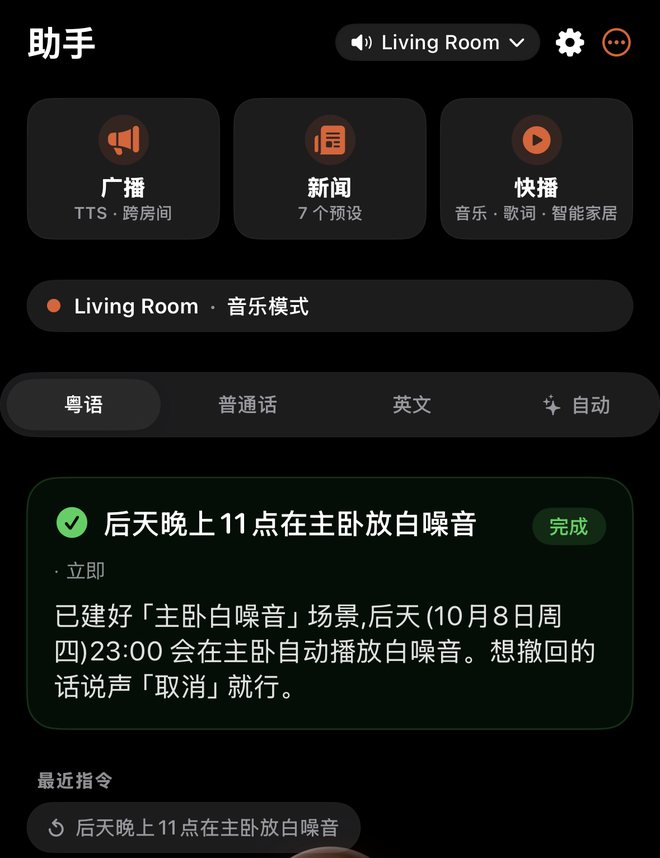
② What it replies: created, undone, or a question
Below is the same three-step exchange, shown in English as an illustration. The real test was run in Chinese on October 6, so “the day after tomorrow” was October 8:
Times in the reply are always 24-hour, and the day is written as every day, every night, weekdays or a weekday, or as a date for a one-off, such as “Thu Oct 8”. If the time or day is wrong, say “cancel” straight away and try again.
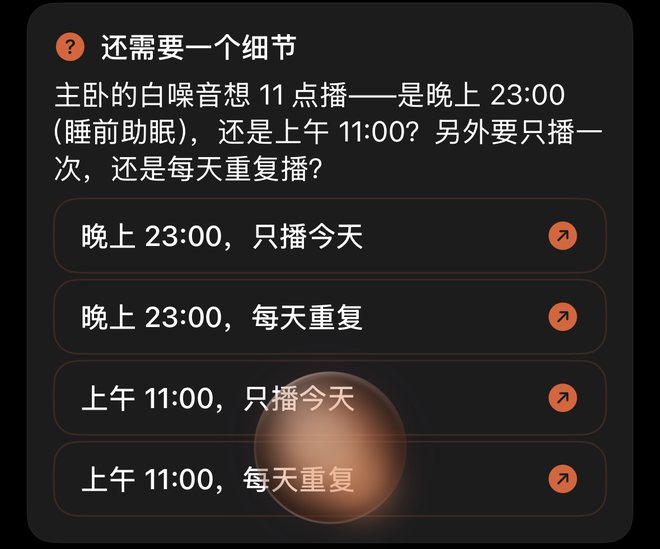
③ When something's unclear, it asks first
- No morning or evening (and not 24-hour time): for “at 11”, it asks whether you mean a.m. or p.m.
- No day: it asks whether to play just once or every day.
While it's asking, nothing is created and it won't guess a time for you. Answer the question, or say the whole request again, such as “every night at 11 pm play white noise in the bedroom”.
④ Got it wrong?
- Undo: within 10 minutes, in the same chat, say “cancel” or “undo” (or 取消 / 撤销 / 撤回 in Chinese) and the new scene and its schedule are both removed.
- Change the time: say something like “no, change it to 10 pm”. It undoes the one it just made, then asks you to say the new request in full.
- After 10 minutes, or if you've asked for something else in between, “cancel” is read the usual way and no longer undoes that scene.
⑤ Where to say it
Any of these work, and none of them need the home bridge:
- The assistant in the ZoneFoundry app: type, or use the voice orb. See Control Sonos by voice.
- WeChat / QQ / Telegram: send ZoneFoundry one line. See Control Sonos from WeChat or Telegram.
- Claude / ChatGPT: add the ZoneFoundry connector (MCP), then just ask. See Let Claude or ChatGPT control your Sonos.
ZoneFoundry tells Claude and ChatGPT to pass its follow-up question to you word for word rather than answer it, so they usually ask you. Now and then the AI still fills in a time on its own (for example assuming "tonight"), so glance at the time and day in the reply and say "cancel" if it's wrong.
Undo only works in the same chat: if you created it in WeChat, say “cancel” in WeChat.
⑥ How this differs from alarms and reminders
A scheduled scene means “at this time, play this in that room”. These don't create one:
- “Wake me with the news at 7 tomorrow”: still an alarm.
- “Remind me to turn off the stove in 10 minutes”: still a reminder.
- “Cancel the 11 pm …” and other cancelling or negative requests: no new scheduled scene.
- “It's 7, put some music on”: that's the time now, so no scheduled scene.
- “Announce: we leave at 8 tomorrow morning”: the time is part of the announcement, so no scheduled scene.
For where to set and cancel alarms, reminders and scheduled news, see Alarms, reminders, scheduled news and sleep timers.
⑦ Where it shows up in the app
Scenes the assistant creates sit in the Scenes row on the Automations tab, alongside your own. That row lists them from 1.0.16 onwards. The schedule runs on the server, so it plays on time with your iPhone locked or the app closed, without waiting for an app update. For how scenes work, see Scenes: save rooms, volume and music as one tap.
FAQ
I said “cancel”. Why wasn't it undone?
Undo only works within 10 minutes of creating it, in the same chat, with no other request in between. Outside that, “cancel” is read the usual way.
Do I have to say morning or evening?
Say morning or evening, or use 24-hour time such as “23:00”. If you don't, it asks you first rather than guessing.
I can't see the new scene in the app. Will it still play on time?
Yes. The schedule runs on the server and already plays on time. The Scenes row on the app's Automations tab lists assistant-created scenes from 1.0.16 onwards.
Say it once, and it plays on time
ZoneFoundry is an iOS app that works with your existing Sonos. Say one sentence in the app, WeChat, or Claude / ChatGPT, and the scene and its schedule are set up together.
