为什么会喜欢它為什麼會喜歡它Why you'll love it
- 真正免动手:换房间不用掏手机、不用喊语音、也不用按面板。人走过去,音乐自己跟上来,自然得像它本来就在那间房。真正免動手:換房間毋須掏手機、毋須呼喚語音,也毋須按面板。人走過去,音樂自己跟上來,自然得像它本來就在那間房一樣。Truly hands-free: changing rooms takes no phone, no voice command, no wall panel. You walk over and the music follows on its own — as if it had always been playing there.
- 离开的房间会自己退出:你走进的房间加入正在播的音乐;你离开的房间,等传感器报告没人、再过「离组等候」的时间(默认 60 秒)后淡出退出,不会一直全屋同时响。離開的房間會自己退出:你走進的房間會加入正在播的音樂;你離開的房間,等傳感器報告沒人、再過「離組等候」的時間(預設 60 秒)後淡出退出,不會一直全屋同時響。The room you left bows out: the room you walk into joins the music that is playing; the room you left fades out and leaves once its sensor reports it empty and the leave delay has passed (60 seconds by default), so the whole house does not keep playing.
- 别处买不到:让音乐跟着人的位置走,是 ZoneFoundry 独有的玩法。Sonos 官方 App 和大多数第三方控制器都没有这个能力。別處買不到:讓音樂跟著人的位置走,是 ZoneFoundry 獨有的玩法。Sonos 官方 App 與大多數第三方控制器都沒有這個能力。You can't get this elsewhere: music that tracks where you are is unique to ZoneFoundry. The Sonos app and most third-party controllers simply don't do it.
这一篇适合你吗?Follow-Me 的房间交接可以由三样东西执行:桥接、家里一台开着 App 的设备(本机),或者云端。这一篇讲前两种:都在 App 的 Follow Me 页设置,但步骤不同,下面第 2 步分开写。如果两样都没有(不想装桥、也不想留一台设备开着 App),看 Follow-Me 云端执行。這一篇適合你嗎?Follow-Me 的房間交接可以由三樣東西執行:橋接、家中一部開著 App 的裝置(本機),或者雲端。這一篇講前兩種:都在 App 的 Follow Me 頁設定,但步驟不同,下面第 2 步分開寫。如果兩樣都沒有(不想裝橋接,也不想留一部裝置開著 App),看 Follow-Me 雲端執行。Is this the right guide for you? Three things can run the room hand-off: the bridge, a device at home with the app open (this device), or the cloud. This guide covers the first two. Both are set up on the app's Follow Me page, but the steps differ, so step 2 below covers them separately. If you have neither (no bridge, and no device you want to leave running), see Follow-Me in the cloud.
开始前你需要開始前你需要Before you start
- 每个想纳入 Follow-Me 的房间,都有一个动作 / 存在传感器,放在它负责的那间房里,并且已经加进 Apple「家庭」App(领普 ES5、Aqara FP 系列等)每個想納入 Follow-Me 的房間,都有一個動作 / 存在傳感器,放在它負責的那間房裡,並且已經加入 Apple「家庭」App(領普 ES5、Aqara FP 系列等)A motion / presence sensor in each room you want in Follow-Me, placed in the room it is paired with, already added to the Apple Home app (Linptech ES5, Aqara FP series, etc.)
- 有人执行房间交接:ZoneFoundry 桥接在家里联网运行、且家里有家居中枢(HomePod 或 Apple TV),或者一台留在家里、连着家里 Wi-Fi、ZoneFoundry 开着在前台的设备(专用 iPad、闲置 iPhone 都行),并已允许 ZoneFoundry 访问 Apple「家庭」数据(HomeKit 权限)。两种的设置步骤不同,见第 2 步。有人執行房間交接:ZoneFoundry 橋接在家中連網運行、而且家中有家居中樞(HomePod 或 Apple TV),或者一部留在家中、連著家中 Wi-Fi、ZoneFoundry 開著在前台的裝置(專用 iPad、閒置 iPhone 都可以),並已允許 ZoneFoundry 存取 Apple「家庭」資料(HomeKit 權限)。兩種的設定步驟不同,見第 2 步。Something to run the hand-off: either the ZoneFoundry bridge on your home network plus a home hub (HomePod or Apple TV), or a device left at home on your home Wi-Fi with ZoneFoundry open in the foreground (a dedicated iPad or spare iPhone both work), with ZoneFoundry allowed to access Apple Home data (HomeKit permission). The two are set up differently; see step 2.
- 如果用桥接:桥接要装在一台一直开着、装了 Docker 的机器上(群晖 / 飞牛 / Unraid / TrueNAS / 软路由 / Linux 主机);Mac / Windows 的 Docker Desktop 不行。安装见家庭桥接安装教程。如果用橋接:橋接要裝在一部一直開著、裝了 Docker 的機器上(群暉 / 飛牛 / Unraid / TrueNAS / 軟路由 / Linux 主機);Mac / Windows 的 Docker Desktop 不行。安裝見家庭橋接安裝教學。If you use the bridge: The bridge runs on an always-on machine with Docker (Synology / fnOS / Unraid / TrueNAS / a soft router / a Linux box); Docker Desktop on Mac or Windows won’t work. Setup: home bridge guide.
- 这些房间里的 Sonos 喇叭,平时在 ZoneFoundry 里都能正常播放這些房間裡的 Sonos 喇叭,平時在 ZoneFoundry 裡都正常播得到The Sonos speakers in those rooms already play normally in ZoneFoundry
动作传感器和毫米波传感器有什么分别?普通红外(PIR)传感器只感「动作」—— 你坐定不动,它就以为房间空了,音乐可能提早交接走。想坐着、躺着也稳定跟随,建议用毫米波(mmWave)存在传感器(如领普 ES5),它能持续感知「房里有没有人」。動作傳感器與毫米波傳感器有何分別?普通紅外(PIR)傳感器只感「動作」—— 你坐著不動,它就以為房間空了,音樂可能提早交接走。想坐著、躺著都穩定跟隨,建議用毫米波(mmWave)存在傳感器(如領普 ES5),它可以持續感知「房裡有沒有人」。Motion vs mmWave sensors? A plain infrared (PIR) sensor only senses motion — sit still and it assumes the room is empty, so the music may hand off too early. For steady following even while sitting or lying down, use a mmWave presence sensor (like the Linptech ES5), which continuously senses whether anyone is in the room.
音乐怎样跟到你所在的房间
- 1每间房配一个传感器「这个传感器一感到有人,音乐就该来这间房」
- 2你走进另一间房那间房的传感器感到有人
- 3那间房加入正在播的音乐由桥接或开着 App 的设备执行,几秒内淡入
- 4离开的房间过一会儿退出传感器报告没人,再过「离组等候」(默认 60 秒)后淡出
要先有一个房间在播音乐,电视、line-in 不会被跟随。觉得退得太快或太慢?先在 Follow Me 页调「离组等候」,也可以去 Apple「家庭」调整传感器本身的设置。
音樂怎樣跟到你所在的房間
- 1每間房配一個感應器「這個感應器一感到有人,音樂就該來這間房」
- 2你走進另一間房那間房的感應器感到有人
- 3那間房加入正在播的音樂由橋接或開著 App 的裝置執行,幾秒內淡入
- 4離開的房間過一會兒退出感應器報告沒人,再過「離組等候」(預設 60 秒)後淡出
要先有一個房間在播音樂,電視、line-in 不會被跟隨。覺得退得太快或太慢?先在 Follow Me 頁調「離組等候」,也可以去 Apple「家庭」調整感應器本身的設定。
How the music finds your room
- 1Pair each room with a sensor"When this sensor senses someone, bring the music to this room."
- 2You walk into another roomIts sensor senses you
- 3That room joins the musicRun by the bridge or a device with the app open; fades in within a few seconds
- 4The room you left bows outOnce its sensor reports empty and the leave delay (60 s by default) passes, it fades out
Some room must already be playing music; TV and line-in are not followed. Room drops out too soon or too late? Adjust the leave delay on the Follow Me page first, or adjust the sensor's own settings in Apple Home.
步骤步驟Steps
打开「自动化」标签,选 Follow-Me打開「自動化」標籤,選 Follow-MeOpen the Automations tab, choose Follow-Me
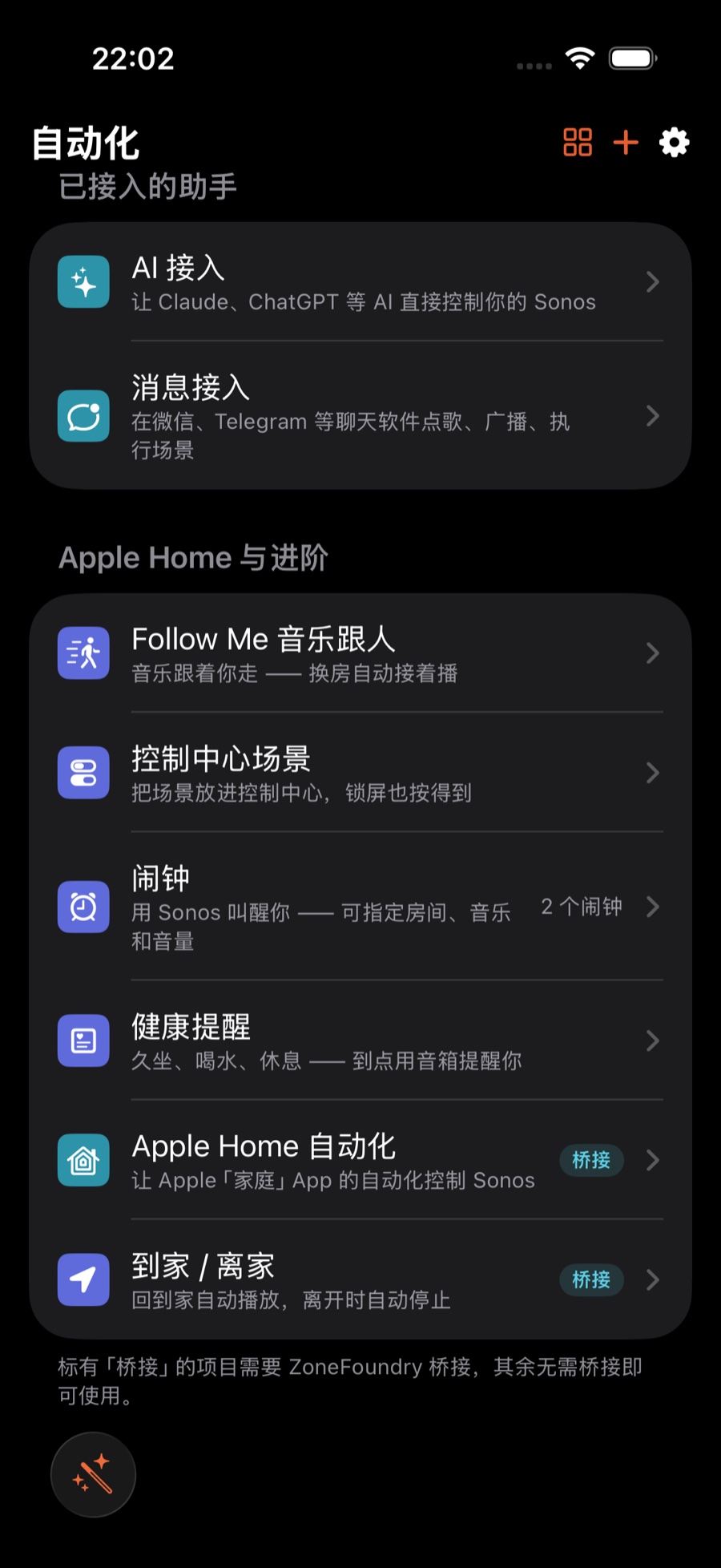
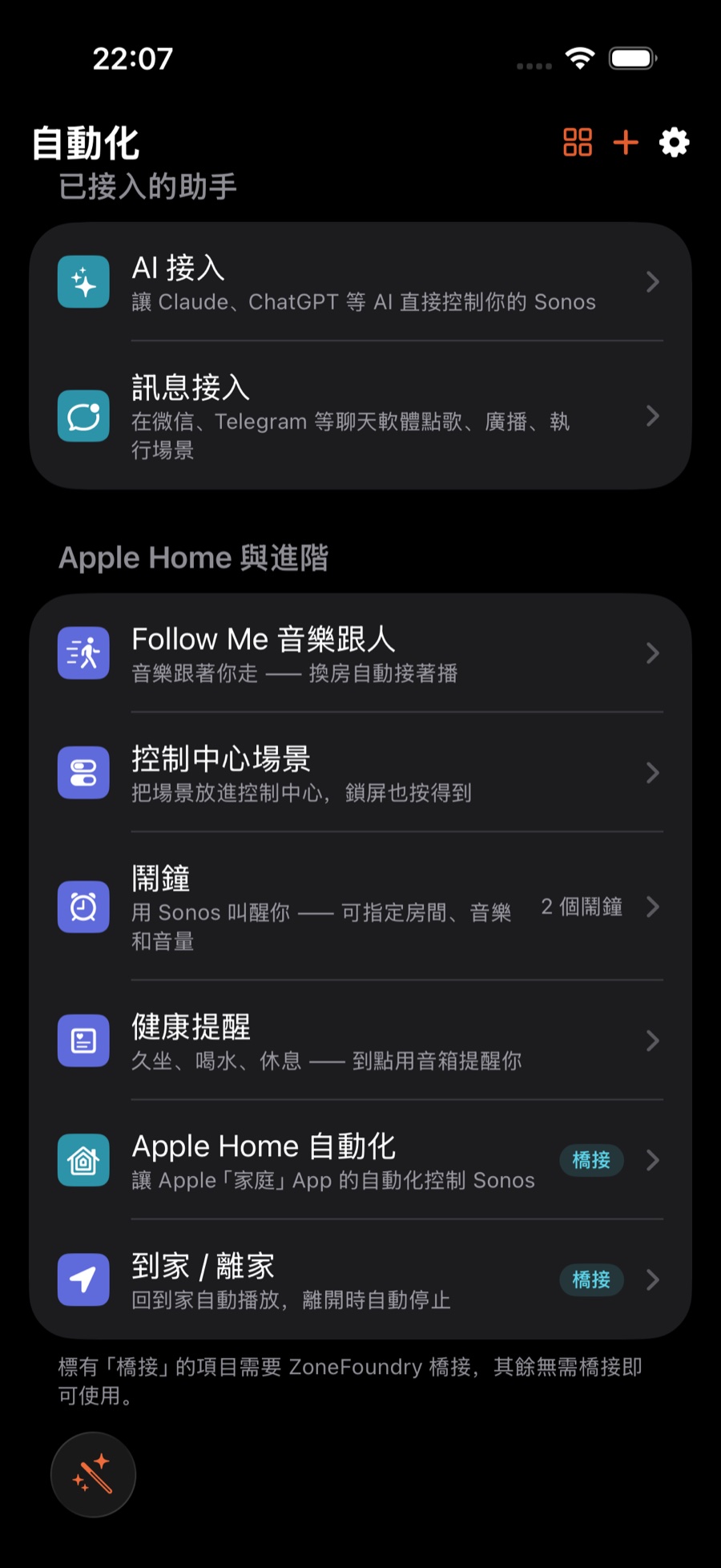
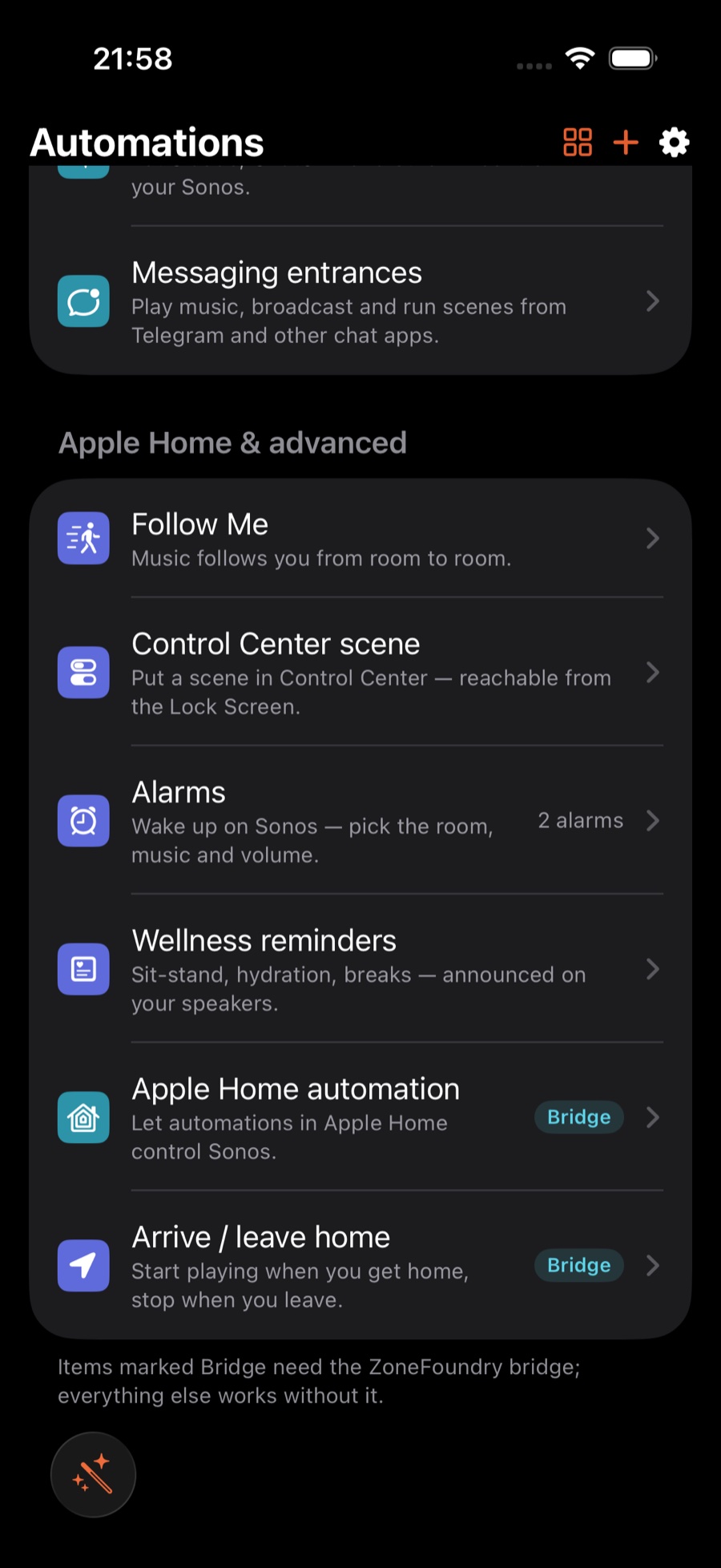
打开 ZoneFoundry,进到底部的「自动化」标签,往下滑到「Apple Home 与进阶」这一组,点「Follow Me 音乐跟人」。第一次进来会有一段简单说明,跟着往下走就行。打開 ZoneFoundry,進入底部的「自動化」標籤,向下捲到「Apple Home 與進階」這一組,點「Follow Me 音樂跟人」。第一次進來會有一段簡單說明,跟著做即可。Open ZoneFoundry, go to the Automations tab at the bottom, scroll down to the "Apple Home & advanced" group and tap Follow Me. The first time you'll see a short intro — just follow it through.
给每间房配上传感器為每間房配上傳感器Pair each room with a sensor
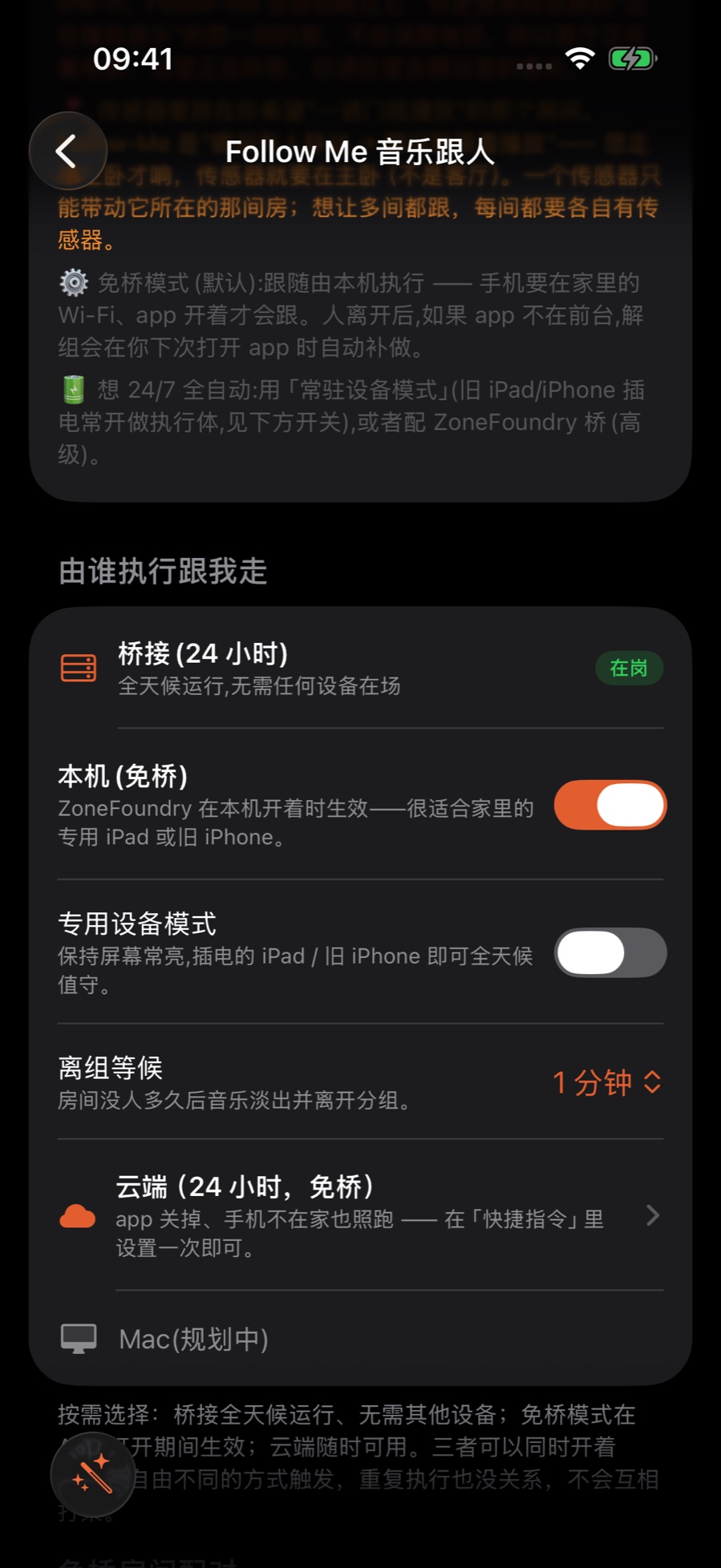
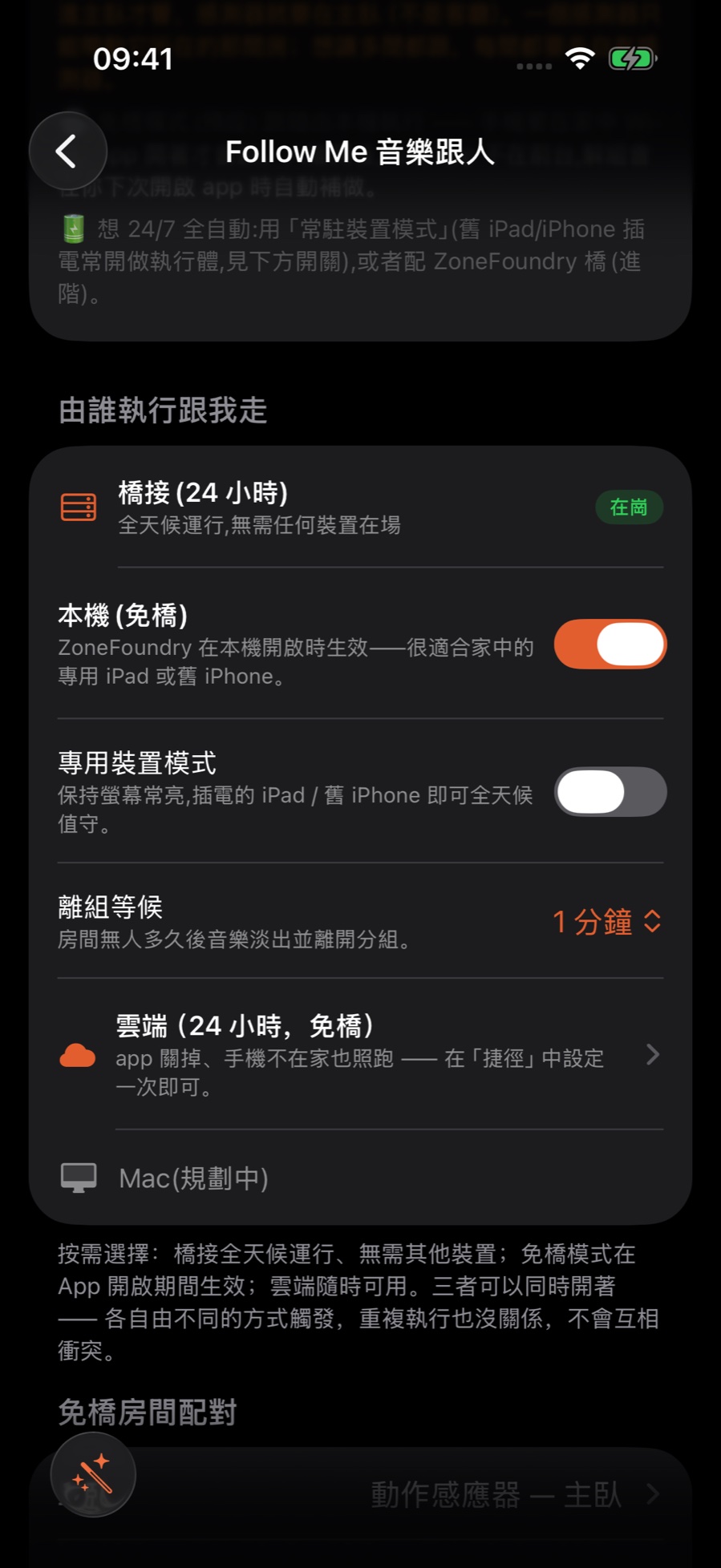
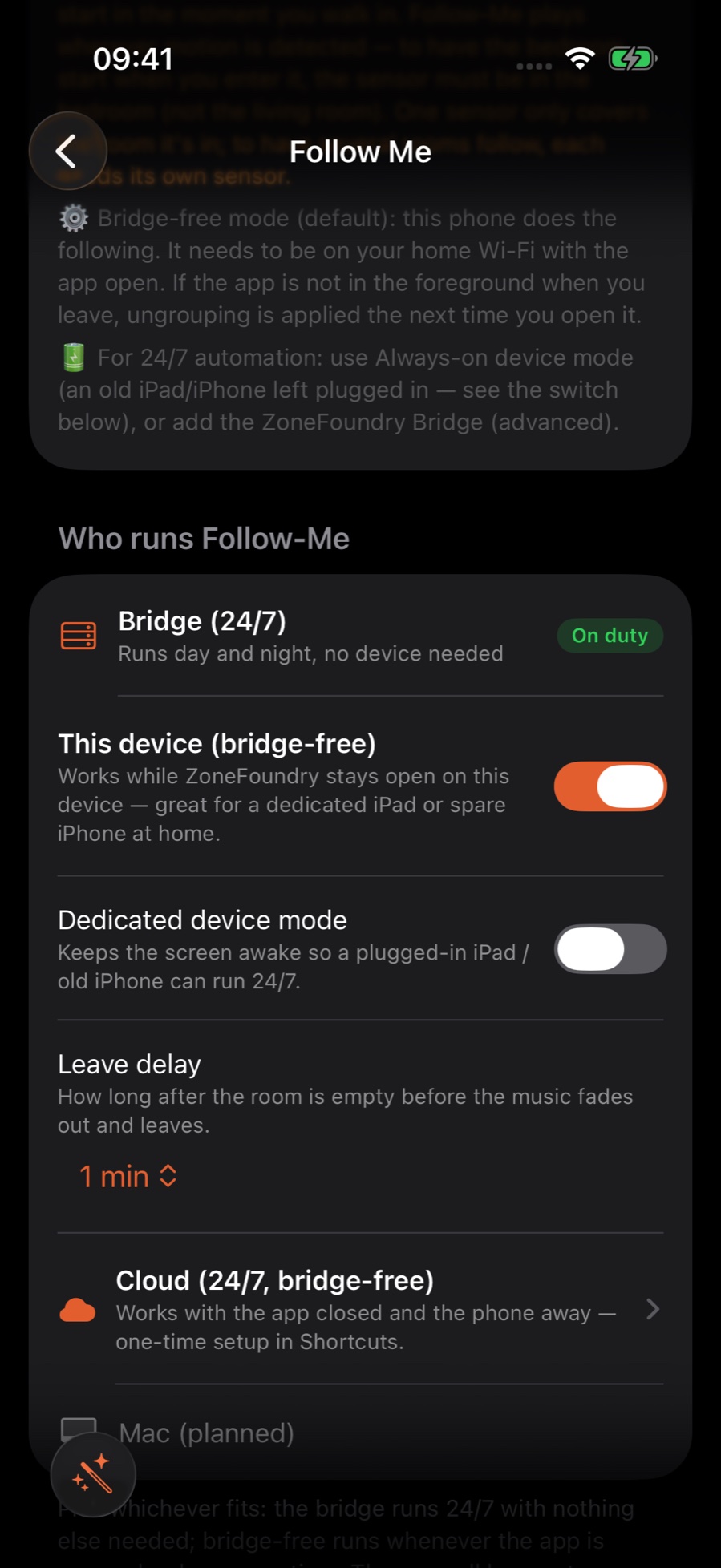
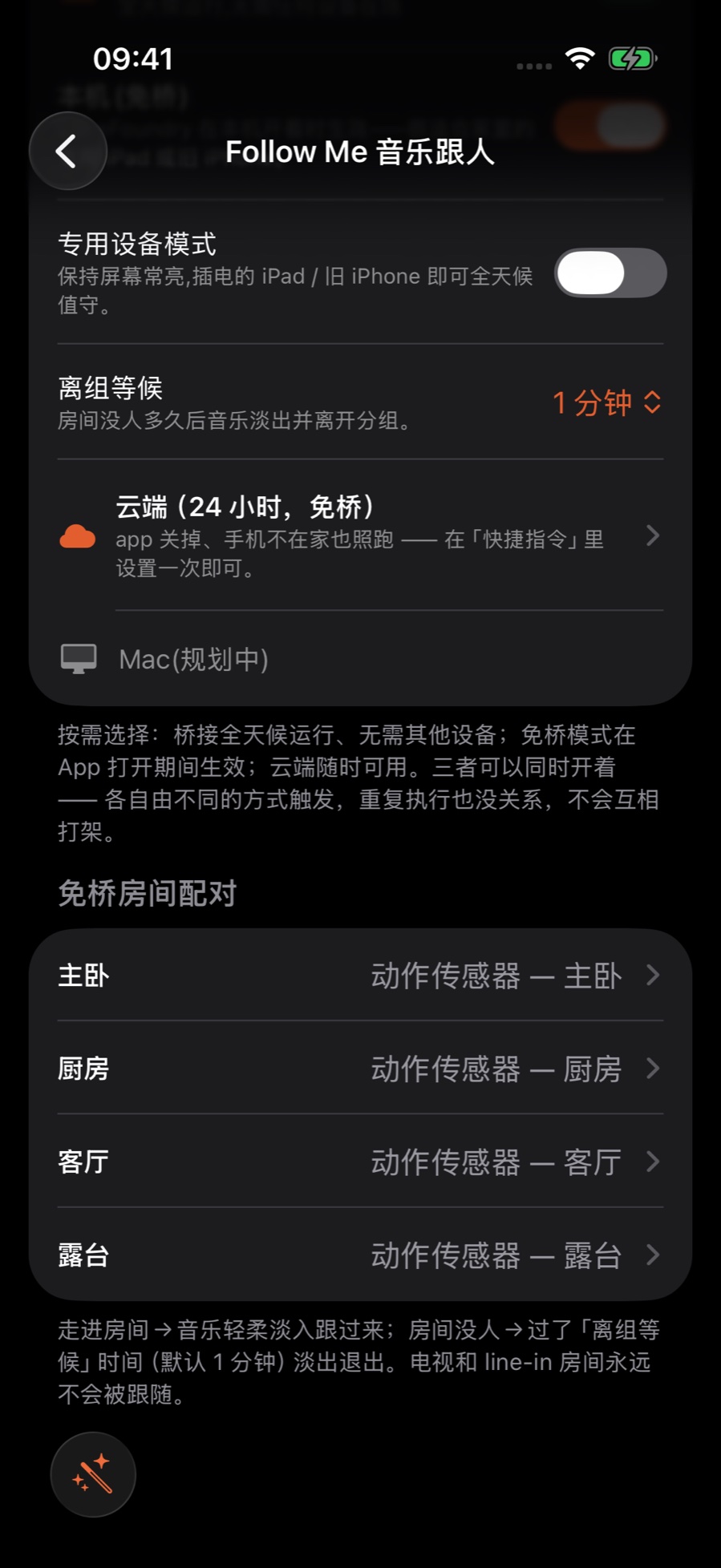
配对就是告诉 ZoneFoundry:「这个传感器一感到有人,音乐就该来这间房。」桥接和本机的配对位置不一样:配對等於告訴 ZoneFoundry:「這個傳感器一感到有人,音樂就應該來這間房。」橋接和本機的配對位置不一樣:Pairing tells ZoneFoundry: "When this sensor senses someone, bring the music to this room." The bridge and this device are paired in different places:
- 用桥接:在「桥接自动化(24 小时)」这一区,给每间房选一个动作传感器并完成配对。App 会在 Apple「家庭」里替你建好自动化:传感器检测到有人,就打开桥接上这间房的 Follow-Me 开关,没人了就关掉。之后 App 关掉也照跑(自动化在家居中枢上运行)。用橋接:在「橋接自動化(24 小時)」這一區,為每間房選一個動作傳感器並完成配對。App 會在 Apple「家庭」裡替你建好自動化:傳感器偵測到有人,就打開橋接上這間房的 Follow-Me 開關,沒人了就關掉。之後 App 關掉也照樣運行(自動化在家居中樞上運行)。With the bridge: in the bridge automation (24/7) section, pick a motion sensor for each room and complete the pairing. The app builds the Apple Home automations for you: when the sensor detects someone it turns on that room's Follow-Me switch on the bridge, and turns it off when the room empties. After that it runs even with the app closed (the automations run on your home hub).
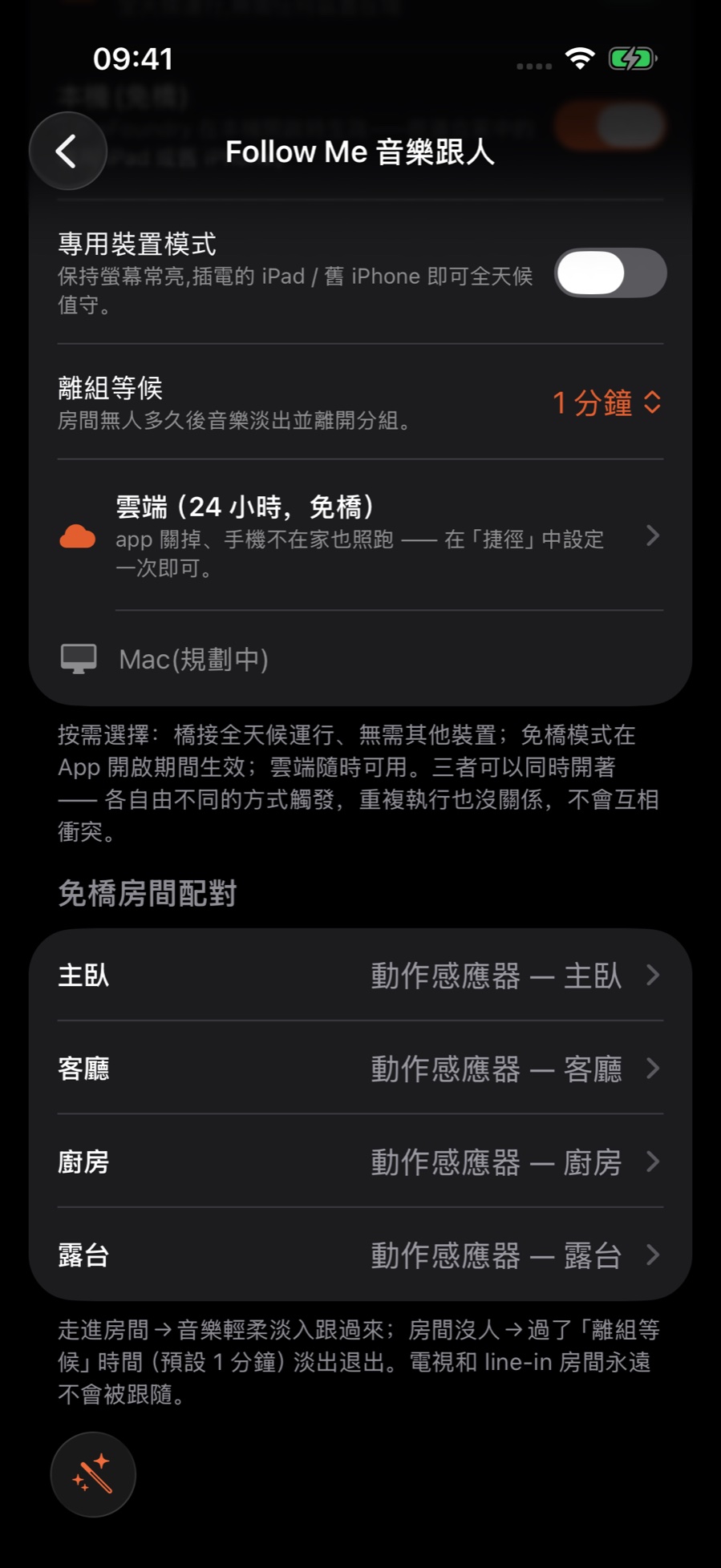
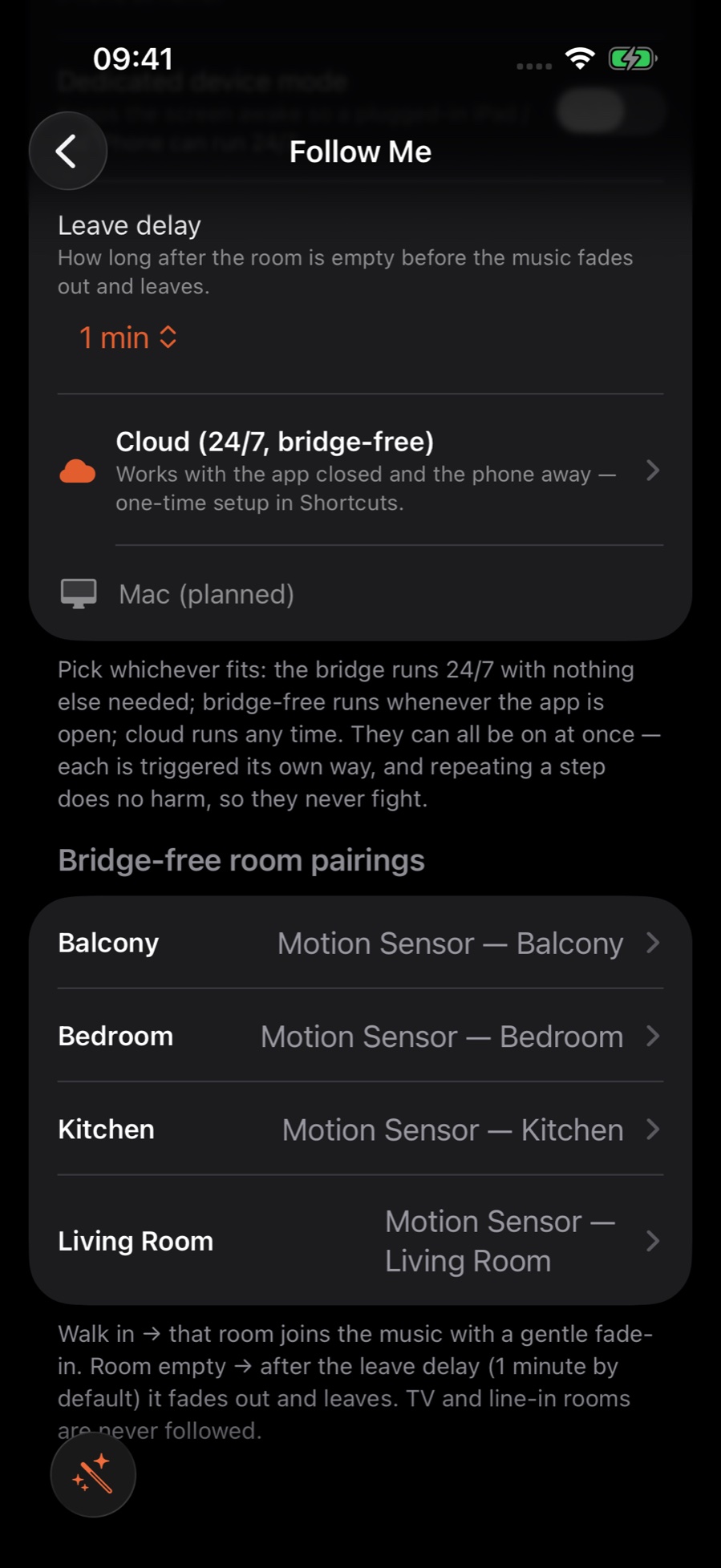
- 用本机(免桥):先打开「本机(免桥)」开关,再在「免桥房间配对」里给每间房选一个传感器(不想跟随的房间选「关」)。这台设备要留在家里、连着家里 Wi-Fi,ZoneFoundry 开在前台;专门用来做这件事的话,可以打开「专用设备模式」,它会让屏幕保持常亮。离开房间时如果 App 不在前台,那间房的退出要等下次打开 App 才会补做。用本機(免橋):先打開「本機(免橋)」開關,再在「免橋房間配對」裡為每間房選一個傳感器(不想跟隨的房間選「關」)。這部裝置要留在家中、連著家中 Wi-Fi,ZoneFoundry 開在前台;專門用來做這件事的話,可以打開「專用裝置模式」,它會令螢幕保持常亮。離開房間時如果 App 不在前台,那間房的退出要等下次打開 App 才會補做。With this device (bridge-free): first turn on the This device (bridge-free) switch, then pick a sensor for each room in the bridge-free room pairing list (set rooms you don't want followed to Off). The device must stay at home on your home Wi-Fi with ZoneFoundry open in the foreground; if it is dedicated to this, turn on dedicated device mode to keep the screen on. If the app is not in the foreground when you leave a room, that room's exit waits until the app is next opened.
开始播一首歌,然后走走看開始播一首歌,然後走一走看看Start playing something, then walk around
在其中一个房间正常播一首歌,然后起身换房间。当你走进另一间,传感器感到有人,那间房会在几秒内淡入、加入正在播的音乐;你离开的房间等传感器报告没人,再过「离组等候」的时间后淡出退出。一路走,音乐一路跟。在其中一個房間正常播一首歌,然後起身換房間。當你走進另一間,傳感器感到有人,那間房會在幾秒內淡入、加入正在播的音樂;你離開的房間等傳感器報告沒人,再過「離組等候」的時間後淡出退出。一路走,音樂一路跟。Play a song normally in one room, then get up and change rooms. As you enter another room, its sensor senses you and that room fades in within a few seconds, joining the music that is playing; the room you left fades out and leaves once its sensor reports it empty and the leave delay has passed. Keep walking and the music keeps following.
Follow-Me 只跟音乐。要先有一个房间正在播音乐,否则走进房间什么都不会发生;正在播电视或 line-in 的房间不会被跟随。Follow-Me 只跟音樂。要先有一個房間正在播音樂,否則走進房間甚麼都不會發生;正在播電視或 line-in 的房間不會被跟隨。Follow-Me only follows music. Some room has to be playing music already, otherwise walking in does nothing; a room playing TV or line-in audio is not followed.
提示:交接不会瞬间完成,传感器感知、再淡入需要几秒,属正常。如果觉得离开的房间退得太快或太慢,先在 Follow Me 页调「离组等候」(即刻 / 1 / 2 / 5 / 10 分钟;要先打开「本机(免桥)」开关才会出现这一项);也可以去 Apple「家庭」里调那个传感器本身的设置。提示:交接不會立即完成,傳感器感知、再淡入需要幾秒,屬正常。如果覺得離開的房間退得太快或太慢,先在 Follow Me 頁調整「離組等候」(即刻 / 1 / 2 / 5 / 10 分鐘;要先打開「本機(免橋)」開關才會出現這一項);也可以去 Apple「家庭」裡調整那個傳感器本身的設定。Tip: Handoff isn't instant — sensing plus the fade-in takes a few seconds, which is normal. If the room you left drops out too soon or too late, first adjust the leave delay on the Follow Me page (immediately / 1 / 2 / 5 / 10 minutes; it only appears after you turn on the This device (bridge-free) switch). You can also adjust that sensor's own settings in Apple Home.
用顺手了,再微调用順手之後,再微調Fine-tune once it feels right
跑熟之后,可以回到 Follow Me 页加减房间。想临时停用(比如有客人、或想多间房一起放):本机模式关掉「本机(免桥)」开关;桥接模式在配对列表里左滑删除那间房的配对(之后要重新配对);云端执行要去 Apple「家庭」App 里停用对应的自动化。停用后,房间回到你平时手动控制的样子。用熟之後,可以回到 Follow Me 頁加減房間。想臨時停用(例如有客人、或想幾間房一起播):本機模式關掉「本機(免橋)」開關;橋接模式在配對列表裡左滑刪除那間房的配對(之後要重新配對);雲端執行要去 Apple「家庭」App 裡停用對應的自動化。停用之後,房間回到你平時手動控制的狀態。Once you've got the hang of it, head back to the Follow Me page to add or drop rooms. To pause it for a while (say when you have guests or want several rooms playing together): in this-device mode, turn off the This device (bridge-free) switch; in bridge mode, swipe left on a room in the pairing list to delete its pairing (you will need to pair it again later); for the cloud executor, turn off the matching automations in the Apple Home app. Once paused, your rooms go back to normal manual control.
和 Apple「家庭」打通:Follow-Me 用的就是 Apple「家庭」里的动作传感器。桥接模式下,桥接会把你的 Sonos 房间映射进 Apple「家庭」(以配件形式出现),跟随直接跑在家庭自动化引擎上,和你其他 HomeKit 设备协同。本机模式则是 ZoneFoundry 在前台时自己读取传感器的变化。與 Apple「家庭」打通:Follow-Me 用的就是 Apple「家庭」裡的動作傳感器。橋接模式下,橋接會將你的 Sonos 房間映射至 Apple「家庭」(以配件形式出現),跟隨直接運行在家庭自動化引擎上,與你其他 HomeKit 裝置協同。本機模式則是 ZoneFoundry 在前台時自己讀取傳感器的變化。Works with Apple Home: Follow-Me runs on the motion sensors already in Apple Home. In bridge mode, the bridge maps your Sonos rooms into Apple Home (they appear there as accessories), so the room-handoff runs on Apple's home-automation engine alongside your other HomeKit devices. In this-device mode, ZoneFoundry watches the sensors itself while it is open in the foreground.
音乐没跟上来?先确认四件事:① 那间房的传感器真的在 Apple「家庭」里、并且能感到你(在家庭 App 看它有没有变「有人」);② 对应的执行者在岗:桥接模式要桥接在家里联网运行,本机模式要那台设备连着家里 Wi-Fi、ZoneFoundry 开在前台;③ 这个房间已经在 Follow Me 页配好了对应的传感器;④ 另一个房间正在播音乐(电视、line-in 不算)。音樂沒有跟上來?先確認四件事:① 那間房的傳感器真的在 Apple「家庭」裡、而且感應到你(在家庭 App 看它有沒有變成「有人」);② 對應的執行者在崗:橋接模式要橋接在家中連網運行,本機模式要那部裝置連著家中 Wi-Fi、ZoneFoundry 開在前台;③ 這個房間已在 Follow Me 頁配好對應的傳感器;④ 另一個房間正在播音樂(電視、line-in 不算)。Music not following? Check four things: ① the room's sensor is really in Apple Home and can sense you (watch it flip to "occupied" in the Home app); ② the matching executor is on duty: in bridge mode the bridge is running on your home network, in this-device mode that device is on your home Wi-Fi with ZoneFoundry open in the foreground; ③ that room has its matching sensor paired on the Follow Me page; ④ another room is playing music (TV and line-in don't count).
分组这件事,说一句就行分組這件事,講一句就行Grouping rooms can be one sentence
「客厅和主卧一起播」——在 ZoneFoundry 里就是一句话,不用逐个房间点进去配对。它是一个 iOS App,直接连你现在的 Sonos,不需要额外硬件。「客廳和主人房一齊播」——在 ZoneFoundry 裏就是一句話,不用逐個房間點進去配對。它是一個 iOS App,直接連你現在的 Sonos,不需要額外硬件。“Play the living room and bedroom together” is a single sentence in ZoneFoundry — no tapping through rooms one by one. It is an iOS app that works with your existing Sonos, no extra hardware needed.