
一分钟看懂一分鐘看懂In one minute
- 多数人不用装:播放、搜歌(含 Plex)、语音、场景、定时、出门遥控都不需要桥。多數人不用裝:播放、搜歌(包括 Plex)、語音、場景、定時、出門遙控都不需要橋。Most people don't need it: playback, search (including Plex), voice, scenes, schedules and remote control all work without it.
- 要装的情况:想在 Apple「家庭」里控制 Sonos、用 Siri / 家庭自动化 / 传感器触发,或者要到家 / 离家自动播放。要裝的情況:想在 Apple「家庭」內控制 Sonos、用 Siri / 家庭自動化 / 感應器觸發,或者要到家 / 離家自動播放。Install it if you want Sonos in Apple Home (Siri, Home automations, sensors) or arrive/leave triggers.
- 怎么装:在 App 里「添加桥接」,回答有一直开着的 NAS,按推荐方式装(群晖、飞牛默认图形界面,其余一键命令),约 10 秒自动配对。怎樣裝:在 App 內「新增橋接」,回答有一直開著的 NAS,按推薦方式安裝(群暉、飛牛預設圖形介面,其餘用一鍵指令),約 10 秒自動配對。How: tap "Add bridge" in the app, confirm you have an always-on NAS, and install the recommended way (graphical on Synology / fnOS, a one-tap command elsewhere) — it pairs in about 10 seconds.
- 手机在家里 Wi-Fi 下:已经跑起来、在等配对的桥会自动出现在 App 里,点「添加到我的家」就行,不用找设置码。手機在家中 Wi-Fi 下:已經執行、正在等待配對的橋會自動出現在 App 內,點「加入我的家」即可,不用尋找設置碼。Phone on your home Wi-Fi: a bridge that's running and waiting to be set up shows up in the app by itself — tap "Add to my home", no setup code needed.
- 不支持 Mac / Windows 上的 Docker Desktop。不支援 Mac / Windows 上的 Docker Desktop。Not supported: Docker Desktop on Mac or Windows.
先判断:你需要桥接吗?先判斷:你需要橋接嗎?Do you need the bridge?
| 功能功能Feature | 要桥接吗要橋接嗎Bridge? |
|---|---|
| 播放、暂停、音量、分组、多房间播放、暫停、音量、分組、多房間Play, pause, volume, grouping, multi-room | 不需要不需要No |
| 跨服务搜歌(含 Apple Music 电台、Plex)跨服務搜歌(包括 Apple Music 電台、Plex)Search across services (incl. Apple Music radio, Plex) | 不需要不需要No |
| 语音助手、场景、定时、出门遥控語音助手、場景、定時、出門遙控Voice assistant, scenes, schedules, remote control | 不需要(部分要登录 Sonos 账户)不需要(部分要登入 Sonos 帳戶)No (some need a Sonos account sign-in) |
| 房间和场景出现在 Apple「家庭」(Siri、家庭自动化、传感器)房間和場景出現在 Apple「家庭」(Siri、家庭自動化、感應器)Rooms and scenes in Apple Home (Siri, automations, sensors) | 需要需要Yes |
| 到家 / 离家自动触发到家 / 離家自動觸發Arrive / leave triggers | 需要需要Yes |
| 人不在家时存歌单 / 加入 Sonos 收藏不在家時存歌單 / 加入 Sonos 收藏Saving to playlists / Sonos favorites while away | 部分需要(在家时直接走局域网)部分需要(在家時直接經區域網絡)Partly (at home it goes over your LAN) |
| AI 点歌直接进播放队列AI 點歌直接進播放隊列AI requests going straight into the queue | 需要(没有桥也会马上出声,只是暂时不在队列里;打开 App 后会载入队列)需要(沒有橋也會即時出聲,只是暫時不在隊列內;打開 App 後會載入隊列)Yes (without it music still starts, just not in the queue until you open the app) |
关掉桥接,上面标「需要」的几项会暂停,其余功能照常。關掉橋接,上面標「需要」的幾項會暫停,其餘功能照常。If the bridge goes offline, only the "Yes" items pause; everything else keeps working.
开始前你需要開始前你需要Before you start
- 一台常开、装了 Docker 的机器:群晖、飞牛 fnOS、Unraid、TrueNAS、OpenWRT / iStoreOS 软路由或 Linux 主机,和 Sonos 在同一个家庭网络,并且能上外网。一部常開、裝了 Docker 的機器:群暉、飛牛 fnOS、Unraid、TrueNAS、OpenWRT / iStoreOS 軟路由或 Linux 主機,和 Sonos 在同一個家庭網絡,並且可以上外網。An always-on machine with Docker — Synology, fnOS, Unraid, TrueNAS, an OpenWRT / iStoreOS router or a Linux box — on the same home network as your Sonos, with internet access.
- 不支持 Mac / Windows 上的 Docker Desktop:它没有 host 网络,发现不到局域网里的 Sonos。不支援 Mac / Windows 上的 Docker Desktop:它沒有 host 網絡,發現不到區域網絡內的 Sonos。Docker Desktop on Mac or Windows isn't supported: it has no host networking, so it can't discover Sonos on your LAN.
- ZoneFoundry iPhone App 已经能看到并控制你的 Sonos 房间。iPhone 不需要和桥在同一网段。ZoneFoundry iPhone App 已經可以看到並控制你的 Sonos 房間。iPhone 不需要和橋在同一網段。The ZoneFoundry iPhone app already sees and controls your Sonos rooms. Your iPhone doesn't need to be on the same network segment as the bridge.
方法一:在 App 里添加(推荐)方法一:在 App 內新增(推薦)Option 1: add it from the app (recommended)
1.0.14 起,「添加桥接」会先问你有没有合适的机器,再按你的平台推荐安装方式。整个流程如下:由 1.0.14 起,「新增橋接」會先問你有沒有合適的機器,再按你的平台推薦安裝方式。整個流程如下:From 1.0.14, "Add bridge" first asks whether you have a suitable machine, then recommends an install method for your platform. The whole flow:
打开「添加桥接」打開「新增橋接」Open "Add bridge"
打开 ZoneFoundry,点首页右上角的齿轮,进入「设置 → 家庭桥接」(1.0.10 及更早版本在「高级(桥接) → 桥接列表」)。点右上角「+」→「添加桥接」。打開 ZoneFoundry,點首頁右上角的齒輪,進入「設定 → 家庭橋接」(1.0.10 及更早版本在「高級(橋接) → 橋接列表」)。點右上角「+」→「新增橋接」。Open ZoneFoundry, tap the gear at the top right of Home and go to Settings → Home bridge (on 1.0.10 and earlier: Advanced (Bridge) → Bridges). Tap "+" at the top right → "Add bridge".
回答「有没有一直开着的 NAS」回答「有沒有一直開著的 NAS」Answer "do you have an always-on NAS?"
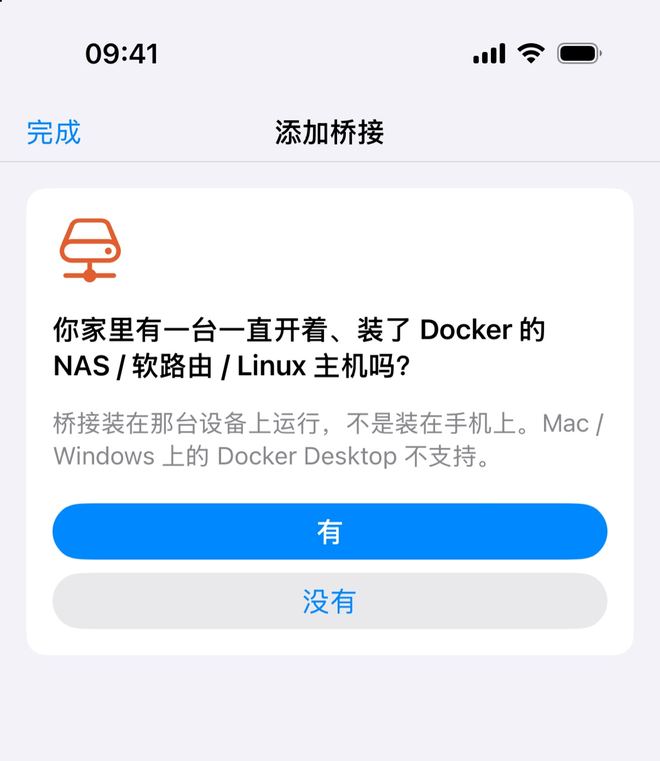
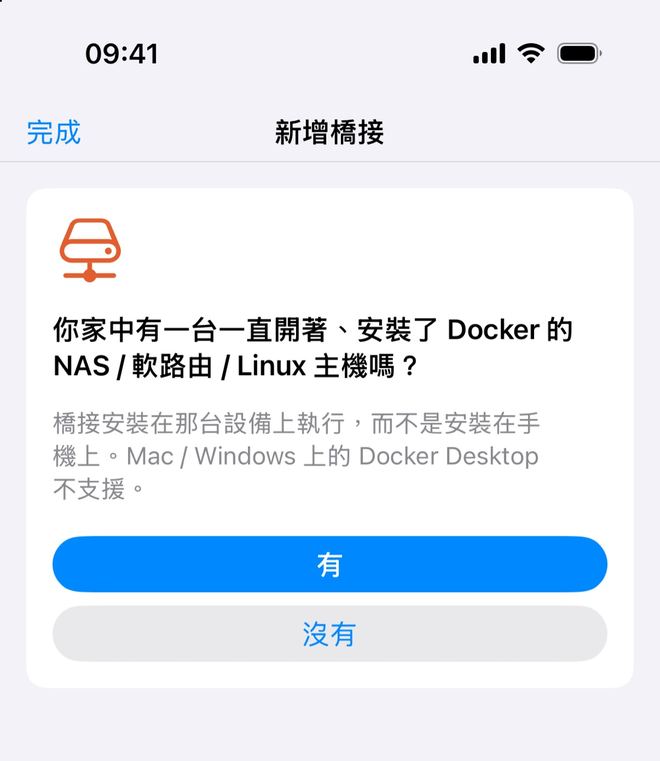
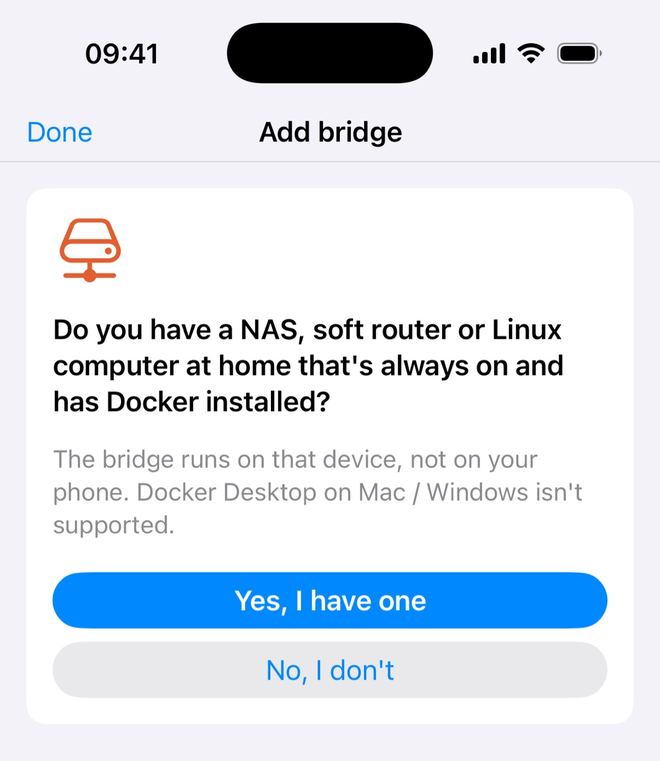
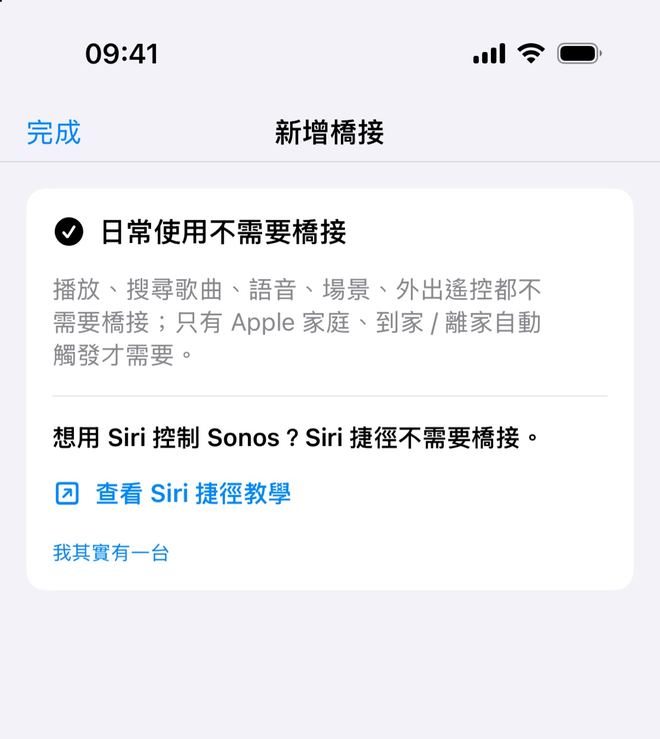
第一屏会问「你家里有一台一直开着、装了 Docker 的 NAS / 软路由 / Linux 主机吗?」,并说明「桥接装在那台设备上运行,不是装在手机上。Mac / Windows 上的 Docker Desktop 不支持。」第一屏會問「你家中有一台一直開著、安裝了 Docker 的 NAS / 軟路由 / Linux 主機嗎?」,並說明「橋接安裝在那台設備上執行,而不是安裝在手機上。Mac / Windows 上的 Docker Desktop 不支援。」The first screen asks "Do you have a NAS, soft router or Linux computer at home that's always on and has Docker installed?" and explains: "The bridge runs on that device, not on your phone. Docker Desktop on Mac / Windows isn't supported."
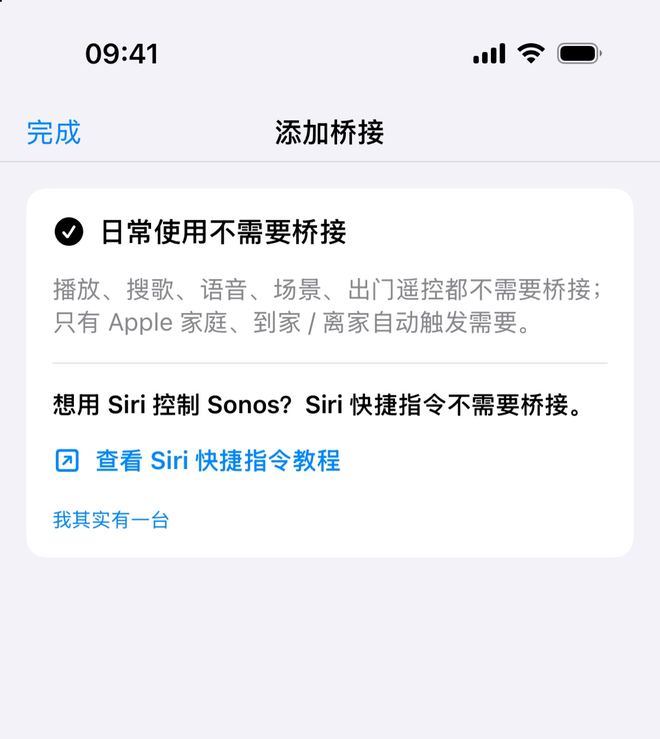
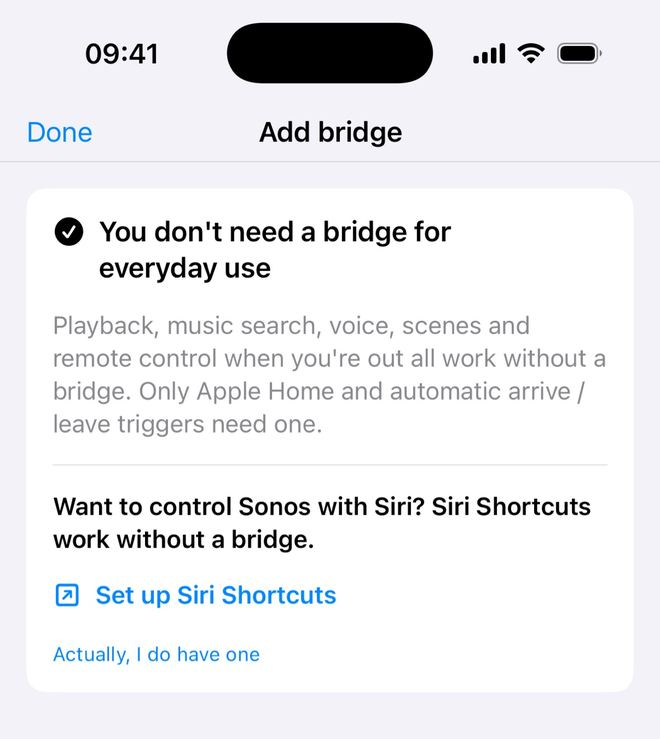
- 点「没有」:App 显示「日常使用不需要桥接」——「播放、搜歌、语音、场景、出门遥控都不需要桥接;只有 Apple 家庭、到家 / 离家自动触发需要。」这时不会生成任何命令。想用 Siri 控制,可以点「查看 Siri 快捷指令教程」;后来有了机器,点「我其实有一台」回到安装。點「沒有」:App 顯示「日常使用不需要橋接」——「播放、搜尋歌曲、語音、場景、外出遙控都不需要橋接;只有 Apple 家庭、到家 / 離家自動觸發才需要。」此時不會產生任何指令。想用 Siri 控制,可以點「查看 Siri 捷徑教學」;之後有了機器,點「我其實有一台」返回安裝。Tap "No, I don't" and the app shows "You don't need a bridge for everyday use" — "Playback, music search, voice, scenes and remote control when you're out all work without a bridge. Only Apple Home and automatic arrive / leave triggers need one." No command is generated. For Siri, tap "Set up Siri Shortcuts"; if you get a machine later, tap "Actually, I do have one".
- 点「有」:进入下一步。點「有」:進入下一步。Tap "Yes, I have one" to continue.
选平台、起名、选网络环境選平台、命名、選網絡環境Pick the platform, a name and the network region
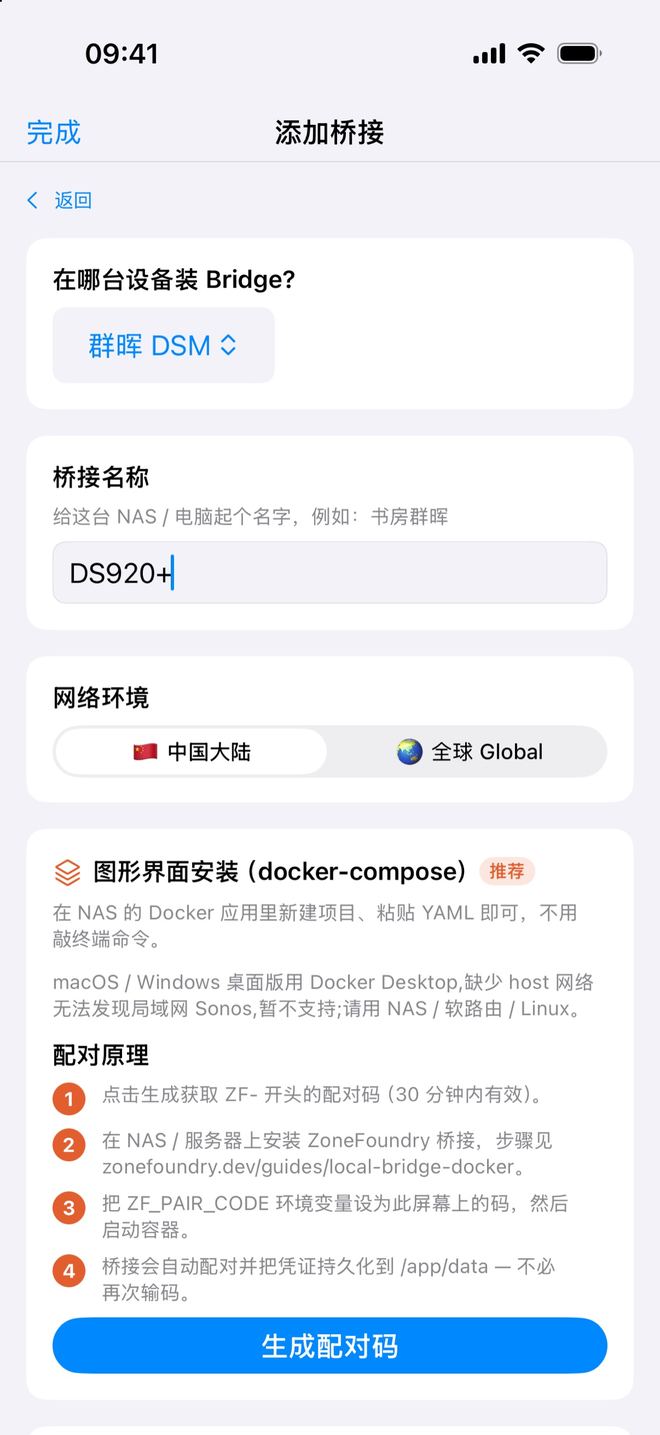
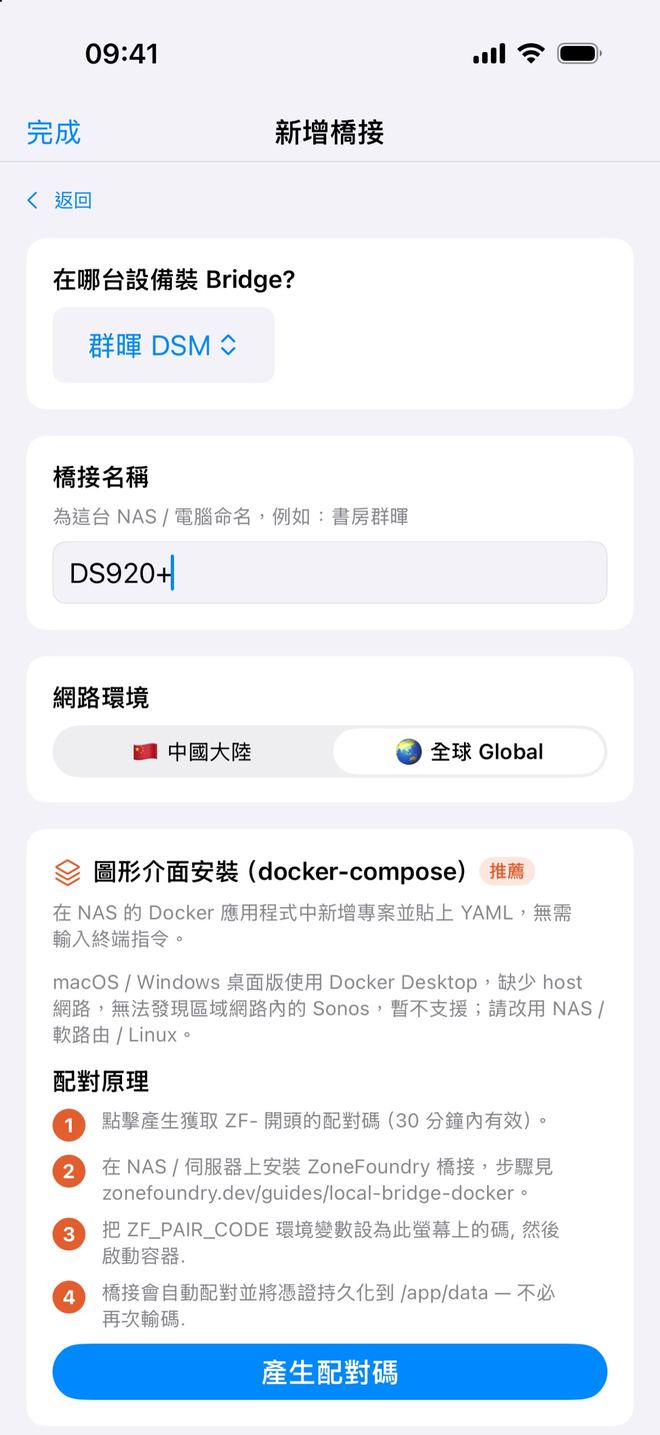
先选要装在哪台设备(群晖、飞牛、Unraid、TrueNAS、OpenWRT / iStoreOS、其他 Linux)。「桥接名称」是给这台 NAS / 电脑起的名字,例如「书房群晖」,不是给音箱起名。「网络环境」在中国大陆请选「🇨🇳 中国大陆」,它从阿里云镜像下载(大陆拉不到 Docker Hub);其他地区选「🌏 全球 Global」。先選要裝在哪部裝置(群暉、飛牛、Unraid、TrueNAS、OpenWRT / iStoreOS、其他 Linux)。「橋接名稱」是給這部 NAS / 電腦起的名稱,例如「書房群暉」,不是給喇叭命名。「網路環境」在中國大陸請選「🇨🇳 中国大陆」,它由阿里雲鏡像下載(大陸拉不到 Docker Hub);其他地區選「🌏 全球 Global」。Choose where you'll install it (Synology, fnOS, Unraid, TrueNAS, OpenWRT / iStoreOS or other Linux). "Bridge name" names the NAS or computer — e.g. Study Synology — not a speaker. Under "Network region", in mainland China choose "🇨🇳 中国大陆" (it downloads from an Alibaba Cloud mirror, since Docker Hub isn't reachable there); elsewhere choose "🌏 全球 Global".
按推荐方式安装按推薦方式安裝Install the recommended way
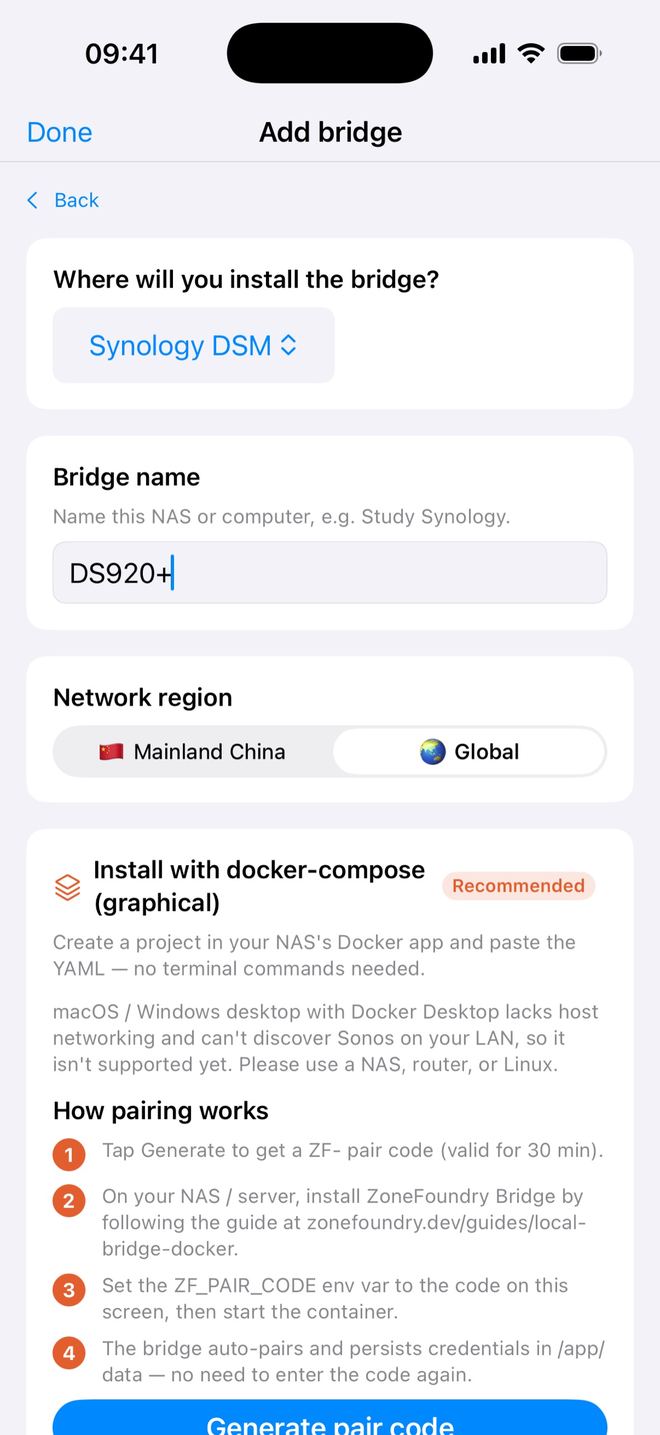
- 群晖、飞牛、TrueNAS:默认推荐「图形界面安装(docker-compose)」——「在 NAS 的 Docker 应用里新建项目、粘贴 YAML 即可,不用敲终端命令。」填好桥接名称后点「生成配对码」,App 给出已填好配对码的 YAML,按下面方法二里你的平台操作。想用终端,展开「或者用一键命令」。群暉、飛牛、TrueNAS:預設推薦「圖形介面安裝(docker-compose)」——「在 NAS 的 Docker 應用程式中新增專案並貼上 YAML,無需輸入終端指令。」填好橋接名稱後點「產生配對碼」,App 會給出已填好配對碼的 YAML,按下面方法二內你的平台操作。想用終端機,展開「或者使用一鍵指令」。Synology, fnOS, TrueNAS: the default is "Install with docker-compose (graphical)" — "Create a project in your NAS's Docker app and paste the YAML — no terminal commands needed." Enter a bridge name, tap "Generate pair code", and the app gives you YAML with the pairing code filled in; follow your platform under Option 2. Prefer the terminal? Expand "Or use a one-tap command".
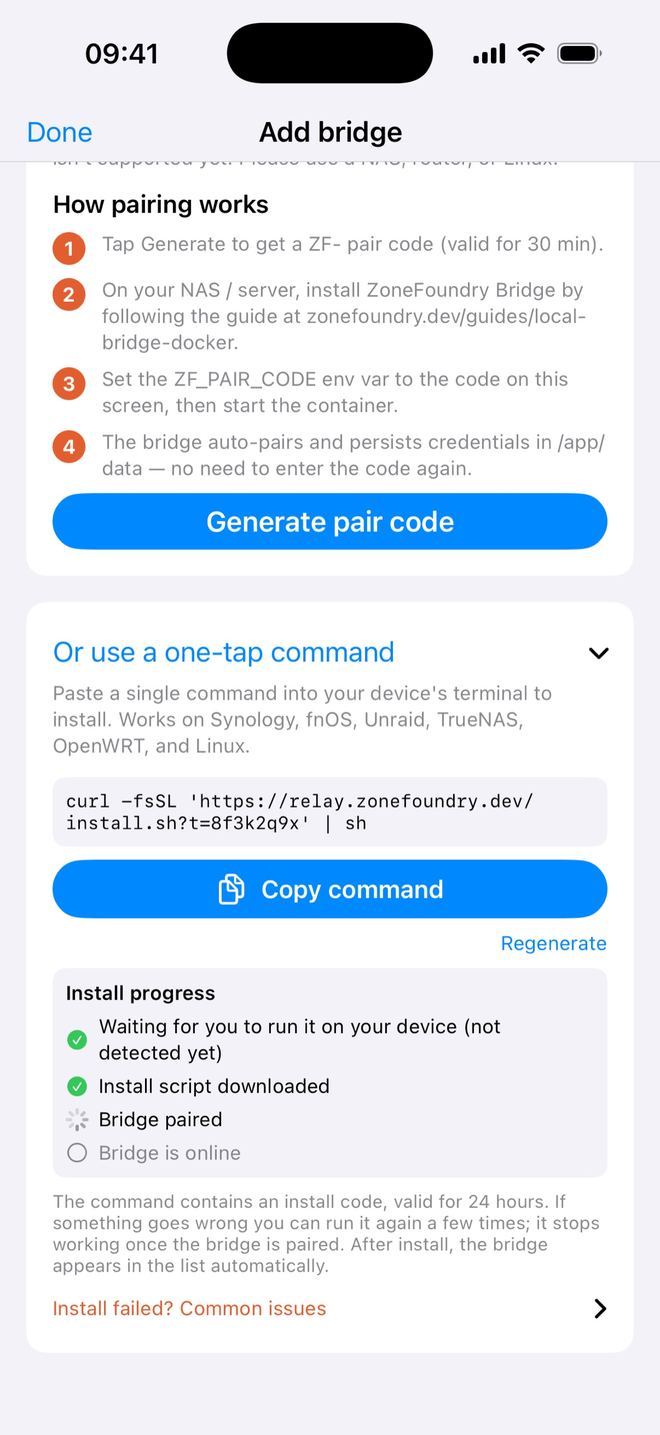
- Unraid、OpenWRT / iStoreOS、Linux:默认推荐「一键安装」。点「生成一键安装命令」→「复制命令」,到装了 Docker 的机器上(终端或 SSH)运行。命令 24 小时内有效:没装好可以重新运行(最多 5 次),桥配对成功后才失效;在微信里打开或预览这条链接不会把它用掉。一键安装各平台通用。Unraid、OpenWRT / iStoreOS、Linux:預設推薦「一鍵安裝」。點「產生一鍵安裝指令」→「複製指令」,到裝了 Docker 的機器上(終端機或 SSH)執行。指令 24 小時內有效:沒裝好可以重新執行(最多 5 次),橋配對成功後才失效;在微信內開啟或預覽這條連結不會把它用掉。一鍵安裝各平台通用。Unraid, OpenWRT / iStoreOS, Linux: the default is "One-tap install". Tap "Generate one-tap install command" → "Copy command" and run it on the Docker machine (terminal or SSH). The command works for 24 hours: if the install didn't finish you can run it again (up to 5 times), and it only stops working once the bridge has paired. Opening or previewing the link in WeChat doesn't use it up. The one-tap command works on every platform.
看安装进度,确认桥出现在列表里看安裝進度,確認橋出現在列表內Watch the progress and check the bridge appears
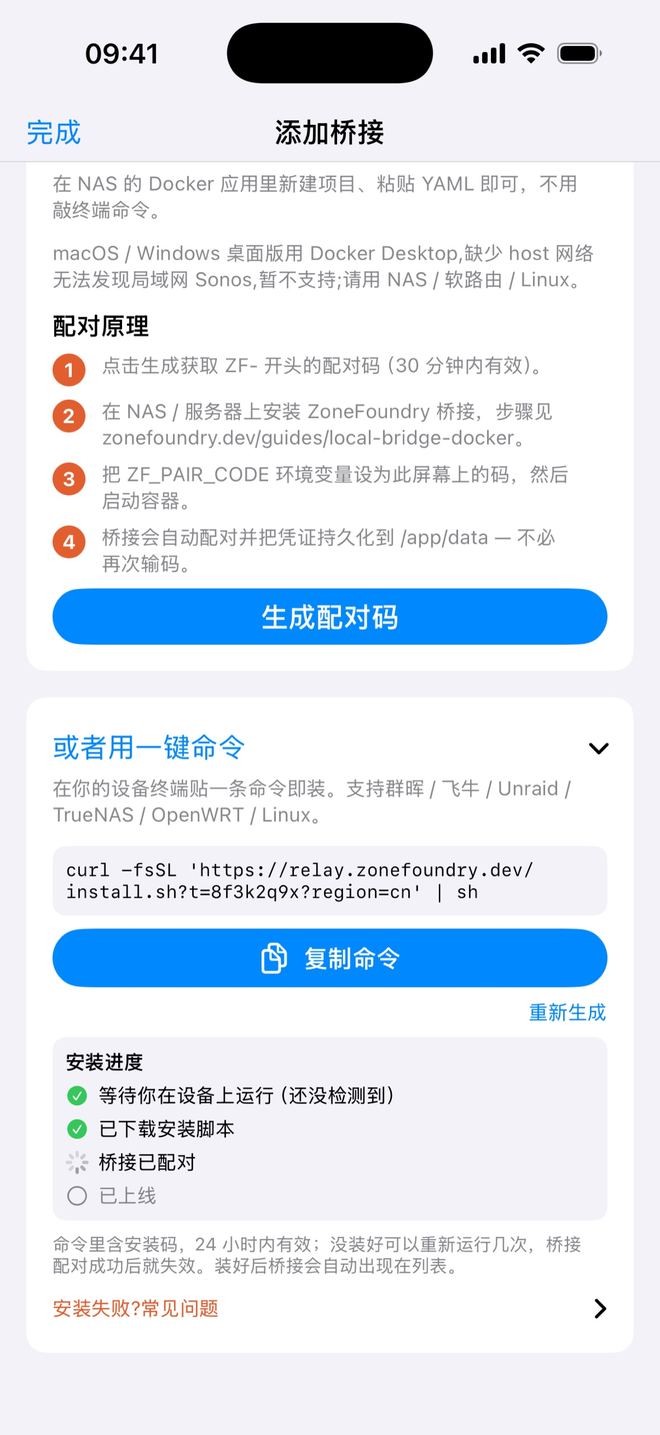
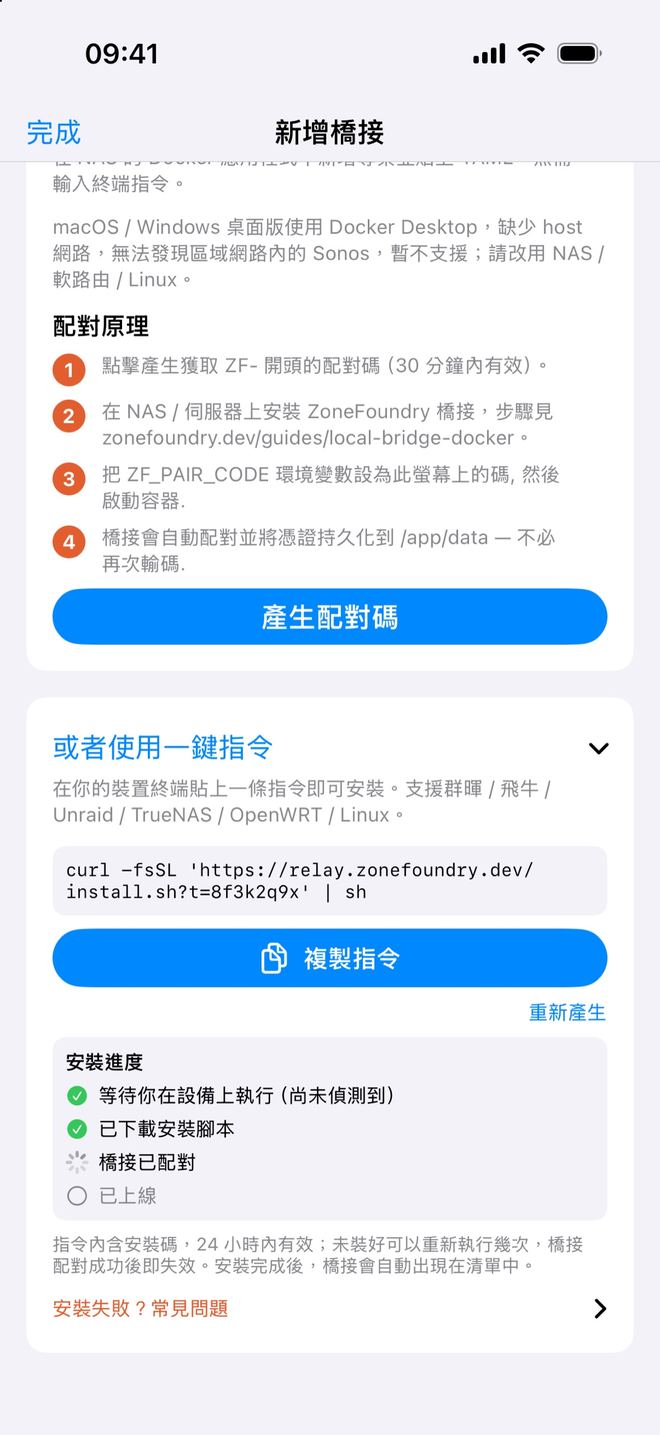
生成一键安装命令后,App 会实时显示「安装进度」:「等待你在设备上运行(还没检测到)」→「已下载安装脚本」→「桥接已配对」→「已上线」。超过 10 分钟还停在第一步,会提示「这条命令要在 NAS 的终端 / SSH 里运行,不是在手机上。」,并给出「查看安装教程」。用 YAML 安装的,启动后约 10 秒自动配对。產生一鍵安裝指令後,App 會即時顯示「安裝進度」:「等待你在設備上執行(尚未偵測到)」→「已下載安裝腳本」→「橋接已配對」→「已上線」。超過 10 分鐘仍停在第一步,會提示「這條指令要在 NAS 的終端機 / SSH 中執行,而不是在手機上。」,並提供「查看安裝教學」。用 YAML 安裝的,啟動後約 10 秒自動配對。After you generate the one-tap command, the app shows "Install progress" live: "Waiting for you to run it on your device (not detected yet)" → "Install script downloaded" → "Bridge paired" → "Bridge is online". If it's still on the first step after 10 minutes, it reminds you "This command has to be run in your NAS's terminal / SSH, not on your phone." with "Open the install guide". With YAML, the bridge pairs about 10 seconds after it starts.
装好后,桥会自动出现在「家庭桥接」列表里,不用填 IP。看到它出现,就说明连上了。裝好後,橋會自動出現在「家庭橋接」列表內,不用填 IP。看到它出現,就代表連上了。Once installed, the bridge appears in the Home bridge list on its own — no IP to enter. When you see it, you're connected.
方法二:按平台手动安装方法二:按平台手動安裝Option 2: install by platform
在「添加桥接」页选好平台、填好桥接名称后点「生成配对码」:群晖、飞牛、TrueNAS 直接在「图形界面安装(docker-compose)」卡片里点;Unraid、OpenWRT、Linux 要先展开「手动安装(进阶)」。App 会生成这个平台专用的 docker-compose YAML(群晖、飞牛、TrueNAS)或 docker run 命令(Unraid、OpenWRT、Linux),配对码已经填好,整段复制就行。各平台的操作如下:在「新增橋接」頁選好平台、填好橋接名稱後點「產生配對碼」:群暉、飛牛、TrueNAS 直接在「圖形介面安裝(docker-compose)」卡片內點;Unraid、OpenWRT、Linux 要先展開「手動安裝(進階)」。App 會生成此平台專用的 docker-compose YAML(群暉、飛牛、TrueNAS)或 docker run 指令(Unraid、OpenWRT、Linux),配對碼已經填好,整段複製即可。各平台的操作如下:On "Add bridge", pick your platform, enter a bridge name and tap "Generate pair code": on Synology, fnOS and TrueNAS it's right in the "Install with docker-compose (graphical)" card; on Unraid, OpenWRT and Linux expand "Manual install (advanced)" first. The app writes a docker-compose YAML (Synology, fnOS, TrueNAS) or a docker run command (Unraid, OpenWRT, Linux) for that platform with the pairing code filled in — copy the whole thing. Platform steps:
群晖 Synology(Container Manager)群暉 Synology(Container Manager)Synology (Container Manager)
- 不要用「镜像仓库 → 下载映像」,改用下面的「项目」方式。不要用「映像倉庫 → 下載映像」,改用下面的「專案」方式。Don't use Registry → Download Image; use Project below.
- SSH 登录群晖,运行 App 给的那条
chown/synoacltool/chmod命令,建好并修正数据目录/volume1/docker/zonefoundry-bridge的权限。SSH 登入群暉,執行 App 給的那條chown/synoacltool/chmod指令,建立並修正資料目錄/volume1/docker/zonefoundry-bridge的權限。SSH into the Synology and run thechown/synoacltool/chmodcommand the app shows, which creates and fixes/volume1/docker/zonefoundry-bridge. - Container Manager →「项目」→「新增」→ 路径选上面的目录 →「创建 docker-compose.yml」,贴上 App 给的 YAML。Container Manager →「專案」→「新增」→ 路徑選上面的目錄 →「建立 docker-compose.yml」,貼上 App 給的 YAML。Container Manager → Project → Create → set the path to that folder → "Create docker-compose.yml" and paste the app's YAML.
- 「下一步」→「完成」→「启动」,约 10 秒自动配对。失败时按「停止 → 清除 → 构建」,不要点「重启」。「下一步」→「完成」→「啟動」,約 10 秒自動配對。失敗時按「停止 → 清除 → 建置」,不要點「重新啟動」。Next → Done → Start; it pairs in about 10 seconds. If it fails, use Stop → Clean → Build, not Restart.
飞牛 fnOS飛牛 fnOSfnOS
- SSH 登录(默认账号 admin),运行 App 给的
mkdir/chmod命令,建好/vol1/1000/docker/zonefoundry-bridge。这是 admin 用户(UID 1000)、单卷的默认路径;多用户或多卷时把/vol1/1000/改成你自己的。SSH 登入(預設帳號 admin),執行 App 給的mkdir/chmod指令,建立/vol1/1000/docker/zonefoundry-bridge。這是 admin 用戶(UID 1000)、單卷的預設路徑;多用戶或多卷時把/vol1/1000/改成你自己的。SSH in (default account admin) and run the app'smkdir/chmodcommand to create/vol1/1000/docker/zonefoundry-bridge. That's the default for the admin user (UID 1000) on one volume; change/vol1/1000/if you have several users or volumes. - Docker 应用 →「项目」→「新建」→「通过 docker-compose.yml 创建」,贴上 App 给的 YAML →「启动」,约 10 秒自动配对。Docker 應用 →「專案」→「新建」→「透過 docker-compose.yml 建立」,貼上 App 給的 YAML →「啟動」,約 10 秒自動配對。Docker app → Project → New → "Create from docker-compose.yml", paste the app's YAML → Start; it pairs in about 10 seconds.
- 失败时按「停止 → 清除 → 构建」,不要点「重启」。失敗時按「停止 → 清除 → 建置」,不要點「重新啟動」。If it fails, use Stop → Clean → Build, not Restart.
UnraidUnraidUnraid
- Web 界面 → Tools → Web Terminal,贴上 App 给的
docker run命令,回车,约 10 秒自动配对,容器会出现在 Docker 页。Web 介面 → Tools → Web Terminal,貼上 App 給的docker run指令,按 Enter,約 10 秒自動配對,容器會出現在 Docker 頁。Web UI → Tools → Web Terminal, paste the app'sdocker runcommand and press Enter; it pairs in about 10 seconds and shows up on the Docker tab. - 命令里的
--group-add 281(Unraid 的 docker 组)是给 App 一键升级用的,保留即可。指令內的--group-add 281(Unraid 的 docker 群組)是給 App 一鍵升級用的,保留即可。Keep--group-add 281(Unraid's docker group) — it lets the app's one-tap upgrade work. - Community Apps 里也能搜到 zonefoundry,但那是较早的模板,建议优先用 App 给的命令。Community Apps 內也搜到 zonefoundry,但那是較早的範本,建議優先用 App 給的指令。Community Apps also lists zonefoundry, but that template is older; prefer the command from the app.
TrueNAS SCALETrueNAS SCALETrueNAS SCALE
- Apps → Custom App →「Install via YAML」,贴上 App 给的 YAML → 保存并启动,约 10 秒自动配对。配对慢时去 App Logs 看日志。Apps → Custom App →「Install via YAML」,貼上 App 給的 YAML → 儲存並啟動,約 10 秒自動配對。配對慢時到 App Logs 看日誌。Apps → Custom App → "Install via YAML", paste the app's YAML, save and start; it pairs in about 10 seconds. Check App Logs if it's slow.
OpenWRT / iStoreOS 软路由OpenWRT / iStoreOS 軟路由OpenWRT / iStoreOS routers
- 先确认路由器有 Docker:iStoreOS 自带;OpenWRT 要先装 dockerman / luci-app-docker。先確認路由器有 Docker:iStoreOS 內建;OpenWRT 要先裝 dockerman / luci-app-docker。Make sure Docker is installed: built into iStoreOS; on OpenWRT install dockerman / luci-app-docker first.
- SSH 登录路由器,运行 App 给的
docker run命令,约 10 秒自动配对,数据保存在/opt/docker/zonefoundry-bridge。SSH 登入路由器,執行 App 給的docker run指令,約 10 秒自動配對,資料儲存在/opt/docker/zonefoundry-bridge。SSH into the router and run the app'sdocker runcommand; it pairs in about 10 seconds and keeps data in/opt/docker/zonefoundry-bridge.
Linux 主机Linux 主機Linux
- SSH 登录已装 Docker 的主机,运行 App 给的
docker run命令,自动配对,凭证保存在/var/lib/zonefoundry-bridge。命令已带--restart unless-stopped,开机会自动启动。SSH 登入已裝 Docker 的主機,執行 App 給的docker run指令,自動配對,憑證儲存在/var/lib/zonefoundry-bridge。指令已帶--restart unless-stopped,開機會自動啟動。SSH into a machine with Docker and run the app'sdocker runcommand; it pairs itself and keeps credentials in/var/lib/zonefoundry-bridge.--restart unless-stoppedis already included, so it starts on boot.
命令长什么样(参考)指令是怎樣的(參考)What the command looks like (reference)
正常照 App 复制即可,下面只是让你看懂每一项。ZF-XXXXXXXX 是配对码,镜像按地区二选一。正常照 App 複製即可,下面只是讓你看懂每一項。ZF-XXXXXXXX 是配對碼,鏡像按地區二選一。Normally just copy it from the app; this is only so you know what each line does. ZF-XXXXXXXX is the pairing code; pick the image for your region.
docker run -d \
  --name zonefoundry-bridge \
  --network host \
  --restart unless-stopped \
  --pull always \
  -e TZ=Asia/Shanghai \
  -e ZF_RELAY_URL=wss://relay.zonefoundry.dev/ws \
  -e ZF_PAIR_CODE=ZF-XXXXXXXX \
  -e ZF_AGENT_LABEL=my-bridge \
  -v /var/lib/zonefoundry-bridge:/app/data \
  -v /var/run/docker.sock:/var/run/docker.sock \
ghcr.io/kisssam6886/zonefoundry:latest- 镜像:海外用
ghcr.io/kisssam6886/zonefoundry:latest;中国大陆用crpi-csglvxm8dyi65pur.cn-shenzhen.personal.cr.aliyuncs.com/zonefoundry/bridge:latest。鏡像:海外用ghcr.io/kisssam6886/zonefoundry:latest;中國大陸用crpi-csglvxm8dyi65pur.cn-shenzhen.personal.cr.aliyuncs.com/zonefoundry/bridge:latest。Image: outside mainland China useghcr.io/kisssam6886/zonefoundry:latest; in mainland China usecrpi-csglvxm8dyi65pur.cn-shenzhen.personal.cr.aliyuncs.com/zonefoundry/bridge:latest. - 必须用 host 网络:桥靠局域网发现 Sonos,bridge 网络模式找不到音箱。必須用 host 網絡:橋靠區域網絡發現 Sonos,bridge 網絡模式找不到喇叭。Host networking is required: the bridge discovers Sonos on your LAN; bridge-mode networking can't see the speakers.
- /app/data 存配对凭证,重启后不用再配对。容器会自己处理目录权限;只有日志出现
data dir is not writable时,才需要在宿主机执行chown -R 10001:10001 <目录>(群晖按上面第 2 步先做)。/app/data 儲存配對憑證,重啟後不用再配對。容器會自行處理目錄權限;只有日誌出現data dir is not writable時,才需要在主機執行chown -R 10001:10001 <目錄>(群暉按上面第 2 步先做)。/app/data keeps the pairing credentials so a restart doesn't need re-pairing. The container fixes permissions itself; only if the log saysdata dir is not writablerunchown -R 10001:10001 <folder>on the host (Synology does this up front, step 2 above). - docker.sock 是给 App 里的「升级」按钮用的;不要一键升级可以删掉这行,以后手动更新。不要加
--cap-drop ALL,否则容器没法正常降权。docker.sock 是給 App 內的「升級」按鈕用的;不要一鍵升級可以刪掉這行,以後手動更新。不要加--cap-drop ALL,否則容器無法正常降權。docker.sock powers the app's Upgrade button; remove that line if you prefer manual updates. Don't add--cap-drop ALL— the container then can't drop privileges properly.
手机在家里 Wi-Fi 下,为什么不用设置码了?手機在家中 Wi-Fi 下,為甚麼不用設置碼了?My phone is on home Wi-Fi — why don't I need a setup code any more?
1.0.14 起,App 会自动找到「和你的手机在同一个网络出口、正在等待配对」的桥接。容器启动时没带配对码,或者配对码已过期、已用过,桥就会进入等待配对状态;这时打开「桥接列表」或「添加桥接」页,最上面会出现一张卡片:由 1.0.14 起,App 會自動找到「和你的手機使用同一個網絡出口、正在等待配對」的橋接。容器啟動時沒帶配對碼,或者配對碼已過期、已用過,橋就會進入等待配對狀態;此時打開「橋接列表」或「新增橋接」頁,最上方會出現一張卡片:From 1.0.14 the app finds bridges that are waiting to be set up on the same internet connection as your phone. If the container started without a pairing code, or the code expired or was already used, the bridge waits to be set up; open the "Bridges" list or "Add bridge" and a card appears at the top:
- 标题「发现一台正在等待配对的桥接:主机名(平台)」,下面写着「它和你的手机在同一个网络里,不用再输入设置码。」標題「發現一台正在等待配對的橋接:主機名稱(平台)」,下面寫著「它與你的手機在同一個網絡中,無需再輸入設置碼。」Title "Found a bridge waiting to be set up: hostname (platform)", with "It's on the same network as your phone, so you don't need to type a setup code." underneath.
- 认得这台机器,点「添加到我的家」。会再弹一次「确认这是你家里的设备」:「只有确认是你自己刚装好的桥接才添加;不认识这个名字请点「取消」。」确认后显示「已把 名字 添加到你的家」,接着「桥接已配对」→「已上线」。認得這部機器,點「加入我的家」。會再彈出「確認這是你家中的裝置」:「只有確認是你自己剛安裝好的橋接才加入;如不認識這個名稱,請點按「取消」。」確認後顯示「已把 名稱 加入你的家」,接著「橋接已配對」→「已上線」。If you recognise the machine, tap "Add to my home". A second prompt, "Confirm this is your device at home", says "Only add it if you just installed this bridge yourself. If you don't recognise the name, tap Cancel." After confirming you'll see "Added name to your home", then "Bridge paired" → "Bridge is online".
- 不认识这个名字,点「不是我的」,本页不再显示它。不認識這個名稱,點「不是我的」,本頁不再顯示它。Don't recognise it? Tap "Not mine" and it's hidden on this page.
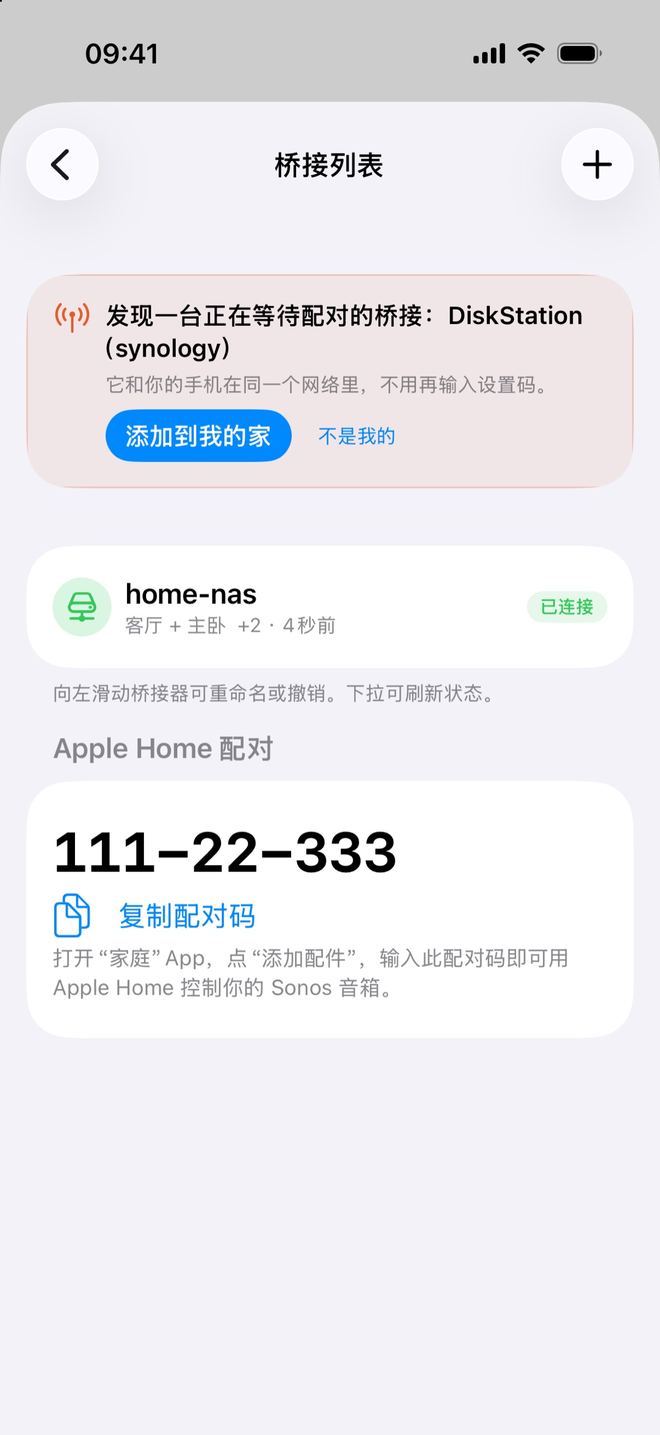
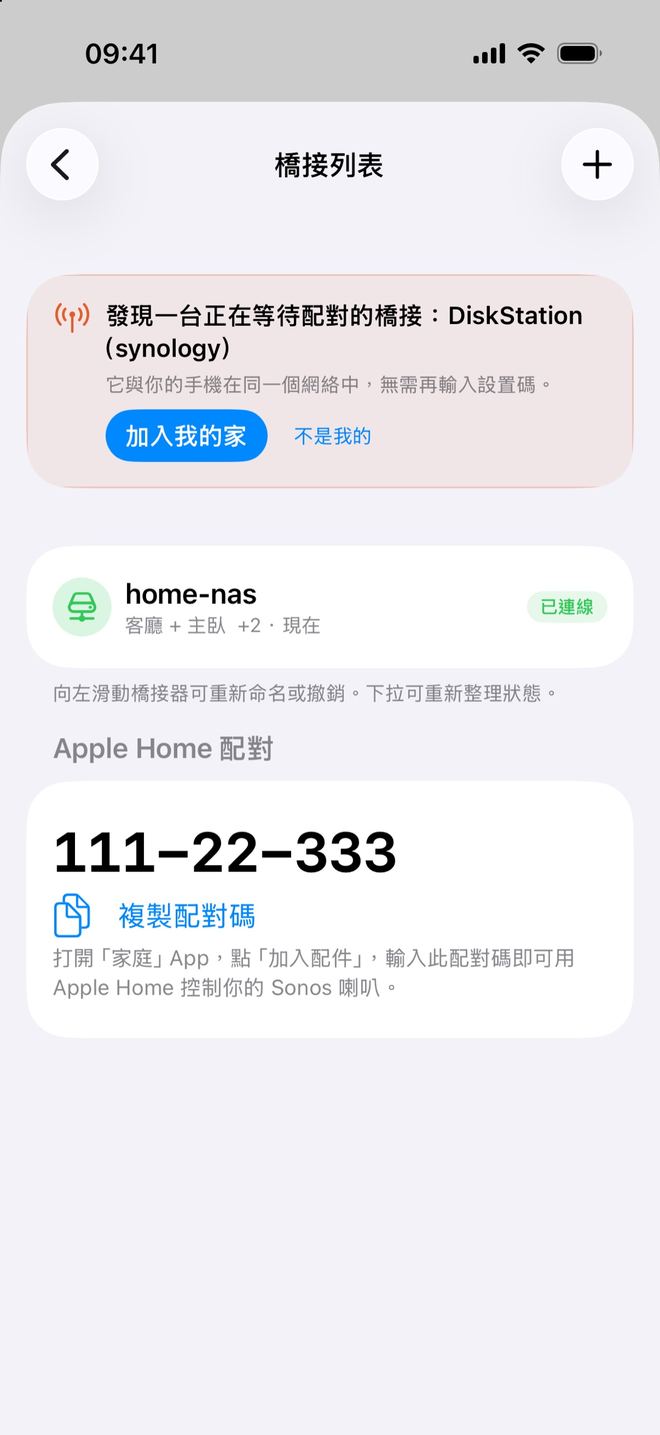
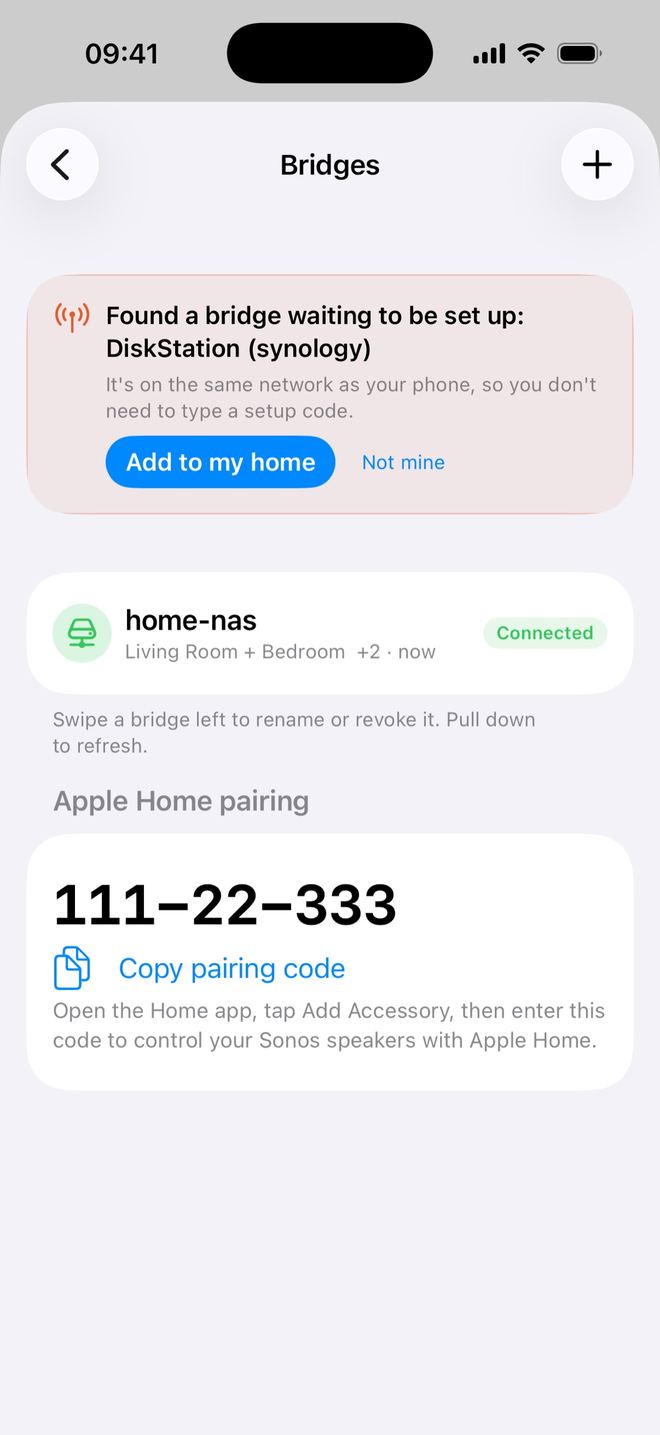
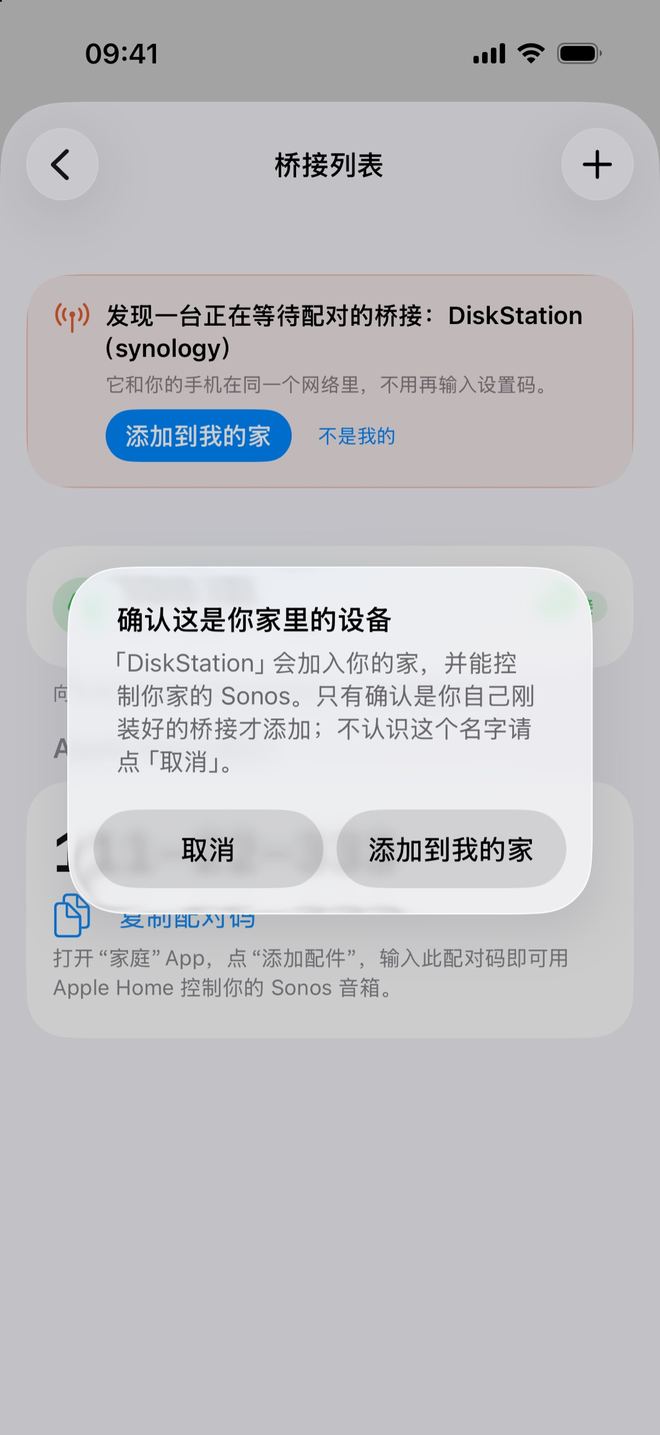
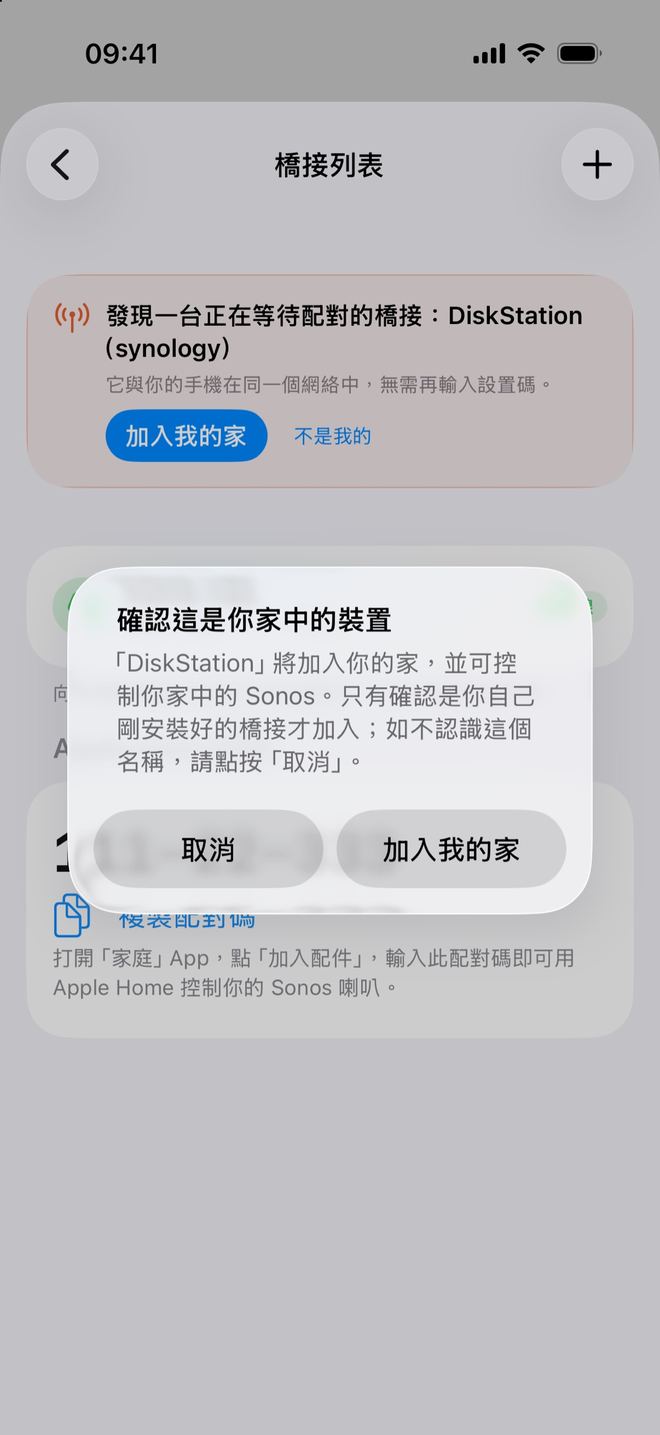
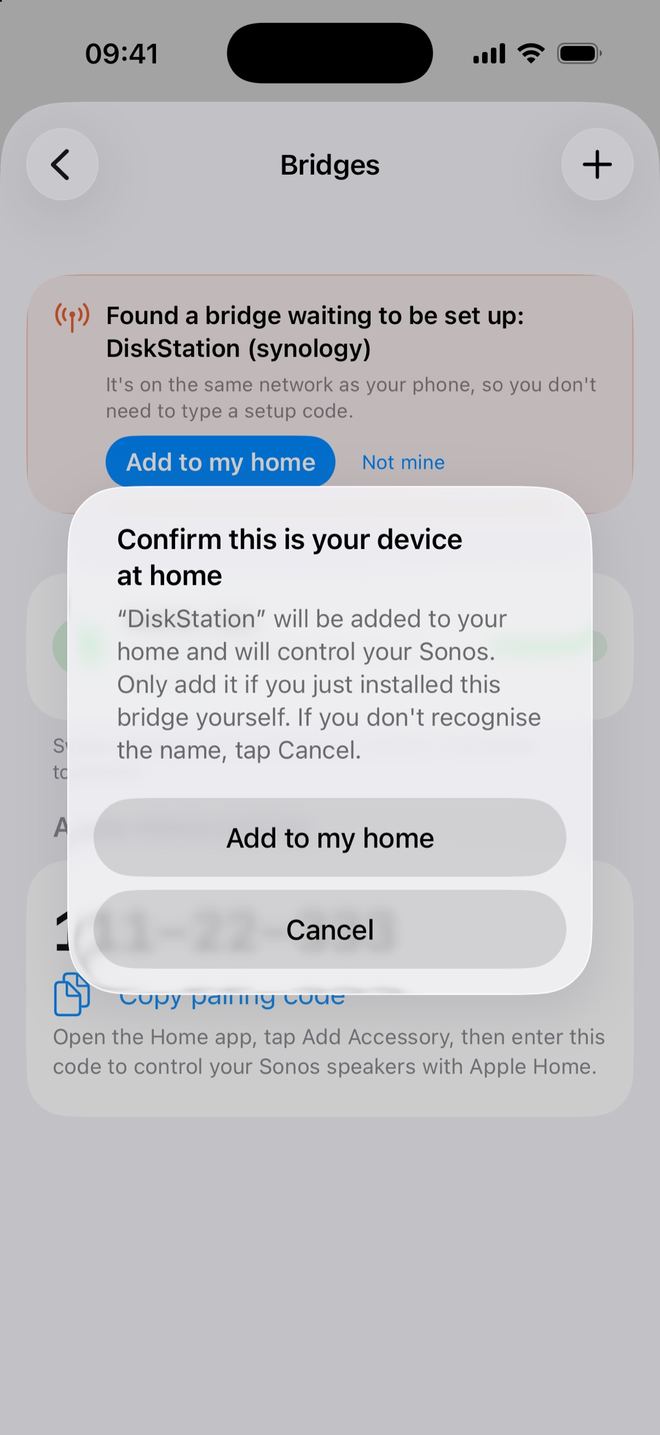
什么时候会出现:手机和桥接用同一个公网 IP(手机连着家里的 Wi-Fi、没开代理),桥在 30 分钟内启动、还没配对。同一个 IP 下等待配对的桥接超过 5 台时(例如运营商多户共用出口),卡片不会自动显示,请改用设置码。甚麼時候會出現:手機和橋接使用同一個公網 IP(手機連接家中 Wi-Fi、沒有開代理),橋在 30 分鐘內啟動、尚未配對。同一個 IP 下等待配對的橋接超過 5 部時(例如電訊商多戶共用出口),卡片不會自動顯示,請改用設置碼。When it appears: your phone and the bridge share the same public IP (phone on home Wi-Fi, no proxy), and the bridge started within the last 30 minutes and hasn't paired yet. If more than 5 bridges are waiting behind the same IP (for example a carrier sharing one address across homes), the card isn't shown — use a setup code instead.
点了却提示「这台桥接已经不在等待配对了(可能已经被添加、刚重启,或者手机换了网络)。请确认手机连着家里的 Wi-Fi,或者改用桥接日志里的 ZF- 设置码。」,就按下一节用设置码。點了卻提示「這台橋接已不再等待配對(可能已被加入、剛重新啟動,或手機切換了網絡)。請確認手機已連接家中的 Wi-Fi,或改用橋接日誌中的 ZF- 設置碼。」,便按下一節使用設置碼。If tapping it says "This bridge is no longer waiting to be set up (it may have been added already, restarted, or your phone switched networks). Make sure your phone is on your home Wi-Fi, or enter the ZF- setup code from the bridge's log instead.", use a setup code as in the next section.
自动发现不出现时:用设置码自動發現沒有出現時:用設置碼When auto-discovery doesn't appear: use the setup code
手机开着代理、用流量(和桥接不在同一个网络出口),或者桥已经启动超过 30 分钟,卡片就不会出现,这时照用设置码:手機開著代理、使用流動數據(和橋接不在同一個網絡出口),或者橋已啟動超過 30 分鐘,卡片便不會出現,此時照用設置碼:If your phone is on a proxy or cellular data (not the same internet connection as the bridge), or the bridge started more than 30 minutes ago, the card won't appear. Use the setup code:
- 启动容器时没带配对码,或配对码过期、已经用过,桥会自动改走设置码(日志里会写「配对码已失效,已改用设置码」),自己申请一个,格式是
ZF-加 8 位,30 分钟有效。用docker logs zonefoundry-bridge 2>&1 | grep "Setup code: *ZF-" | tail -1取出来。啟動容器時沒帶配對碼,或配對碼過期、已經用過,橋會自動改走設置碼(日誌內會寫「配对码已失效,已改用设置码」),自行申請一個,格式是ZF-加 8 位,30 分鐘有效。用docker logs zonefoundry-bridge 2>&1 | grep "Setup code: *ZF-" | tail -1取出。If the container started without a pairing code, or the code expired or was already used, the bridge switches to a setup code by itself (the log says the pairing code is no longer valid) and requests one —ZF-plus 8 characters, valid 30 minutes. Get it withdocker logs zonefoundry-bridge 2>&1 | grep "Setup code: *ZF-" | tail -1. - 在 App「设置 → 家庭桥接」点右上角「+」→「输入设置码」,填入后点「确认」,约 5 秒配好。大小写、横杠、空格都认。服务器维护重启不会让设置码失效。在 App「設定 → 家庭橋接」點右上角「+」→「輸入設置碼」,填入後點「確認」,約 5 秒完成。大小寫、橫線、空格都能識別。伺服器維護重啟不會令設置碼失效。In the app go to Settings → Home bridge → "+" (top right) → "Enter setup code", enter it and tap "Confirm"; it pairs in about 5 seconds. Case, dashes and spaces don't matter. Server maintenance restarts don't invalidate the setup code.
配对码、设置码,别和 Apple 家庭的码搞混配對碼、設置碼,別和 Apple 家庭的碼搞混Pairing code vs setup code vs the Apple Home code
- 配对码:App「生成配对码」给的,格式是
ZF-加 8 位字母数字,30 分钟内有效,写进命令里用。配對碼:App「產生配對碼」給的,格式是ZF-加 8 位英數字,30 分鐘內有效,寫入指令使用。Pairing code: from "Generate pairing code" in the app —ZF-plus 8 letters/digits, valid 30 minutes, goes into the command. - 设置码:容器没带配对码(或码已失效)时,桥自己申请的码,格式同样是
ZF-加 8 位,30 分钟有效,在 App 的「输入设置码」里填。手机在家里 Wi-Fi 下通常用不到它(见自动发现);用法见上一节。設置碼:容器沒帶配對碼(或碼已失效)時,橋自行申請的碼,格式同樣是ZF-加 8 位,30 分鐘有效,在 App 的「輸入設置碼」內填寫。手機在家中 Wi-Fi 下通常用不到它(見自動發現);用法見上一節。Setup code: the code the bridge requests by itself when the container has no (valid) pairing code — alsoZF-plus 8 characters, valid 30 minutes, entered under "Enter setup code" in the app. On home Wi-Fi you usually won't need it (see auto-discovery); how to use it is in the section above. - Apple 家庭配对码:日志里还有一行也叫「Setup code」,格式是
XXX-XX-XXX,那是给 Apple「家庭」App 用的,不要填进 ZoneFoundry。Apple 家庭配對碼:日誌內還有一行也叫「Setup code」,格式是XXX-XX-XXX,那是給 Apple「家庭」App 用的,不要填入 ZoneFoundry。Apple Home code: the log also shows a "Setup code" in the formXXX-XX-XXX— that one is for Apple's Home app; don't enter it in ZoneFoundry.
接进 Apple「家庭」接入 Apple「家庭」Connect to Apple Home
桥接列表里至少有一个桥后,「家庭桥接」页会出现「Apple Home 配对」一栏。点「复制配对码」,打开 iPhone 的「家庭」App →「添加配件」,输入这个码(格式 XXX-XX-XXX)。橋接列表內至少有一個橋後,「家庭橋接」頁會出現「Apple Home 配對」一欄。點「複製配對碼」,打開 iPhone 的「家庭」App →「加入配件」,輸入這個碼(格式 XXX-XX-XXX)。Once you have at least one bridge, the Home Bridge page shows an "Apple Home pairing" section. Tap "Copy pairing code", then in Apple's Home app choose Add Accessory and enter the code (format XXX-XX-XXX).
- 每个房间变成一个「灯」,名字是「房间名 + 音响」:开 = 播放,关 = 暂停,亮度 = 音量(0–100)。每個房間變成一盞「燈」,名稱是「房間名 + 音響」:開 = 播放,關 = 暫停,亮度 = 音量(0–100)。Each room becomes a "light" named after the room: on = play, off = pause, brightness = volume (0–100).
- 你在 ZoneFoundry 建的每个场景变成一个开关,可以和灯、空调组合进同一个「家庭」场景。你在 ZoneFoundry 建立的每個場景變成一個開關,可以和燈、冷氣組合入同一個「家庭」場景。Every ZoneFoundry scene becomes a switch you can combine with lights and AC in one Home scene.
- 人不在旁边时也要自动执行,家里需要有 HomePod 或 Apple TV 作家庭中枢(这是 Apple 的要求)。人不在旁邊時也要自動執行,家中需要有 HomePod 或 Apple TV 作家庭中樞(這是 Apple 的要求)。For automations to run when you're not around, you need a HomePod or Apple TV as a home hub (an Apple requirement).
- 看不到配对码?1.0.14 起这一栏会如实说明原因:桥离线时显示「桥接现在离线,暂时显示不了 Apple 家庭配对码。请检查桥接容器是否在运行。」,先把容器启动起来;只有桥接版本真的太旧,才会显示「把桥接更新到最新版本,才能显示 Apple 家庭配对码。」看不到配對碼?由 1.0.14 起這一欄會如實說明原因:橋離線時顯示「橋接目前離線,暫時無法顯示 Apple 家庭配對碼。請檢查橋接容器是否正在執行。」,先把容器啟動;只有橋接版本確實太舊,才會顯示「請把橋接更新至最新版本,才能顯示 Apple 家庭配對碼。」No code shown? From 1.0.14 this section tells you why: when the bridge is offline it says "The bridge is offline, so the Apple Home pairing code can't be shown. Check that the bridge container is running." — start the container first. Only a genuinely outdated bridge shows "Update the bridge to the latest version to show the Apple Home pairing code."
详细玩法:詳細玩法:More: 让 Siri 和 Apple 家庭控制 Sonos讓 Siri 和 Apple 家庭控制 SonosLet Siri & Apple Home control your Sonos · 场景联动灯光和空调場景聯動燈光和冷氣Link a scene with lights & AC · 有人进门自动执行场景有人進門自動執行場景Auto-run a scene when someone walks in
桥接卡片上的提示是什么意思?橋接卡片上的提示是甚麼意思?What do the notes on a bridge card mean?
1.0.14 起,「桥接列表」里每个桥接的卡片会直接告诉你哪里不对:由 1.0.14 起,「橋接列表」內每個橋接的卡片會直接告訴你哪裡出錯:From 1.0.14, each card in the Bridges list tells you directly what's wrong:
- 「长期离线(最后在线 …)」:这台桥很久没连上了。App 只做标记、不会自动撤销;不再用的话,点旁边的「移除」。「長期離線(最後在線 …)」:這部橋很久沒有連上。App 只會標記、不會自動撤銷;不再使用的話,點旁邊的「移除」。"Long offline (last online …)": the bridge hasn't connected for a long time. The app only flags it and never revokes it automatically; tap "Remove" next to it if you no longer use it.
- 房间名后面的「(本次没发现)」:这个房间以前见过,这次扫描没找到。常见原因是音箱断电,或者不在桥接所在的网络里。房間名稱後面的「(本次未發現)」:這個房間以前見過,這次掃描找不到。常見原因是喇叭斷電,或者不在橋接所在的網絡內。"(not found this time)" after a room name: the room was seen before but not in this scan — usually the speaker is powered off or not on the bridge's network.
- 「这台桥接看到的音箱不在你登录的 Sonos 账号里。」:桥接所在的网络里的 Sonos,不属于你在 App 登录的 Sonos 账号。如果是「这台桥接看到的音箱在你账号的另一个 Sonos 系统里(…)。」,可以点「切换到这个 Sonos 系统」,确认「切换 Sonos 系统?」后点「切换」。「這台橋接看到的喇叭不在你登入的 Sonos 帳戶中。」:橋接所在網絡內的 Sonos,不屬於你在 App 登入的 Sonos 帳戶。如果是「這台橋接看到的喇叭在你帳戶的另一個 Sonos 系統中(…)。」,可以點「切換到這個 Sonos 系統」,確認「切換 Sonos 系統?」後點「切換」。"The speakers this bridge sees aren't in the Sonos account you're signed in to.": the Sonos on the bridge's network belongs to a different Sonos account than the one signed in to the app. If it says "The speakers this bridge sees are in another Sonos system in your account (…).", tap "Switch to this Sonos system", then "Switch" in the "Switch Sonos system?" prompt.
- 「最近 24 小时在线 …%」「最近一次断开 …」:在线质量,经常断开时可以先查那台机器的网络。「最近 24 小時在線 …%」「最近一次斷開 …」:在線質素,經常斷開時可先檢查那部機器的網絡。"Online …% in the last 24 hours" / "Last disconnected …": connection quality — if it drops often, check that machine's network first.
升级、撤销、重新配对升級、撤銷、重新配對Upgrade, remove, re-pair
- 升级:有新版本时,桥接那一行会出现「升级」按钮,点了之后桥在 30–60 秒内自动重启到新版本(命令里要挂了 docker.sock)。桥离线时会显示「有新版本待升级」,上线后就能点。v0.3.52(2026-10-01)起,主入口连不上时桥会自动改走备用入口,掉线后 1–2 分钟内重连;旧容器在桥接页点「升级」就能升上去(App 可能要几小时后才提示有新版)。升級:有新版本時,橋接那一行會出現「升級」按鈕,點了之後橋在 30–60 秒內自動重啟到新版本(指令內要掛了 docker.sock)。橋離線時會顯示「有新版本待升級」,上線後就可以點。v0.3.52(2026-10-01)起,主入口連不上時橋會自動改走備用入口,斷線後 1–2 分鐘內重連;舊容器在橋接頁點「升級」就能升上去(App 可能要幾小時後才提示有新版)。Upgrade: when a new version is out, the bridge row shows an Upgrade button; the bridge restarts on the new version within 30–60 seconds (needs the docker.sock line). If it's offline, the button becomes available once it's back. From v0.3.52 (2026-10-01) the bridge switches to a backup entry point when the main one is unreachable and reconnects within 1–2 minutes after a drop; existing containers can upgrade with the Upgrade button (the app may take a few hours to show the new version).
- 手动更新时要重建容器(先拉新镜像,再删掉旧容器、用同样的命令重新运行);只做
docker restart不会换到新版本。手動更新時要重建容器(先拉新鏡像,再刪除舊容器、用同樣的指令重新執行);只做docker restart不會換到新版本。For manual updates, recreate the container (pull the new image, remove the old container, run the same command again);docker restartalone won't switch versions. - 撤销:在桥接列表里对这个桥选「撤销」,它就和你的家断开;之后容器可以用新码重新配对。撤銷:在橋接列表內對這個橋選「撤銷」,它就和你的家斷開;之後容器可以用新碼重新配對。Remove: choose Revoke on the bridge in the list to disconnect it from your home; the container can pair again with a new code.
常见问题常見問題FAQ
连不上,桥一直没出现在列表里?連不上,橋一直沒出現在列表內?The bridge never shows up in the list?
按顺序查:① 用的是 host 网络;② 机器和 Sonos 在同一个家庭网络,并且能上外网(配对经 wss://relay.zonefoundry.dev);③ 用的不是 Mac / Windows 上的 Docker Desktop;④ 码没过期(配对码、设置码 30 分钟;一键安装命令 24 小时内可以重跑,最多 5 次);⑤ 看 docker logs zonefoundry-bridge 有没有报错;⑥ 桥是 v0.3.52 或更新:旧版本连不上主入口时不会自动换备用入口,先在 App 里点「升级」。按次序檢查:① 用的是 host 網絡;② 機器和 Sonos 在同一個家庭網絡,並且可以上外網(配對經 wss://relay.zonefoundry.dev);③ 用的不是 Mac / Windows 上的 Docker Desktop;④ 碼沒過期(配對碼、設置碼 30 分鐘;一鍵安裝指令 24 小時內可以重跑,最多 5 次);⑤ 看 docker logs zonefoundry-bridge 有沒有錯誤;⑥ 橋是 v0.3.52 或更新:舊版本連不上主入口時不會自動換備用入口,先在 App 內點「升級」。Check in order: ① host networking; ② the machine is on the same home network as Sonos and can reach the internet (pairing goes through wss://relay.zonefoundry.dev); ③ it's not Docker Desktop on Mac/Windows; ④ the code hasn't expired (pairing/setup codes 30 min; the one-click command can be re-run within 24 h, up to 5 times); ⑤ look for errors in docker logs zonefoundry-bridge; ⑥ the bridge is v0.3.52 or newer — older versions don't switch to the backup entry point, so tap Upgrade in the app first.
手机在家里 Wi-Fi,却没看到「发现一台正在等待配对的桥接」?手機在家中 Wi-Fi,卻沒看到「發現一台正在等待配對的橋接」?My phone is on home Wi-Fi but "Found a bridge waiting to be set up" never appears?
按顺序查:① 手机没开代理 / VPN,连的是家里 Wi-Fi 而不是流量;② 桥在 30 分钟内启动、还没配对——用带配对码的命令或 YAML 装的会自己配对,不会出现这张卡片;③ 同一个公网 IP 下等待配对的桥接超过 5 台时不会显示。都不符合就改用设置码。按次序檢查:① 手機沒有開代理 / VPN,連接的是家中 Wi-Fi 而不是流動數據;② 橋在 30 分鐘內啟動、尚未配對——用帶配對碼的指令或 YAML 安裝的會自行配對,不會出現這張卡片;③ 同一個公網 IP 下等待配對的橋接超過 5 部時不會顯示。都不符合便改用設置碼。Check in order: ① your phone isn't on a proxy / VPN and is on home Wi-Fi, not cellular; ② the bridge started within 30 minutes and hasn't paired — bridges installed with a pairing-code command or YAML pair themselves, so no card appears; ③ the card is hidden when more than 5 bridges are waiting behind the same public IP. Otherwise use the setup code.
Apple 家庭配对码那一栏说桥接离线?Apple 家庭配對碼一欄說橋接離線?The Apple Home pairing section says the bridge is offline?
说明桥现在没连上,不是要升级。到那台机器的 Docker 应用或用 docker ps 看容器是否在运行,桥上线后这一栏就会显示配对码。代表橋現在沒有連上,不是要升級。到那部機器的 Docker 應用程式或用 docker ps 檢查容器是否正在執行,橋上線後這一欄便會顯示配對碼。The bridge isn't connected right now — it doesn't need an update. Check in that machine's Docker app or with docker ps that the container is running; once the bridge is back online the code appears.
日志里有 Could not resolve host?日誌內有 Could not resolve host?Log says "Could not resolve host"?
机器的 DNS 有问题。在中国大陆可以把 DNS 改成 223.5.5.5 再试。機器的 DNS 有問題。在中國大陸可以把 DNS 改成 223.5.5.5 再試。The machine's DNS is broken. In mainland China, try setting DNS to 223.5.5.5.
群晖 / 飞牛启动失败?群暉 / 飛牛啟動失敗?Synology / fnOS won't start it?
在「项目」里按「停止 → 清除 → 构建」,不要点「重启」——只有这样才会重新套用 YAML 并拉新镜像。在「專案」內按「停止 → 清除 → 建置」,不要點「重新啟動」——只有這樣才會重新套用 YAML 並拉取新鏡像。In Project, use Stop → Clean → Build, not Restart — only that re-applies the YAML and pulls a fresh image.
可以装在 Mac 或 Windows 电脑上吗?可以裝在 Mac 或 Windows 電腦上嗎?Can I run it on a Mac or Windows PC?
Docker Desktop 不支持:它没有 host 网络,发现不到 Sonos。请用 NAS、软路由或 Linux 主机。Docker Desktop 不支援:它沒有 host 網絡,發現不到 Sonos。請用 NAS、軟路由或 Linux 主機。Not with Docker Desktop — it has no host networking, so it can't find Sonos. Use a NAS, router or Linux box.
Plex 需要桥接吗?Plex 需要橋接嗎?Does Plex need the bridge?
不需要。手机和音箱在同一个家庭 Wi-Fi、音箱连得到你的 Plex 服务器就能播。不需要。手機和喇叭在同一個家庭 Wi-Fi、喇叭連得到你的 Plex 伺服器就可以播放。No. It works as long as your phone and speakers are on the same home Wi-Fi and the speakers can reach your Plex server.
桥接是可选增强,不是入场券橋接是可選增強,不是入場券The bridge is an optional extra, not a requirement
ZoneFoundry 是一个 iOS App,直接连你现在的 Sonos;想接 Apple 家庭时再装桥接也不迟。ZoneFoundry 是一個 iOS App,直接連接你現有的 Sonos;想接 Apple 家庭時再裝橋接也不遲。ZoneFoundry is an iOS app that works with the Sonos you already have; add the bridge later if you want Apple Home.


