为什么特别為什麼特別Why it's special
- 把 Sonos 变成原生 HomeKit 配件:一般的 Sonos 控制 App 不会把你的音箱变成 Apple「家庭」里真正的配件——ZoneFoundry 会,于是 Siri 和家庭自动化能像对待灯、空调一样对待 Sonos。把 Sonos 變成原生 HomeKit 配件:一般的 Sonos 控制 App 不會把你的音箱變成 Apple「家庭」裡真正的配件——ZoneFoundry 會,於是 Siri 與家庭自動化可以像對待燈、空調一樣對待 Sonos。Sonos as native HomeKit accessories: a typical Sonos controller won't turn your speakers into real Apple Home accessories — ZoneFoundry does, so Siri and Home automations can treat Sonos like a light or an AC.
- 音乐场景也同步进家庭:除了房间,你的整套音乐场景也会出现在 Apple「家庭」里,可以折叠进任何家庭自动化,和灯光、空调一起联动。音樂場景也同步至家庭:除了房間,你整套音樂場景都會出現在 Apple「家庭」裡,可以編入任何家庭自動化,與燈光、空調一起聯動。Music scenes sync in too: beyond rooms, your whole music scenes show up in Apple Home — fold them into any automation alongside lights and AC.
- 各司其职:ZoneFoundry 专注把 Sonos 音频做到最好,设备和场景的编排交给 Apple 成熟的家庭引擎——诚实地说,这正是它的优势所在。各司其職:ZoneFoundry 專注把 Sonos 音頻做到最好,設備與場景的編排交給 Apple 成熟的家庭引擎——老實說,這正是它的強項。Best of both: ZoneFoundry focuses on great Sonos audio and hands device & scene orchestration to Apple's mature Home engine — honestly, that's the point.
开始前你需要開始前你需要Before you start
- 一台 iPhone一部 iPhoneAn iPhone
- 桥接要装在一台一直开着、装了 Docker 的机器上(群晖 / 飞牛 / Unraid / TrueNAS / 软路由 / Linux 主机);Mac / Windows 的 Docker Desktop 不行。安装见家庭桥接安装教程。橋接要裝在一部一直開著、裝了 Docker 的機器上(群暉 / 飛牛 / Unraid / TrueNAS / 軟路由 / Linux 主機);Mac / Windows 的 Docker Desktop 不行。安裝見家庭橋接安裝教學。The bridge runs on an always-on machine with Docker (Synology / fnOS / Unraid / TrueNAS / a soft router / a Linux box); Docker Desktop on Mac or Windows won’t work. Setup: home bridge guide.
- ZoneFoundry 桥接已连接,并已在「家庭」App 里用配对码添加(房间靠它才能映射进 Apple「家庭」)ZoneFoundry 橋接已連接,並已在「家庭」App 裡用配對碼加入(房間要靠它才映射得到 Apple「家庭」)The ZoneFoundry bridge connected and added to the Home app with its pairing code (rooms map into Apple Home through it)
- 要用家庭自动化(或不在家时控制):家里有 Apple 家庭中枢(HomePod / Apple TV)要使用家庭自動化(或不在家時控制):家裡有 Apple 家庭中樞(HomePod / Apple TV)To use Home automations (or control things while you are away): an Apple Home hub (HomePod / Apple TV) at home
- (可选)在 ZoneFoundry「Apple Home 自动化」页点「启用 Apple Home 自动化」,允许访问家庭数据——这样才能在 App 里看到映射、一步建自动化;Siri 和「家庭」App 控制不靠这个权限(可選)在 ZoneFoundry「Apple Home 自動化」頁點「啟用 Apple Home 自動化」,允許存取家庭資料——這樣才能在 App 裡看到映射、一步建立自動化;Siri 與「家庭」App 控制不靠這個權限(Optional) On ZoneFoundry’s Apple Home automation page, tap “Enable Apple Home Automation” and allow access to your Home data — this lets you see the mapping and create automations inside the app; Siri and Home-app control don’t depend on it
家里没有 NAS?播放、搜歌、语音、场景和出门遥控都不需要桥接;只有接入 Apple「家庭」和到家 / 离家自动触发需要。想用 Siri 控制 Sonos,可以看不打开 App 控制 Sonos:Siri、快捷指令、控制中心,不需要桥接。家裡沒有 NAS?播放、搜歌、語音、場景和出門遙控都不需要橋接;只有接入 Apple「家庭」和到家 / 離家自動觸發才需要。想用 Siri 控制 Sonos,可以看不開 App 控制 Sonos:Siri、捷徑、控制中心,不需要橋接。No NAS at home? Playback, search, voice, scenes and remote control away from home don’t need the bridge — only Apple Home and arrive / leave automations do. To control Sonos with Siri, see Control Sonos without opening the app: Siri, Shortcuts, Control Center; no bridge needed.
每个房间,就是一个「灯泡」
房间和场景都经 ZoneFoundry 桥接映射进「家庭」,桥接要保持连接,并已用配对码添加到「家庭」App。
每個房間,就是一個「燈泡」
房間和場景都經 ZoneFoundry 橋接映射進「家庭」,橋接要保持連接,並已用配對碼添加到「家庭」App。
Every room is a "lightbulb"
Bulbs are named after the room plus 音响 (e.g. "Living Room音响"); rename them in the Home app if you like. Rooms and scenes map in through the ZoneFoundry bridge: keep it connected, and add it to Home with its pairing code.
步骤步驟Steps
连接桥接,并在「家庭」App 里配对連接橋接,並在「家庭」App 裡配對Connect the bridge and pair it in Home
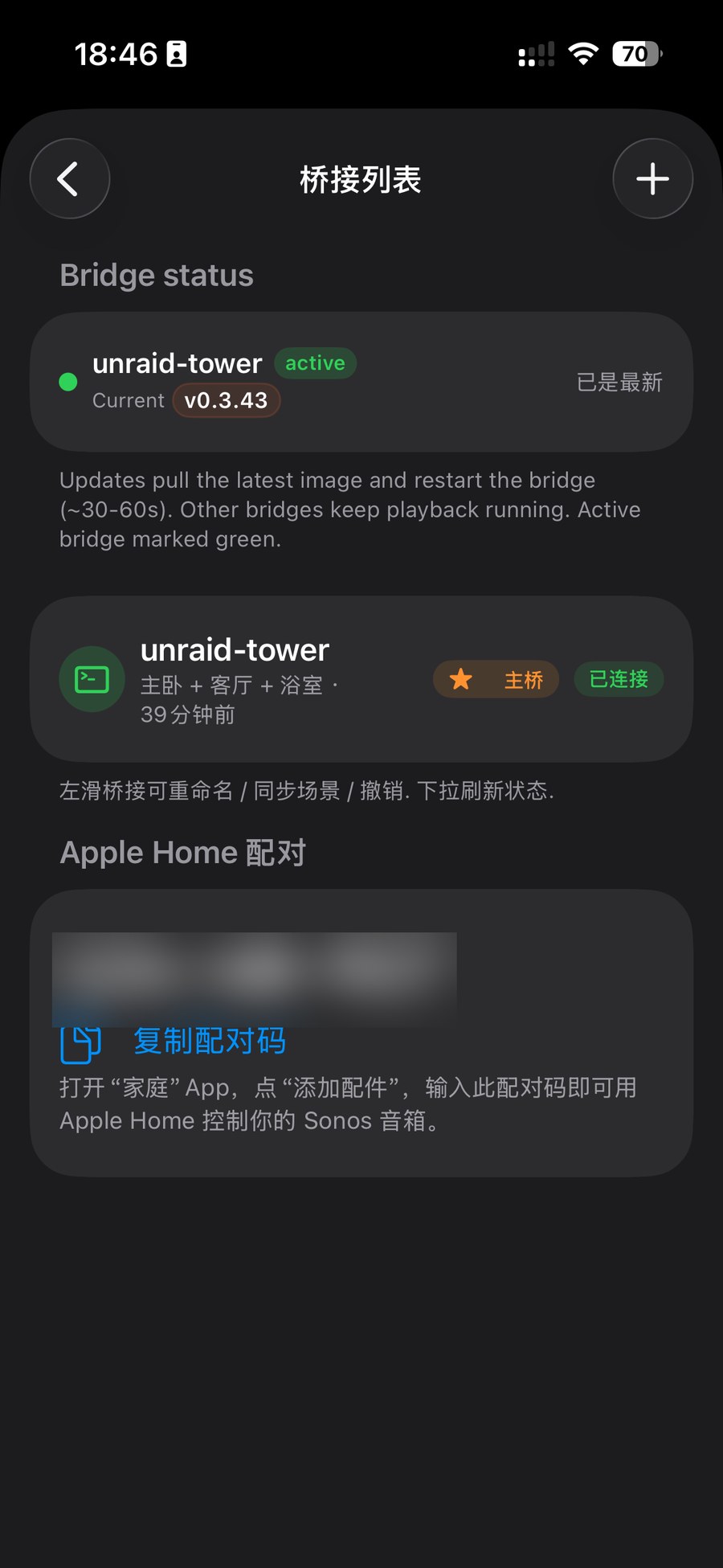
① 先把 ZoneFoundry 桥接连上(还没装的话,先按家庭桥接安装教程装好)。② 在 ZoneFoundry 右上角齿轮 → 设置 → 家庭桥接(1.0.10 及更早版本叫「桥接列表」)→「Apple Home 配对」,复制配对码;打开 Apple「家庭」App →「添加配件」→ 输入这个配对码。做完这两步,你的 Sonos 房间才会被映射进 Apple「家庭」——上面提到的「灯泡」和场景同步,都依赖这一步。① 先把 ZoneFoundry 橋接連上(還沒安裝的話,先按家庭橋接安裝教學裝好)。② 在 ZoneFoundry 右上角齒輪 → 設定 → 家庭橋接(1.0.10 及更早版本叫「橋接列表」)→「Apple Home 配對」,複製配對碼;打開 Apple「家庭」App →「加入配件」→ 輸入這個配對碼。完成這兩步,你的 Sonos 房間才會映射至 Apple「家庭」——上面說的「燈泡」與場景同步,都靠這一步。① First connect the ZoneFoundry bridge (not installed yet? Follow the home bridge guide first). ② In ZoneFoundry, tap the gear in the top-right → Settings → Home Bridge (called "Bridges" on 1.0.10 and earlier) → Apple Home pairing and copy the pairing code; then open Apple's Home app → Add Accessory → enter that code. Only after both steps do your Sonos rooms map into Apple Home — both the "lightbulbs" and the scene sync described above depend on this.
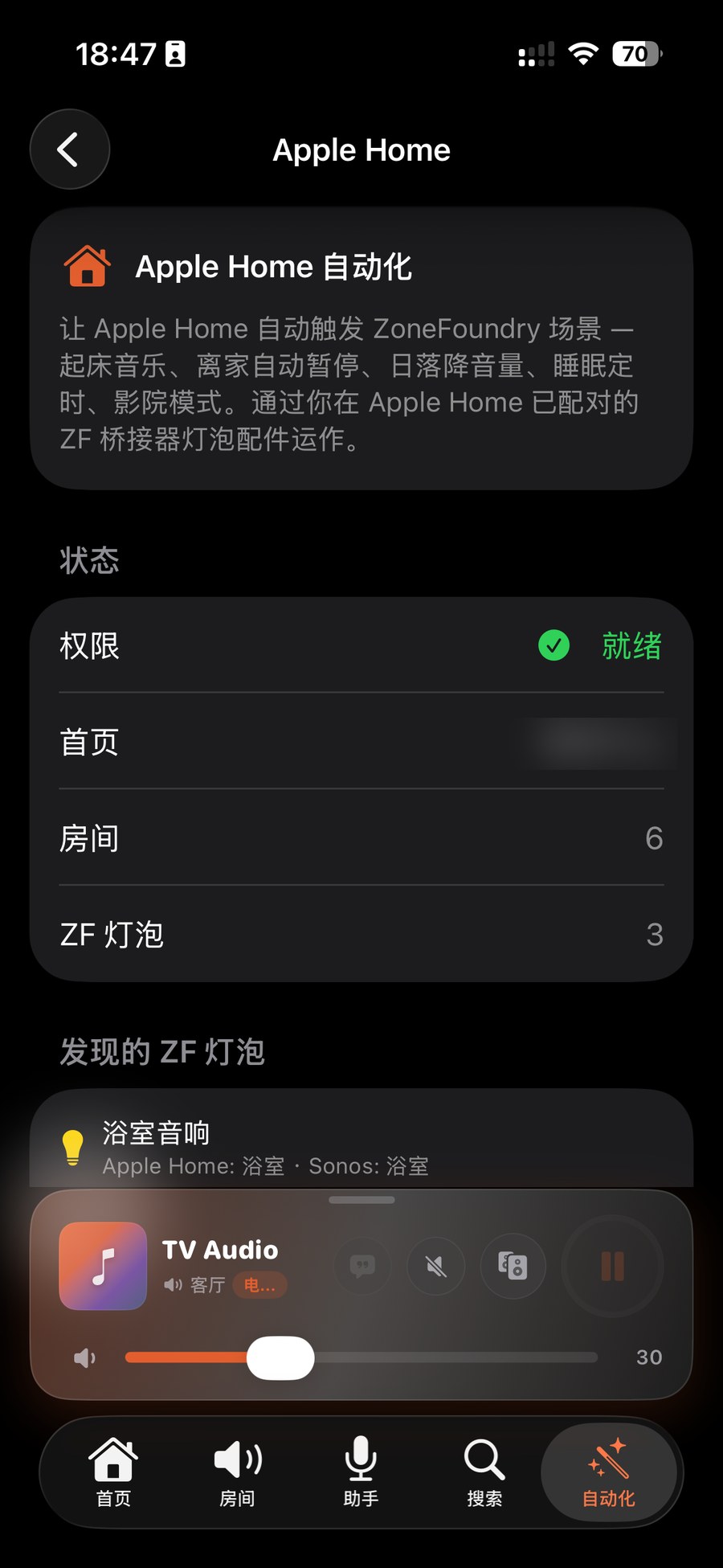
打开「自动化」→「Apple Home 自动化」看你的房间灯泡打開「自動化」→「Apple Home 自動化」查看你的房間燈泡Open Automations → Apple Home automation and see your room lightbulbs
在 ZoneFoundry 打开「自动化」标签 →「Apple Home 与进阶」→「Apple Home 自动化」(带「桥接」标记,进去后页面标题是「Apple Home」)。这个页面是整套功能的设置与概览:它把已发现的房间列成「ZF 灯泡」,并显示房间↔Sonos 的映射,例如「客厅音响 → Apple Home 客厅 · Sonos 客厅」。要先允许家庭数据权限,这份列表才会显示;看到它,就说明房间已经进了家庭。在 ZoneFoundry 打開「自動化」分頁 →「Apple Home 與進階」→「Apple Home 自動化」(帶「橋接」標記,進去後頁面標題是「Apple Home」)。這個頁面是整套功能的設定與概覽:它會把已發現的房間列成「ZF 燈泡」,還會顯示房間↔Sonos 的映射,例如「客廳音響 → Apple Home 客廳 · Sonos 客廳」。要先允許家庭資料權限,這份清單才會顯示;看到它,就代表房間已經進入家庭。In ZoneFoundry open the Automations tab → Apple Home & advanced → Apple Home automation (marked with a bridge badge; the page itself is titled "Apple Home"). This screen is the setup and overview for the whole feature: it lists discovered rooms as "ZF lightbulbs" and shows the room↔Sonos mapping, e.g. "Living-room speaker → Apple Home Living room · Sonos Living room". The list only appears after you allow access to Home data; seeing it means the rooms are now in Home.
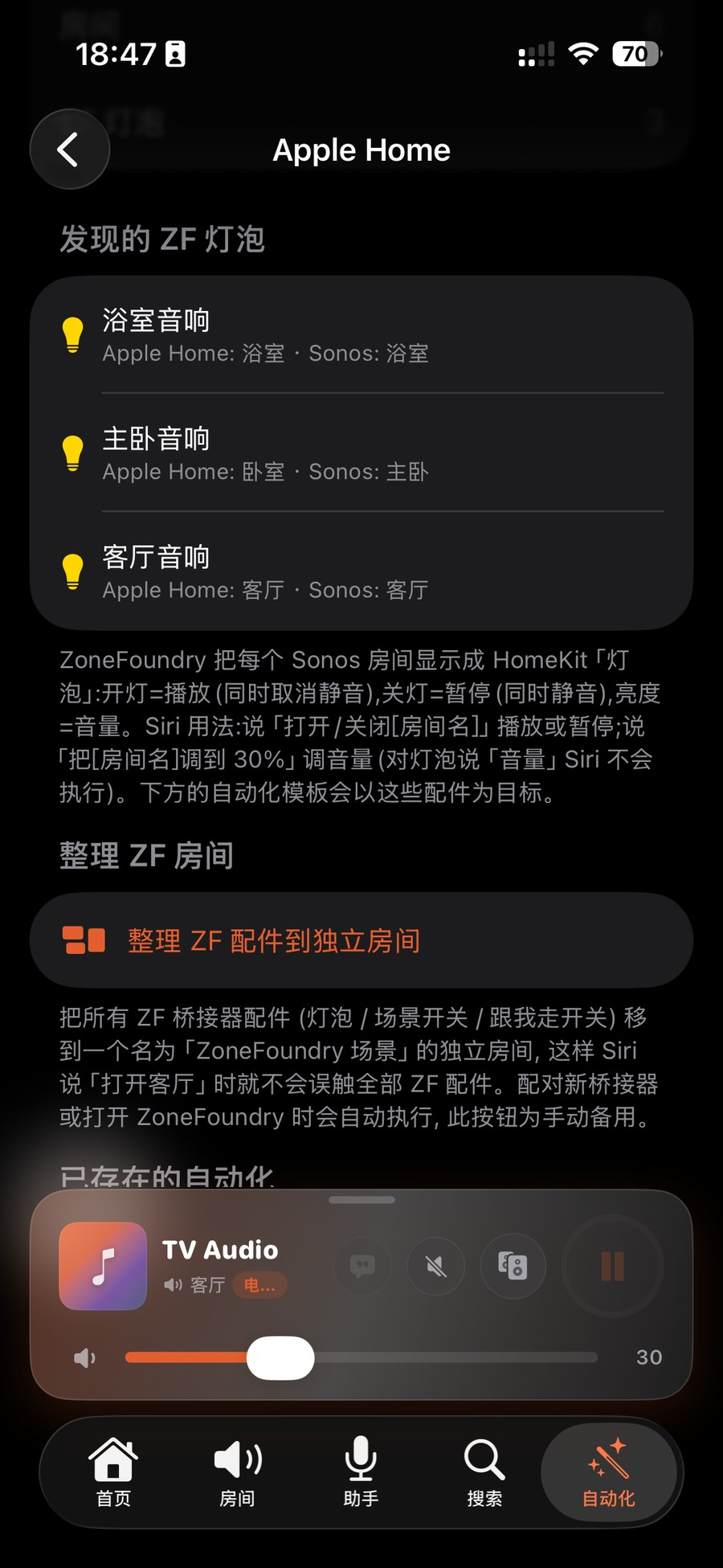
用 Siri 或「家庭」App 控制用 Siri 或者「家庭」App 控制Control with Siri or the Home app
现在每个房间都是一个灯泡,名字是「房间名+音响」:开=播放(并取消静音),关=暂停(并静音),亮度=音量。对 Siri 说「打开客厅音响」就是播放,「关闭客厅音响」就是暂停,「把客厅音响调到 30%」就是把音量设到 30%。只说「打开客厅」会作用于整个「客厅」房间里的配件,包括真的灯。在「家庭」App 里轻点灯泡、拖亮度条也一样。現在每個房間都是一個燈泡,名字是「房間名+音響」:開=播放(並取消靜音),關=暫停(並靜音),亮度=音量。跟 Siri 說「打開客廳音響」就是播放,「關閉客廳音響」就是暫停,「把客廳音響調到 30%」就是把音量設到 30%。只說「打開客廳」會作用於整個「客廳」房間裡的配件,包括真正的燈。在「家庭」App 裡點燈泡、拖亮度條也一樣。Each room is now a lightbulb: On = play (and unmute), Off = pause (and mute), brightness = volume. Use the bulb's name as shown in the Home app — by default your Sonos room name followed by 音响 (e.g. "Living Room音响"). You can rename it in the Home app (e.g. "Living Room Speaker") and then tell Siri "Turn on Living Room Speaker" to play, "Turn off Living Room Speaker" to pause, "Set Living Room Speaker to 30%" to set volume. Saying just "Turn on the living room" acts on every accessory in that Home room, real lights included. Tapping the bulb or dragging the brightness slider in the Home app does the same.
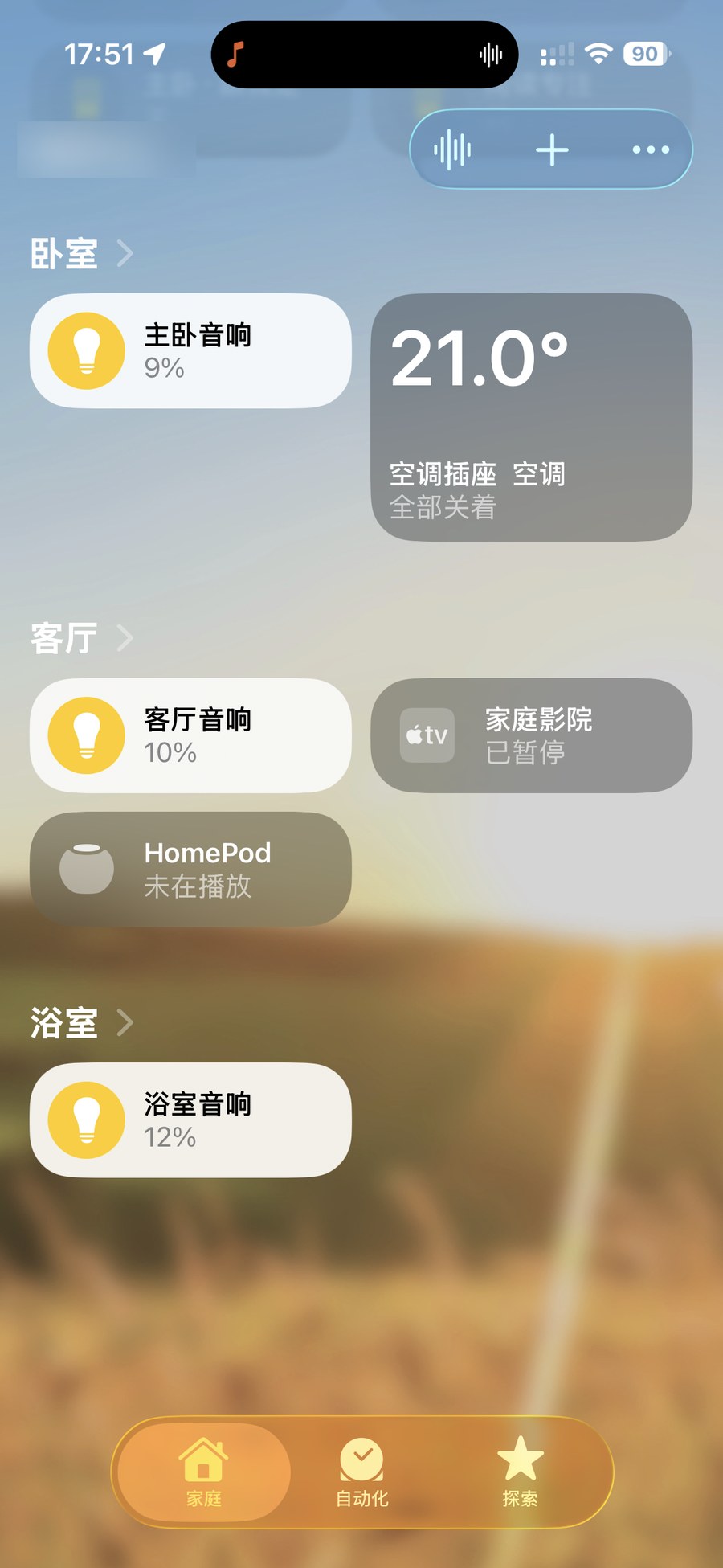
小提示:因为房间是以「灯泡」呈现的,对 Siri 说「音量 / volume」这个词在灯泡上不会生效——请改用亮度百分比,例如「把客厅音响调到 30%」。小貼士:因為房間是以「燈泡」呈現,跟 Siri 說「音量 / volume」這個詞在燈泡上不會生效——請改用亮度百分比,例如「把客廳音響調到 30%」。Heads up: because rooms appear as "lightbulbs", saying the word "volume" to Siri won't work on a bulb — use a brightness percent instead, e.g. "Set Living Room Speaker to 30%" (using the bulb's name from the Home app).
场景:编辑一次,自动同步成家庭里的开关場景:編輯一次,自動同步成家庭裡的開關Scenes: edit once, auto-sync to Home as a switch
在 ZoneFoundry 里新建或编辑一个场景,它会自动保存,并同步成 Apple「家庭」里一个同名的开关,通常半分钟内出现(启用过 Apple Home 自动化的话,打开 App 时会被整理进「ZoneFoundry 场景」这个房间)。之后你可以对 Siri 说「打开」加场景名来触发、在「家庭」App 里轻点它,或把它加进家庭场景或家庭自动化——和灯光、空调一起联动。在 ZoneFoundry 裡新建或編輯一個場景,它會自動儲存,並同步成 Apple「家庭」裡一個同名的開關,通常半分鐘內出現(啟用過 Apple Home 自動化的話,打開 App 時會被整理進「ZoneFoundry 場景」這個房間)。之後你可以跟 Siri 說「打開」加場景名來觸發、在「家庭」App 裡點一下它,或把它加進家庭場景或家庭自動化——與燈光、空調一起聯動。Create or edit a scene in ZoneFoundry — it auto-saves and syncs into Apple Home as a switch with the same name, usually within half a minute (if you have enabled Apple Home automation, opening the app tidies it into a room called “ZoneFoundry 场景”). From there, say "Turn on" plus the scene name to Siri, tap it in the Home app, or add it to a Home scene or automation alongside your lights and AC.
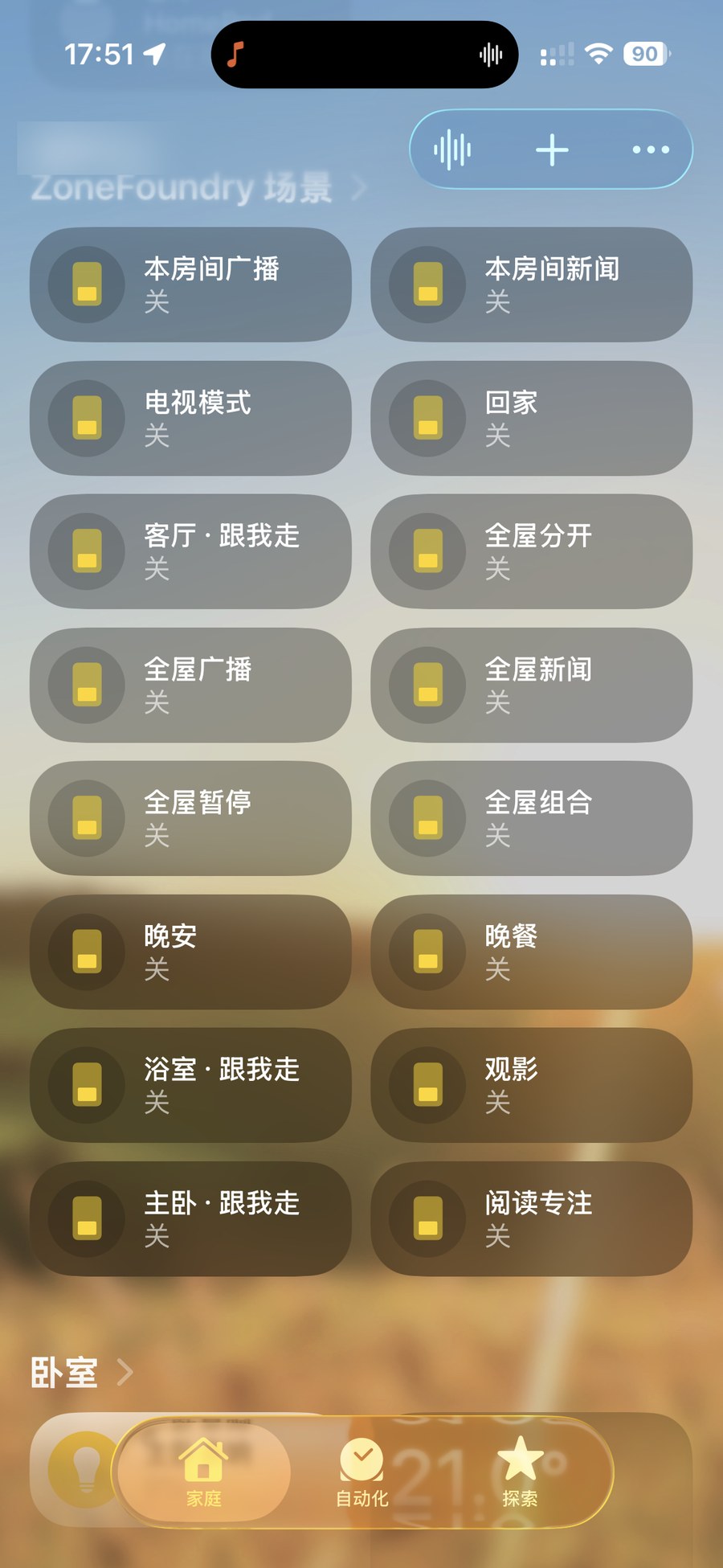
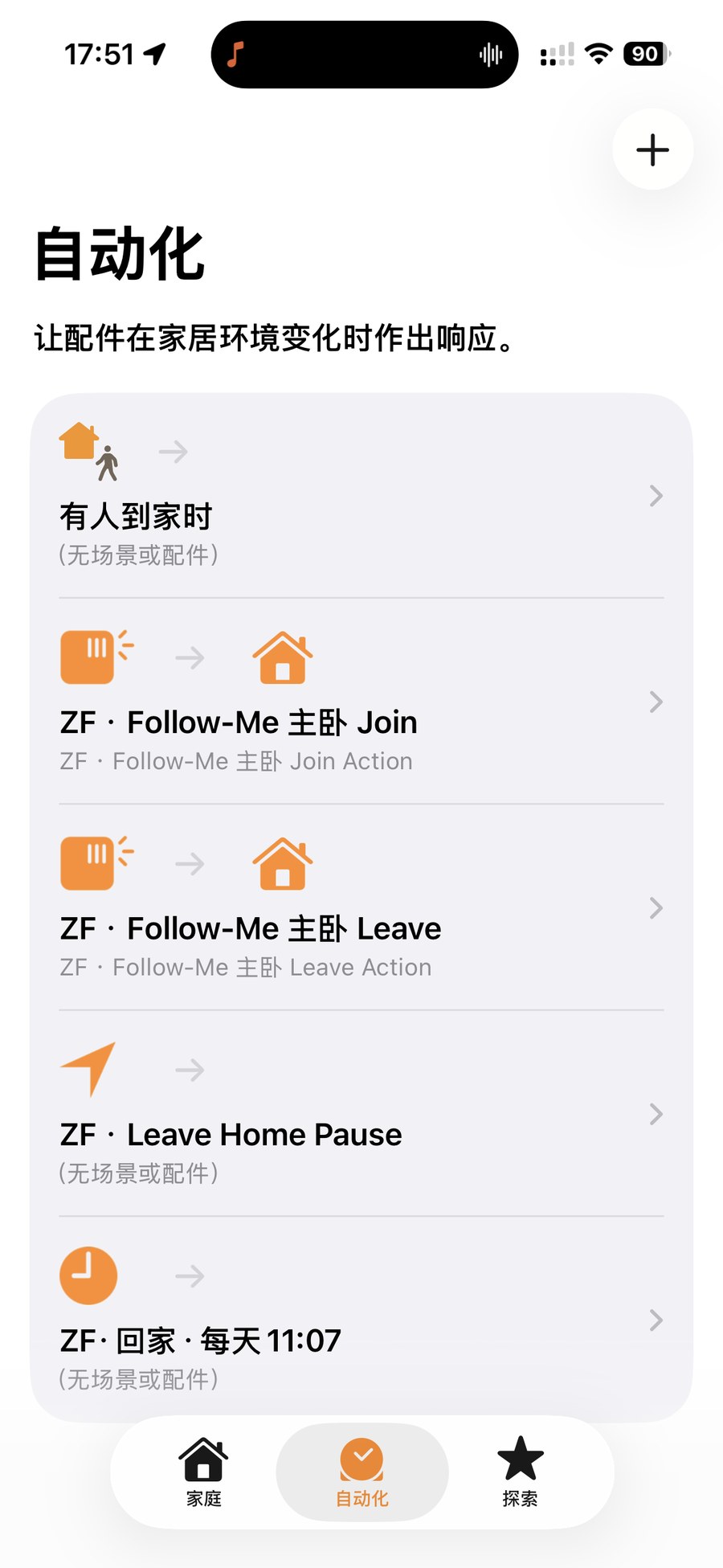
没看到房间或场景?先确认 ZoneFoundry 桥接还连着,并且已经在「家庭」App 里用配对码添加过——房间和场景都是经桥接映射进 Apple「家庭」的。映射列表在「自动化」→「Apple Home 自动化」页可以随时核对。沒有看到房間或場景?先確認 ZoneFoundry 橋接仍然連著,並且已經在「家庭」App 裡用配對碼加入過——房間與場景都是經橋接映射至 Apple「家庭」的。映射清單在「自動化」→「Apple Home 自動化」頁可以隨時核對。Rooms or scenes missing? First check the ZoneFoundry bridge is still connected and has been added to the Home app with its pairing code — rooms and scenes both map into Apple Home through the bridge. You can re-check the mapping list any time under Automations → Apple Home automation.
锁屏、快捷指令都能接上;装了家庭桥接,还能接 Apple 家庭鎖屏、捷徑都能接上;裝了家庭橋接,還能接 Apple 家庭Lock screen and Shortcuts, plus Apple Home with the bridge
ZoneFoundry 把 Sonos 接进快捷指令和锁屏,不用为了换首歌先解锁再开 App;装了家庭桥接,还能接进 Apple「家庭」。ZoneFoundry 把 Sonos 接進捷徑和鎖屏,不用為了換首歌先解鎖再開 App;裝了家庭橋接,還能接進 Apple「家庭」。ZoneFoundry brings Sonos into Shortcuts and onto your lock screen — no unlocking and opening an app just to change a track. With the home bridge installed, it also joins Apple Home.