01
自然地说,不用背命令。自然地講,毋須背指令。Speak naturally. No command syntax.
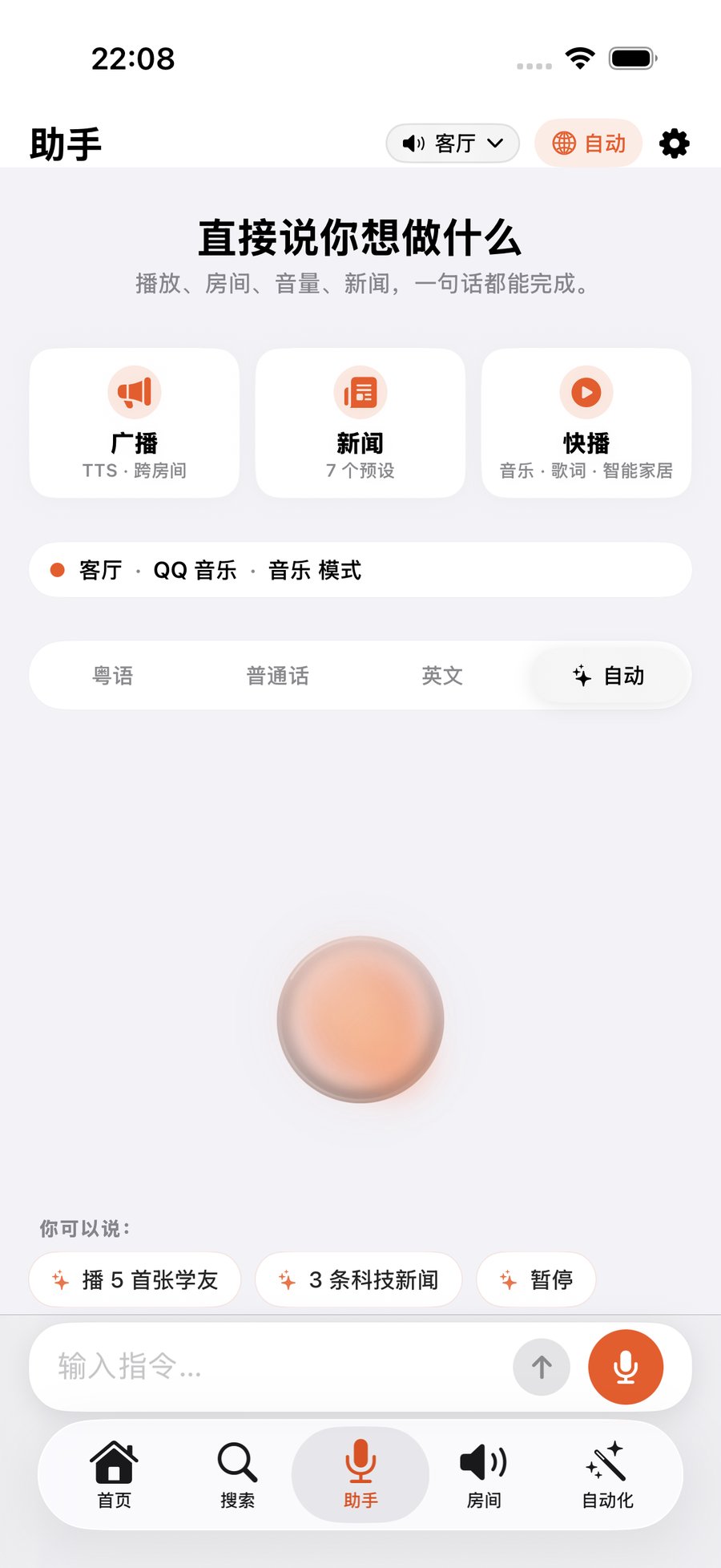
粤语、普通话或英语都可以。指定歌手、房间、音量和播放方式,也可以直接打字。廣東話、普通話或英語都可以。指定歌手、房間、音量和播放方式,也可以直接輸入文字。Use Cantonese, Mandarin, or English. Name the artist, room, volume, and play mode—or type instead.
用粤语、普通话或英语,说出或输入你想听的内容。一次搜索多个已连接的音乐服务,包括 QQ 音乐、网易云音乐、Apple Music 和 Spotify,再把音乐送到任何一个 Sonos 房间。用廣東話、普通話或英語,講出或輸入你想聽的內容。一次搜尋多個已連接的音樂服務,包括 Apple Music 與 Spotify,再把音樂送到任何一個 Sonos 房間。Speak or type in Cantonese, Mandarin, or English. Search and play across multiple connected services, including Spotify and Apple Music, then send music to any Sonos room.
绝大多数日常功能无需 Bridge,连接 Sonos Cloud 即可开始。絕大多數日常功能毋須 Bridge,連接 Sonos Cloud 即可開始。Most everyday features work without Bridge. Connect Sonos Cloud and start listening.
四个真实日常四個真實日常Four everyday moments
从开口找歌,到跨房间控制、看歌词和插播新闻,每一步都围绕正在听的音乐。由開口找歌,到跨房間控制、看歌詞和插播新聞,每一步都圍繞正在聽的音樂。From asking for a song to room control, lyrics, and news briefings, every step stays centered on what is playing.
粤语、普通话或英语都可以。指定歌手、房间、音量和播放方式,也可以直接打字。廣東話、普通話或英語都可以。指定歌手、房間、音量和播放方式,也可以直接輸入文字。Use Cantonese, Mandarin, or English. Name the artist, room, volume, and play mode—or type instead.
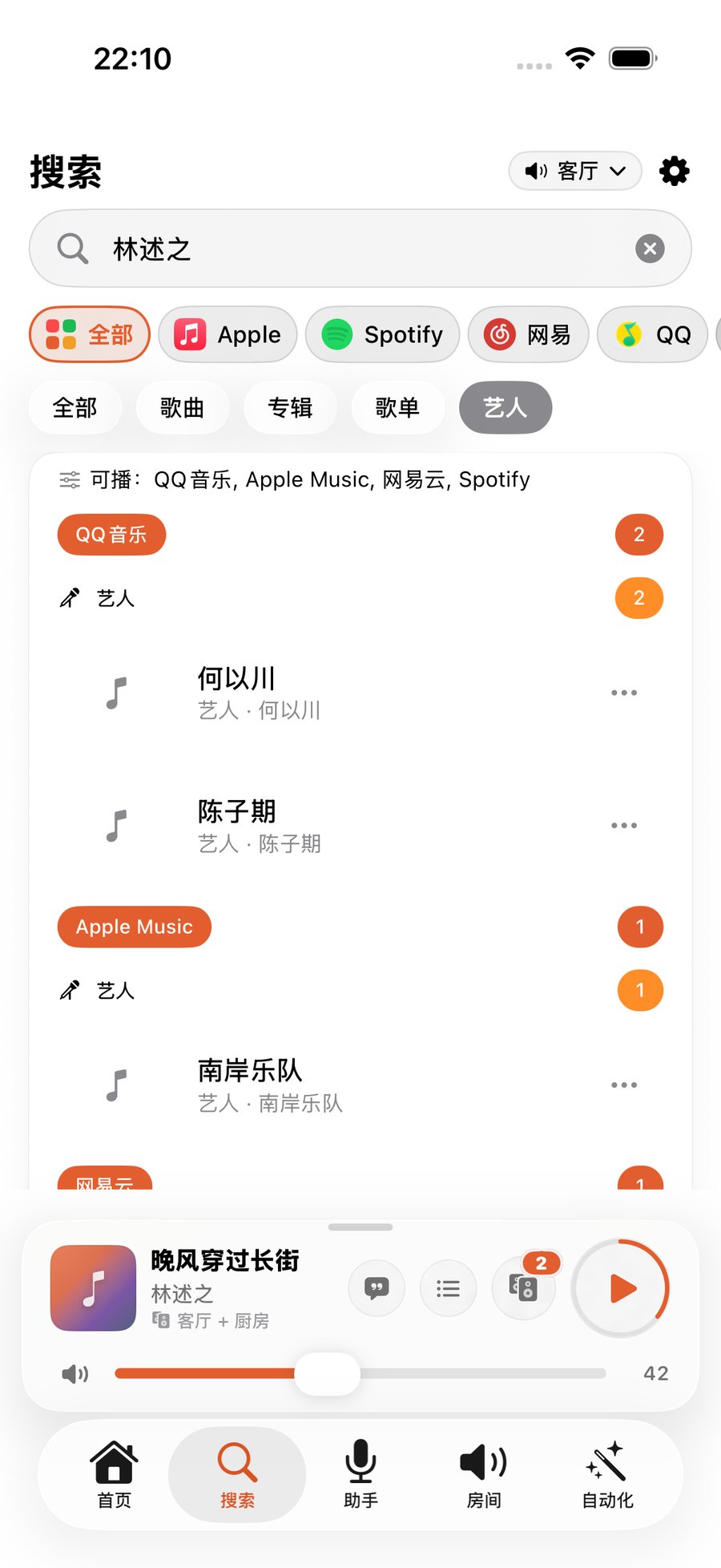
一个搜索入口并列呈现多种已连接服务,找到后直接播放、下一首或加入队列。一個搜尋入口並列呈現多種已連接服務,找到後直接播放、下一首或加入佇列。One search surface presents results from multiple connected services, ready to play or add to the queue.
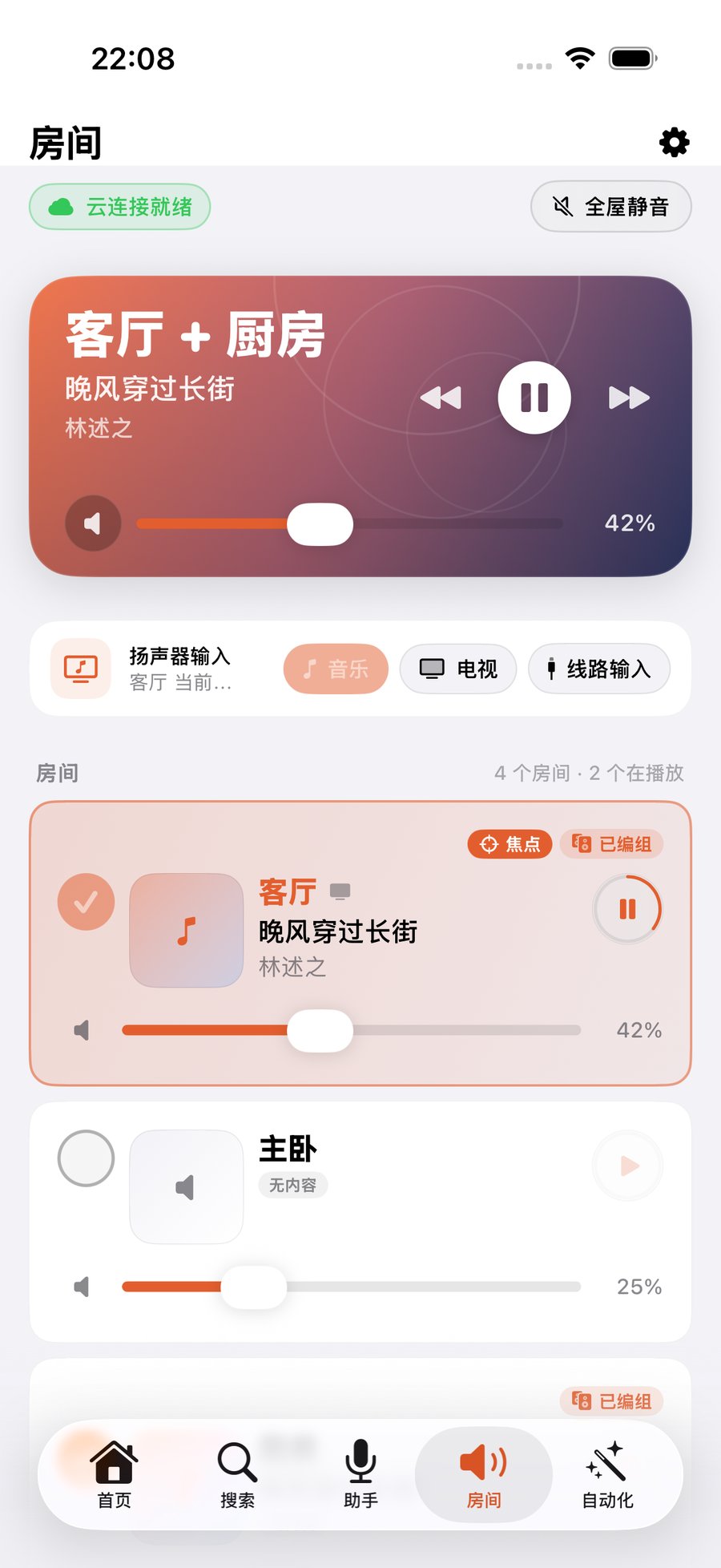
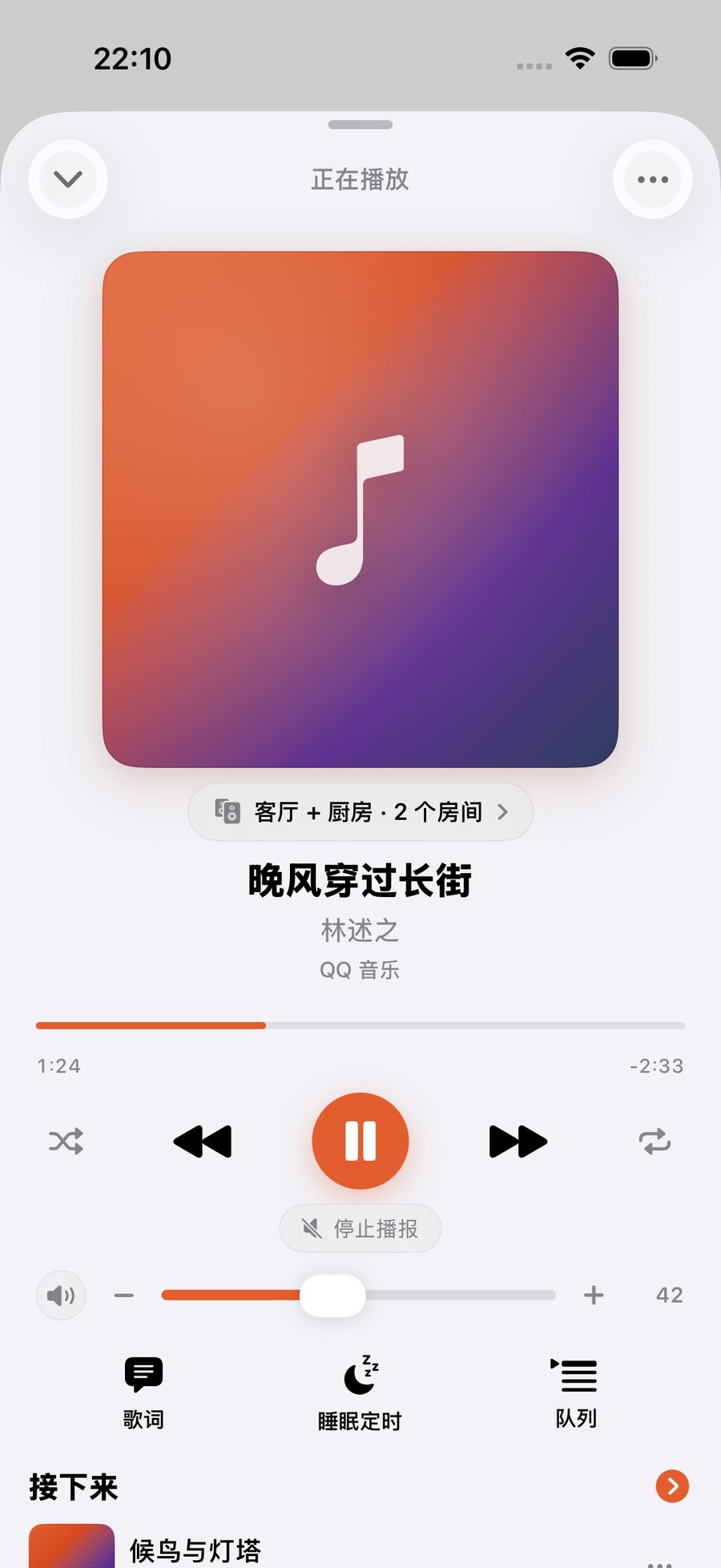
房间、编组、逐房音量、正在播放、歌词和队列,放在同一条操作路径里。房間、群組、逐房音量、正在播放、歌詞和佇列,放在同一條操作路徑。Rooms, groups, per-room volume, Now Playing, lyrics, and queue management stay in one flow.
新闻、提醒和家庭广播开始前保存播放状态,结束后恢复原来的房间、队列和进度。新聞、提醒和家庭廣播開始前保存播放狀態,結束後恢復原來的房間、佇列和進度。News, reminders, and household announcements preserve rooms, queue, and progress before playback resumes.
再往前一步再往前一步Go further
让音乐进入时间、场景、个人资料库和你已经在用的智能工作流。讓音樂進入時間、場景、個人資料庫和你已在使用的智能工作流程。Bring music into scenes, schedules, your personal library, and the intelligent workflows you already use.
把房间、音乐、音量和时间组合成一次操作。把房間、音樂、音量和時間組合成一次操作。Combine rooms, music, volume, and time into a single action.
App 在场时,音乐可以跟随你移动;Bridge 让它在后台持续无人值守。App 在場時,音樂可以跟隨你移動;Bridge 讓它在背景持續無人值守。Music follows while the app is present; Bridge keeps it running unattended in the background.
连接个人资料库;需要 Plex 账号和可访问的媒体服务器。連接個人資料庫;需要 Plex 帳戶和可存取的媒體伺服器。Connect your personal library with a Plex account and a reachable media server.
在微信、QQ 或 Telegram 发一句话就点歌;也可以把 Sonos 接进 Claude、ChatGPT、OpenClaw、Hermes 等支持 MCP 的助手,由它们直接播放、广播和跑场景。在微信、QQ 或 Telegram 發一句話就點歌;也可以把 Sonos 接進 Claude、ChatGPT、OpenClaw、Hermes 等支援 MCP 的助手,由它們直接播放、廣播和執行場景。Send one message in WeChat, QQ or Telegram to queue music — or connect Sonos to Claude, ChatGPT, OpenClaw, Hermes and other MCP-capable assistants and let them play, announce and run scenes directly.
封面、歌名、房间和控制按钮直接出现在锁屏、灵动岛和小组件上,不用解锁进 App。封面、歌名、房間和控制按鈕直接出現在鎖屏、動態島和小工具上,不用解鎖進 App。Artwork, title, room and transport controls appear on the Lock Screen, Dynamic Island and widgets — no need to unlock and open the app.
记住你常用的房间、音量习惯和说法,重复的请求越来越短。記住你常用的房間、音量習慣和說法,重複的請求越來越短。It remembers the rooms you use, your volume habits and how you phrase things, so repeat requests get shorter.
不登录任何账号、不装 Bridge,只要和音箱在同一个 Wi-Fi,就能播放、调音量和分组。不登入任何賬號、不裝 Bridge,只要和喇叭在同一個 Wi-Fi,就能播放、調音量和分組。With no account and no Bridge, playback, volume and grouping work as long as you share a Wi-Fi network with the speakers.
三步开始三步開始Three steps
Bridge 不在入门流程里。先连接 Sonos Cloud,就可以开始使用绝大多数日常能力。Bridge 不在入門流程裡。先連接 Sonos Cloud,就可以開始使用絕大多數日常能力。Bridge is not part of onboarding. Connect Sonos Cloud first and use most everyday capabilities immediately.
一个 App 覆盖 iPhone、iPad 和 Apple Watch。一個 App 覆蓋 iPhone、iPad 和 Apple Watch。One app across iPhone, iPad and Apple Watch.
去 App Store →去 App Store →Open the App Store → 02授权后读取家庭、房间和已连接的音乐服务。授權後讀取家庭、房間和已連接的音樂服務。Authorize once to read your homes, rooms and connected music services.
看这一步怎么做 →看這一步怎麼做 →See how this step works → 03选择房间,从语音、搜索或正在播放界面开始。選擇房間,從語音、搜尋或正在播放介面開始。Pick a room and start from voice, search, or the now-playing screen.
看语音怎么用 →看語音怎麼用 →See voice in action →使用教程使用教學Guides
上手上手Start
10 分钟播出第一首歌10 分鐘播出第一首歌Your first song in 10 minutes第一次播放第一次播放First play登录 Sonos,解锁搜歌和语音登入 Sonos,解鎖搜歌和語音Sign in to Sonos — unlock search & voice连接 Sonos連接 SonosSonos login一个搜索框,搜完所有服务一個搜尋框,搜完所有服務One search box for every service音乐服务音樂服務Music services绝大多数日常控制无需 Bridge。需要家庭持续在线、无人值守时,再安装它。絕大多數日常控制毋須 Bridge。需要家庭持續在線、無人值守時,再安裝它。Most everyday control needs no Bridge. Install it when your home needs an always-on, unattended layer.
把房间和场景发布为 Apple Home 配件,用于家庭自动化与 HomePod 语音。把房間和場景發佈為 Apple Home 配件,用於家庭自動化與 HomePod 語音。Publish rooms and scenes as Apple Home accessories for household automation and HomePod voice control.
让家庭成员的到达或离开触发场景与播放行为。讓家庭成員的到達或離開觸發場景與播放行為。Trigger scenes and playback as household members arrive or leave.
即使 iPhone 不在前台,也能持续感知并执行音乐跟随。即使 iPhone 不在前台,也能持續感知並執行音樂跟隨。Keep presence detection and music-following active even when the iPhone app is not in the foreground.
FAQ
不需要。播放、搜索、房间、编组、逐房音量、Siri 快捷指令、控制中心场景、广播和自动恢复等绝大多数日常能力,在连接 Sonos Cloud 后即可使用。不需要。播放、搜尋、房間、群組、逐房音量、Siri 捷徑、控制中心場景、廣播和自動恢復等絕大多數日常能力,在連接 Sonos Cloud 後即可使用。No. Playback, search, rooms, groups, per-room volume, Siri Shortcuts, Control Center scenes, announcements, and automatic resume work through Sonos Cloud.
支持多种已连接服务,包括 QQ 音乐、网易云音乐、Apple Music 和 Spotify;可用服务视 Sonos 账户地区及已连接服务而定。Plex 作为个人资料库单独连接。支援多種已連接服務,包括 Apple Music、Spotify、QQ 音樂和網易雲音樂;可用服務視 Sonos 帳戶地區及已連接服務而定。Plex 作為個人資料庫單獨連接。Multiple connected services are supported, including Spotify, Apple Music, QQ Music, and NetEase Cloud Music. Availability depends on your Sonos account region and connected services. Plex connects separately as a personal library.
不一定。App 在场或前台时可以免 Bridge 使用;Bridge 的作用是让它持续、无人值守地运行。不一定。App 在場或前台時可以免 Bridge 使用;Bridge 的作用是讓它持續、無人值守地運行。Not always. It works without Bridge while the app is present or foregrounded. Bridge keeps it running continuously and unattended.
不是。ZoneFoundry 是独立产品,与 Sonos、Apple、Spotify、QQ 音乐或网易云音乐没有官方隶属关系。不是。ZoneFoundry 是獨立產品,與 Sonos、Apple、Spotify、QQ 音樂或網易雲音樂沒有官方隸屬關係。No. ZoneFoundry is an independent product and is not affiliated with Sonos, Apple, Spotify, QQ Music, or NetEase Cloud Music.
App 免费下载,上架初期全部功能免费。日后如果推出进阶订阅,价格、计费周期和包含内容会在购买前于 App 内清楚标示,核心控制保持免费。App 免費下載,上架初期全部功能免費。日後如果推出進階訂閱,價格、計費週期和包含內容會在購買前於 App 內清楚標示,核心控制保持免費。The app is free to download and every launch feature is free. If an advanced subscription arrives later, its price, billing period and contents will be shown clearly in the app before purchase, and core control stays free.
不能。ZoneFoundry 是用来控制你已经拥有的 Sonos 喇叭的,它本身不是喇叭,也不从手机输出声音。不能。ZoneFoundry 是用來控制你已經擁有的 Sonos 喇叭的,它本身不是喇叭,也不從手機輸出聲音。No. ZoneFoundry controls Sonos speakers you already own. It is not a speaker and does not output audio from your phone.
核心的喇叭控制不需要任何账号,同一个 Wi-Fi 下就能用。Sonos 账号用于云端搜歌、语音和场景;ZoneFoundry 账号只用于跨网络远程控制和多设备同步,两者都可以之后再加。核心的喇叭控制不需要任何賬號,同一個 Wi-Fi 下就能用。Sonos 賬號用於雲端搜歌、語音和場景;ZoneFoundry 賬號只用於跨網絡遙控和多裝置同步,兩者都可以之後再加。Core speaker control needs no account at all — the same Wi-Fi is enough. A Sonos account unlocks cloud search, voice and scenes; a ZoneFoundry account is only for remote control across networks and multi-device sync. Both can be added later.
使用语音或自然语言功能时,指令会交给第三方云端服务做识别和意图解析。App 会在首次使用前明确请求你同意;不同意则相关功能保持关闭,其他功能照常。详细说明见隐私政策。使用語音或自然語言功能時,指令會交給第三方雲端服務做識別和意圖解析。App 會在首次使用前明確請求你同意;不同意則相關功能保持關閉,其他功能照常。詳細說明見私隱政策。Voice and natural-language features send your command to third-party cloud services for recognition and intent parsing. The app asks for explicit consent before first use; decline and those features stay off while everything else keeps working. The privacy policy has the full detail.

上架初期全部功能免费。支持 iPhone、iPad 和 Apple Watch,Mac 版规划中。上架初期全部功能免費。支援 iPhone、iPad 和 Apple Watch,Mac 版規劃中。All launch features are free. Available on iPhone, iPad and Apple Watch — a Mac app is planned.
早期用户早期用戶Early users
ZoneFoundry 刚上架,现在提的每一条都还来得及进产品。缺了什么功能、哪一步别扭、哪句话看不懂 —— 都想听。ZoneFoundry 剛剛上架,現在提出的每一條都還來得及納入產品。缺少哪些功能、哪一步彆扭、哪句話看不明白 —— 都想聽。ZoneFoundry just launched, so anything you raise now can still make it into the product. Missing features, awkward steps, confusing wording — we want to hear it.
被采纳的反馈,我们会送 3 个月 Pro(在付费功能上线后生效)。被採納的反饋,我們會送 3 個月 Pro(在付費功能上線後生效)。If we ship your suggestion, we'll send you 3 months of Pro (once paid features launch).
也可以在 App 里「更多 → 帮助与反馈」直接发,会带上你的版本号,我们更快定位。亦可在 App 內「更多 → 幫助與反饋」直接發送,會附上你的版本號,我們可以更快定位。You can also send it from More → Help & Feedback in the app — it attaches your build number so we can pinpoint issues faster.